

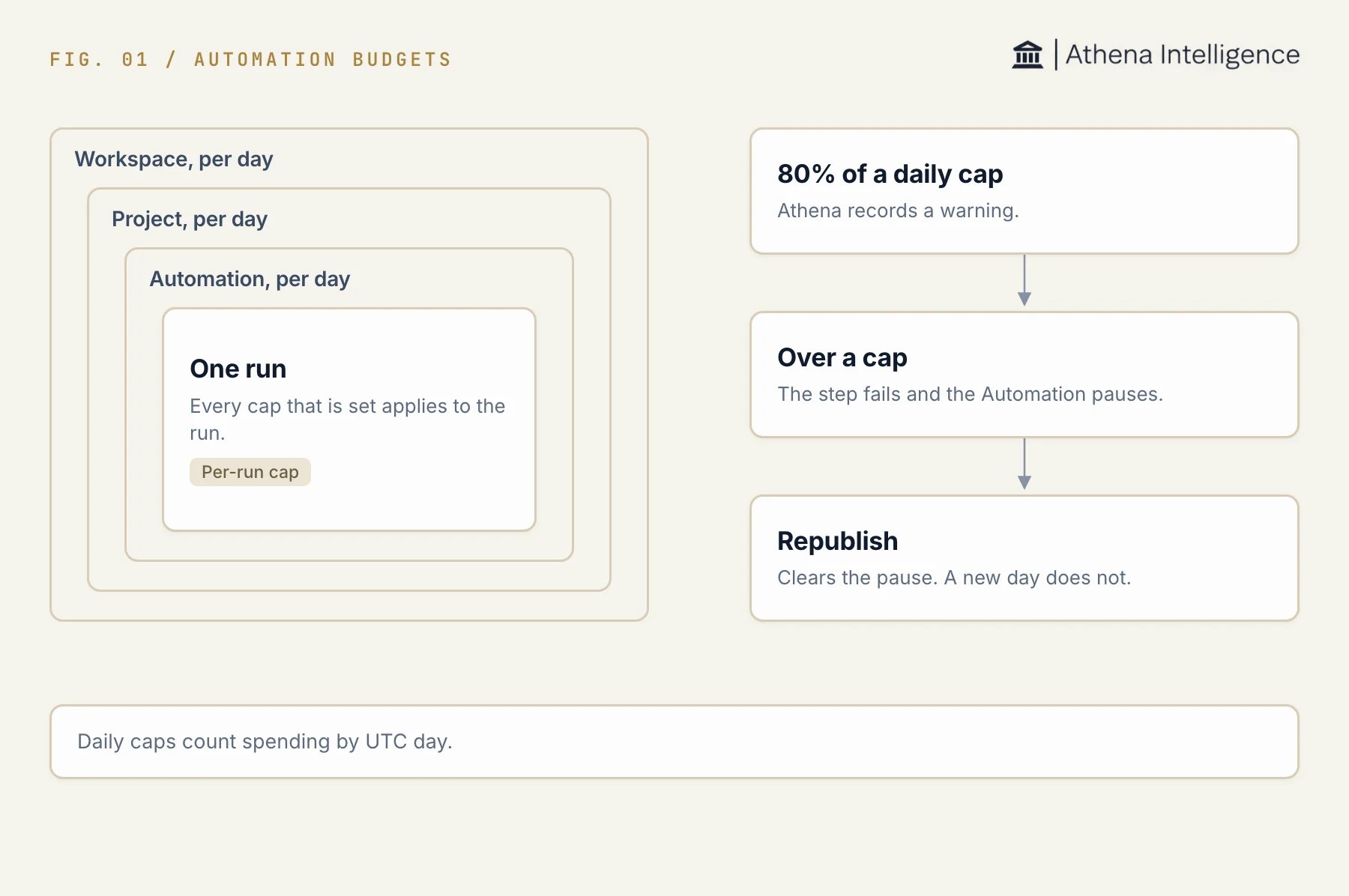
Four caps apply to a run. A breach pauses the Automation until you republish.
Choose spending caps
Caps are expressed in US dollars. Every applicable cap constrains the run.
All four fields are optional in the budget model. An unset cap places no limit at that level.
Publishing an ordinary Automation as a non-admin workspace member requires both definition caps: at most $25 per run and $100 per day for the Automation. Admin publishers are exempt from these ceilings and required fields. Follow-ups and generated Automations have separate publication exceptions. Project and workspace caps remain optional.
Set caps for an Automation
You need edit access to the Automation.- Open the Automation and select Definition.
- Configure the budget policy in the draft. In JSON, set
policies.budget.per_run_usdandpolicies.budget.per_day_usdto the limits you want. - Review validation errors and any member publication limits.
- Publish the draft and confirm the publication.
Set shared caps
A person with edit access to a project can set or clear the project’s daily cap, but the project page has no control for it yet. Contact Athena support to set one. An admin can set the current workspace’s daily cap in Environment, Automations admin, Policies. A workspace owner or manager role alone does not give access to this control. Clearing a shared cap removes the limit at that level. A shared daily cap of zero admits no new run.Understand daily accounting
Daily accounting starts at midnight UTC. A run belongs to the UTC day on which it was created, including costs recorded after that day ends. Daily totals include settled costs for ended runs and recorded step costs for runs still in progress. Run costs come from recorded step spending, including child agent or AOP sessions and model judgment steps.Budget enforcement checks recorded costs. It checks again after cost-bearing records and final settlement, so a cap can be crossed before the pause is applied. Treat it as a spending control that reacts to recorded usage.
Understand warnings and pauses
Before starting a run, Athena checks for an existing budget pause and for daily caps with no room left. Spending at or above a daily cap refuses admission withbudget_exceeded.
At 80% of a daily cap, Athena records an automation.budget.warning event, once per scope per UTC day.
When recorded spending exceeds a cap during execution, Athena fails the crossing step with budget_exceeded, pauses the affected Automations, and records an automation.budget.exceeded event. Configured pause notification recipients are notified.
The pause blocks manual runs as well as managed triggers. Final settlement can also discover a breach and apply a pause after a run ends. In that case, the ended run keeps its recorded status.
Resume after a budget pause
A new UTC day does not clear the pause. Raising a cap also leaves the pause in place until you clear it.- Read the pause reason to identify the breached scope, limit, and recorded spending.
- Wait for daily allowance to become available or have an authorized editor or admin change the relevant cap.
- Review the Automation’s draft and republish it to clear its budget pause and re-enable the configured triggers. Republishing can activate triggers, so review them before confirming.
- Check run history after the next execution starts.