

Human in the loop AI means a named person controls or reviews defined workflow points before AI work becomes an accepted financial output or action. In finance, people set permissions, approve consequential steps, check results, and handle exceptions.
Where does the human belong in the workflow?
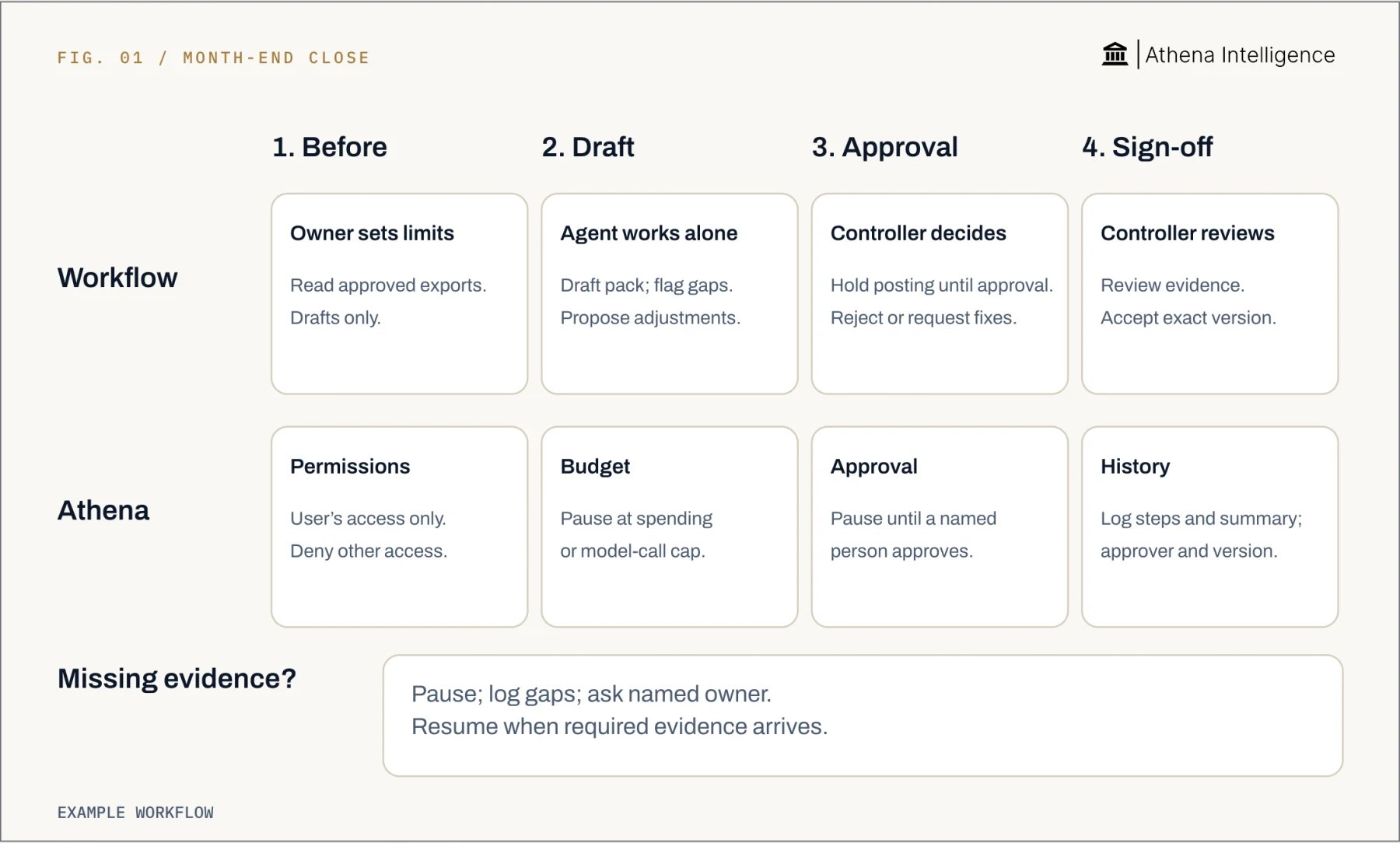
Place human control before, during, and after the work. Give reviewers authority to reject an output, request corrections, or stop an action.- Before: define the task, source systems, and allowed actions. Permit reading an accounts payable export while withholding payment-release access.
- During: require approval before consequential actions. Hold a proposed journal entry for review before posting.
- After: accept a specific output version. Check reconciliation differences against source records before signing off.
- At exceptions: route missing evidence and unexpected results to a named owner. Pause the affected step until that person resolves the issue.
What are human in the loop AI examples in finance?
Month-end close. AI drafts a close pack from approved exports. The preparer checks completeness, and the controller reviews adjustments before approving the pack. Reconciliations. AI proposes matches between bank and ledger transactions. A reviewer checks exceptions against source records and accepts the reconciliation version used for close. Accounts payable. AI compares invoice fields with purchase orders and receipts. An accounts payable reviewer resolves mismatches, while existing approvals govern bank-detail changes and payment release. Forecasting. AI drafts a forecast from approved actuals and assumptions. The financial planning team checks changed formulas and assumptions before circulation. For each example, define what the reviewer must inspect. A forecast review might show each changed exchange rate, its source, and the affected cells. Keep proposed work separate from accepted work. Use formulas for fixed calculations and AI for interpretation, with reproducible calculations available for review.How much autonomy should you grant, and when?
Grant autonomy per action. Reading an export and releasing a payment have different consequences, even when they belong to the same workflow. Start with draft-only work. Expand permissions after representative tests show that reviewers can detect errors and resolve exceptions.- Prepare a draft: allow automatic preparation from approved data, followed by human acceptance.
- Edit a forecast: limit changes to agreed ranges and review before circulation.
- Make an accounting judgment: require a named expert to check the evidence and rationale.
- Post, pay, or send externally: require approval before execution, with the action details available to the approver.
How do you set up human in the loop AI workflows?
- Choose one output. Name its owner and define acceptance criteria. Start with a forecast or reconciliation your team already understands.
- Limit access. Specify permitted reads and writes. Test an action that should be prohibited.
- Place approval gates. Name a reviewer and backup. Show them the proposed action before they authorize it.
- Define exceptions. Set pause conditions, exception owners, and the evidence needed to resume.
- Test review and recovery. Check reporting periods and completeness. Insert a known error and ask the reviewer to find and reverse it.
- Expand deliberately. Examine completed runs before changing permissions. Record the new scope and procedure version.
- Run identifier, time, human operator, and agent identity.
- Procedure version, model configuration, and permitted scope.
- Source records, versions, and extraction dates.
- Proposed changes, before-and-after values, and executed actions.
- Approver identity, decision, and exact output version reviewed.
- Exceptions, corrections, stop events, and final outcome.
How do ChatGPT, Copilot, Gemini and Athena compare?
Compare one task: update forecast assumptions, inspect changes, and recover an error. The table covers OpenAI’s ChatGPT Business uploaded-file analysis, Microsoft’s Copilot in Excel, Google’s Gemini in Google Sheets, and edits in Athena Sheets.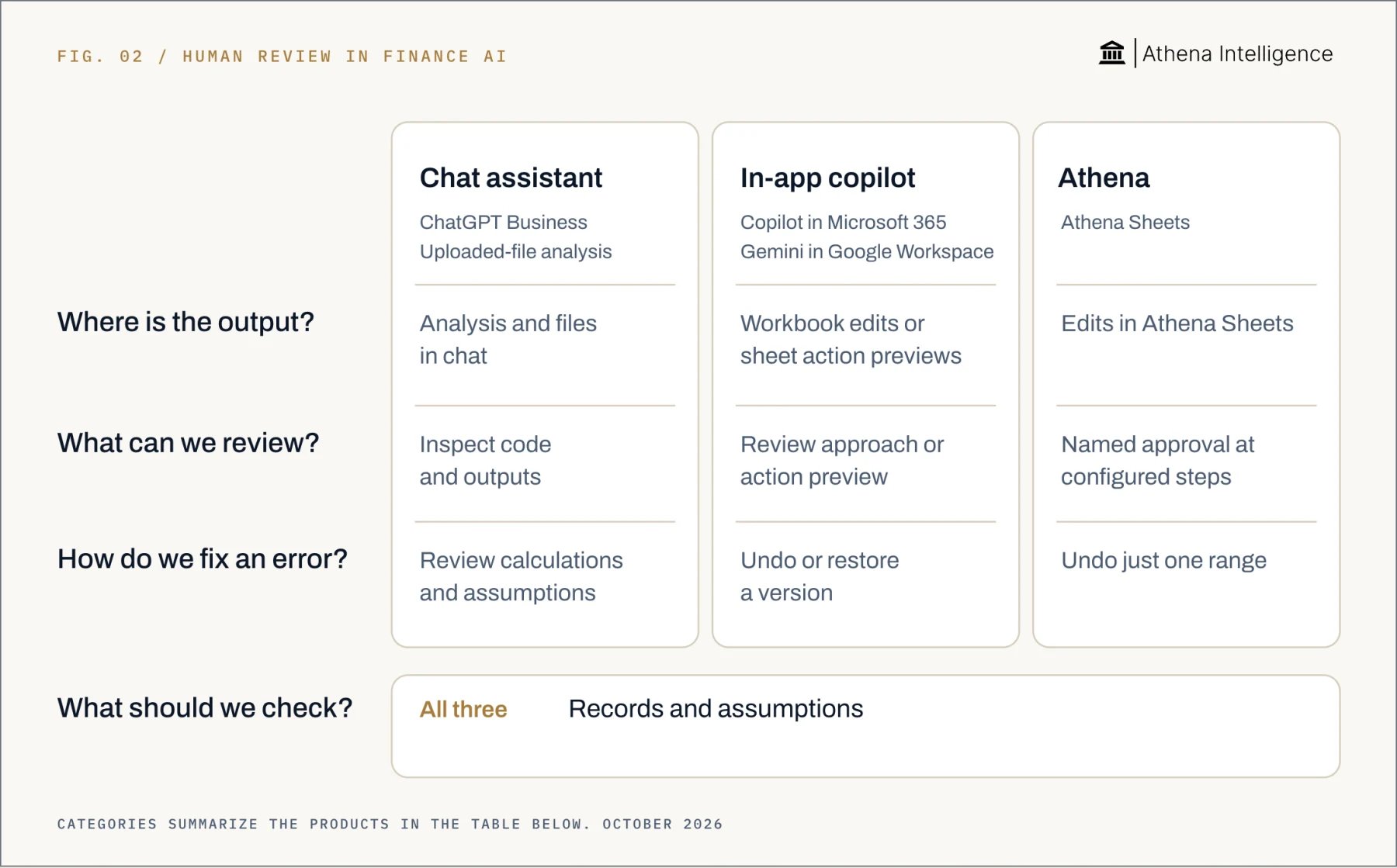
Full comparison with sources, October 2026
Full comparison with sources, October 2026
How does Athena keep people in control?
Use Athena’s Agent Operating Procedure editor for recurring work. Procedures are versioned and can branch by entity, region, or account. Start with sample data and follow this sequence:- Describe the procedure. Enter its tools, approved sources, and output format in Athena’s workflow editor.
- Set the gates. Choose a trigger. Check that your workspace’s tool rules make posting, payment, and external-send tools ask for approval, so the run waits until a reviewer approves or declines the proposed action.
- Set the budget. When you start runs through the API, add a per-run
run_budgetwith a dollar or model-call cap. At the cap, Athena stops the run and marks it as not succeeded. Start a new run with a larger budget to continue. - Inspect the changes. Athena’s Activity Monitor shows affected ranges, human or agent authors, before-and-after values, and triggering session messages.
- Correct the affected range. In Athena, compare before and after side by side, then roll back selected cells while keeping the other changes.
What to plan for
Give reviewers time and source access. If an accepted version changes, repeat the affected checks before circulation. An activity log cannot prove a number correct. PCAOB staff reported concerns about source reliability and generated content’s auditability in July 2024. Microsoft advises against using Copilot for decisions in sensitive areas such as finance. Google says Gemini features should not be relied on as financial advice. Athena history records each save, rather than each keystroke. When a human and agent edit the same cell within one save, the last edit wins. Google says Gemini’s last action can be undone until further edits occur. Restoring a Google Sheets version clears earlier cell edit history; copy the file if you need that evidence. Some external actions, including sent emails and committed accounting-system rows, cannot be reversed through Athena. Approve them first and confirm recovery in the destination system. Before external writes, test stopping a run. Check who can intervene and what happens to queued actions or work already underway. A spending cap limits consumption, not accounting errors. Review controls also do not determine legal liability.Questions teams ask
What does human in the loop mean for AI in accounting and finance?
What does human in the loop mean for AI in accounting and finance?
A named person controls or reviews defined points before AI work becomes an accepted financial output. The procedure identifies permissions, approvals, and who accepts the result.
What are examples in finance?
What are examples in finance?
Examples include reviewing reconciliation matches, approving journal entries before posting, and checking forecast assumptions before circulation. Each needs evidence and a recorded decision.
What does AI accountability require?
What does AI accountability require?
Assign an owner and keep a record that lets another reviewer reconstruct the work. Include inputs, changes, the human decision, and the accepted version.
How do you set up the workflow?
How do you set up the workflow?
Define the output and permissions first. Add approvals and exception routing, then test review and recovery before expanding autonomy.
Can Copilot change a forecast?
Can Copilot change a forecast?
Microsoft’s Copilot in Excel can edit a forecast workbook. Plan mode lets a user confirm the approach before editing.
What makes Athena different?
What makes Athena different?
Athena combines configured approval steps with attribution of saved changes and rollback of selected ranges. Reviewers can inspect before-and-after values while keeping unrelated changes.