

Microsoft’s Copilot in Excel works in shared Excel workbooks. Google’s Gemini edits in Sheets, where people can share files with collaborators. Athena Sheets lets people and AI edit shared spreadsheets. Athena connects saved changes to human or agent authors and their linked conversations, with rollback of selected ranges.
What counts as humans and AI editing the same file live?
Live editing means people and AI write into one shared working file and see changes there. An analyst might correct a revenue assumption while an agent fills a separate forecast range. A replacement workbook needs a separate review or merge before it becomes the team’s working version. Ask three questions when choosing a tool:- Where does the AI write? Look for changes in the file your team uses.
- Who made each change? Check whether history names the human, assistant or individual agent.
- What does recovery preserve? Check whether reversing one change keeps other contributors’ work.
Can Copilot and my team edit the same Excel file together in real time?
Yes, with supported Excel coauthoring and Copilot editing enabled. Microsoft says to save the workbook to OneDrive or SharePoint and use AutoSave; saved Copilot changes reach coauthors. Microsoft’s Review > Show Changes can identify user and Copilot edits. Use a copy of your forecast to see the workflow. Ask Copilot to change one range while a teammate corrects another. Open the file from both accounts and inspect the saved result. Keep visibility, authorship and recovery separate. Seeing an edit confirms that it reached the file. History and recovery tell you who changed it and what survives a reversal.How do Copilot, Gemini, ChatGPT, Claude, Univer and Athena compare?
Google’s Gemini applies supported changes in the open Google Sheet, with an action preview and Apply button. Google lets people share that Sheet and collaborate in it. This gives teams another way to combine human work with AI edits. Univer Worktree takes a different approach: an agent edits an isolated draft that a reviewer can merge into the main file. Univer lets a human continue editing that draft. Choose whether your team needs a review before changes reach the main file or edits in the shared workbook.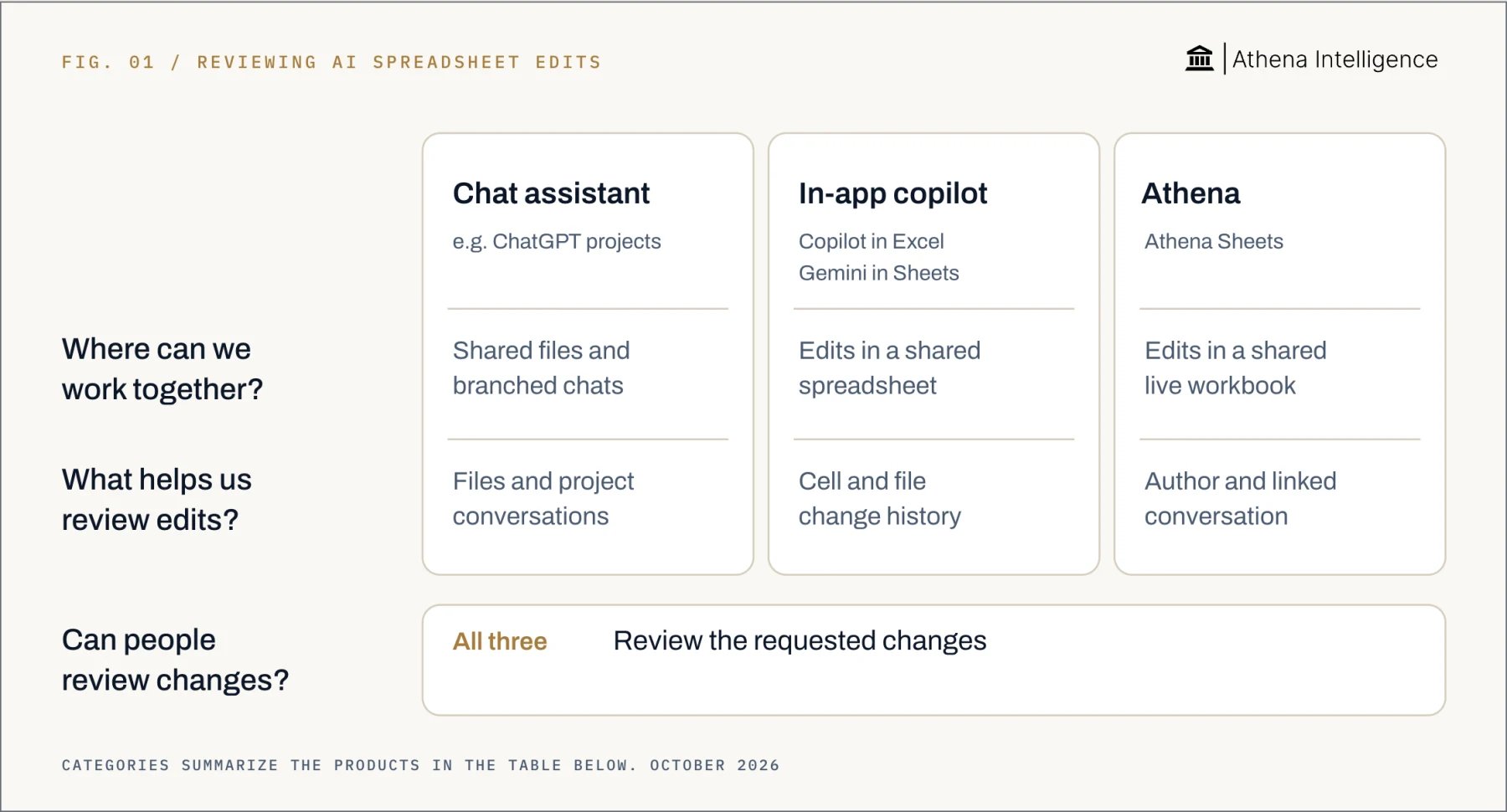
Full comparison with sources, October 2026
Full comparison with sources, October 2026
How does Athena handle multiplayer AI agents?
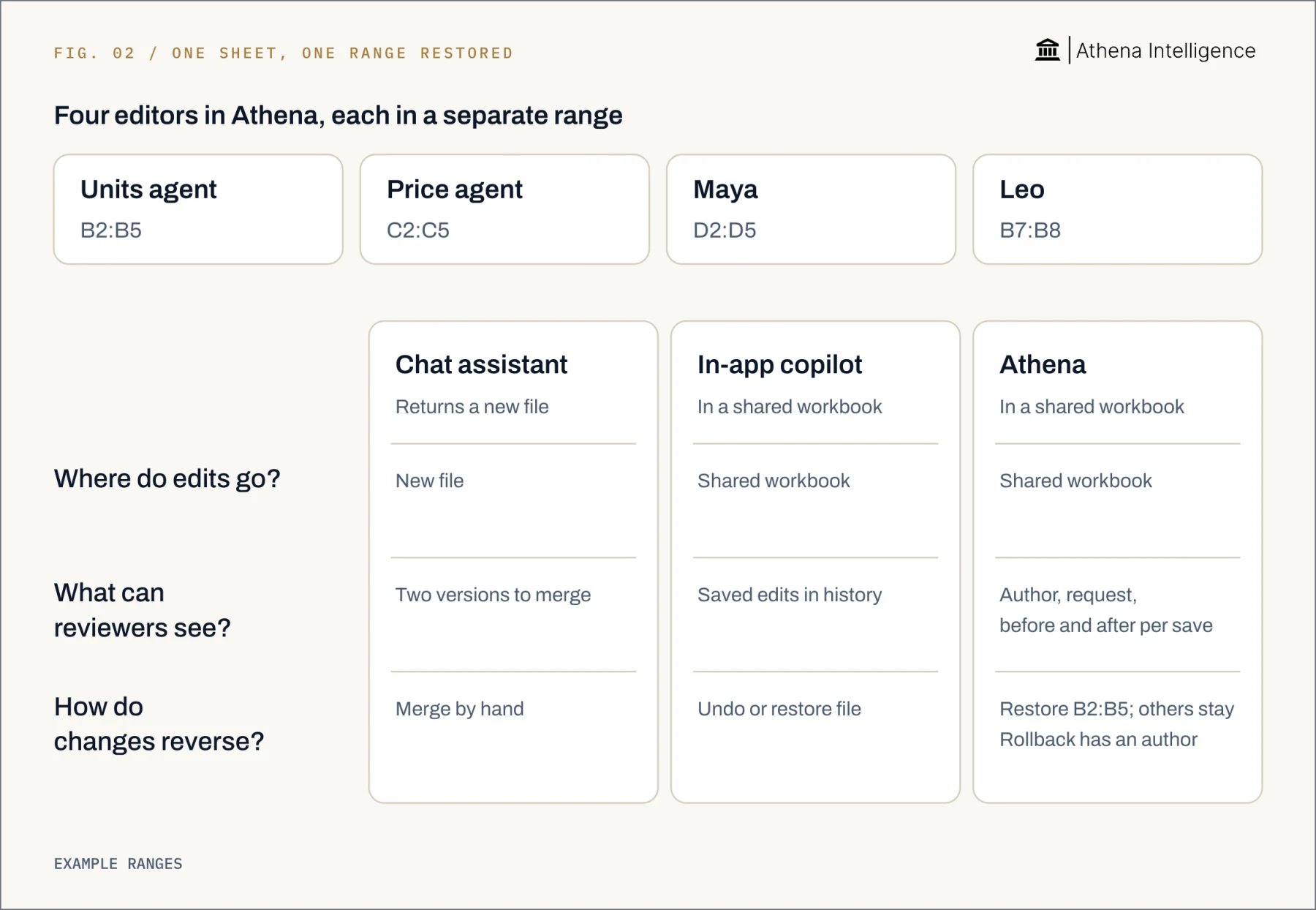
Multiplayer AI agents are distinct agents contributing to shared work. Athena Sheets supports live human and agent editing, with each save attributed to its author. Athena reports a test where 95 sub-agents edited one workbook at once. To follow a spreadsheet change through review:- Open Athena Sheets. Ask an agent to transform a range while a teammate edits another range.
- Open Activity Monitor. Inspect the changed range, before-and-after values and triggering session message.
- Read the conversation. Open the linked request from the triggering session message and compare it with the intended task.
- Compare the versions. Compare in Editor shows the saved before and after states side by side.
- Reverse the chosen range. Selected-range rollback keeps changes outside that range.
How can I test whether the collaboration controls work?
Start with a disposable forecast and synthetic data. Give every contributor a named task and a separate range. Apply the same acceptance criteria to each tool.- Save a starting copy. Record the original values in two small ranges. Assign one to the agent and one to the analyst.
- Work at the same time. Have both contributors edit their ranges. Confirm that both changes appear in each person’s view.
- Inspect the history. Look for the analyst, assistant and any separate agents. Where available, follow the saved edit to its triggering request.
- Try recovery. Put an incorrect value in the agent’s range and restore it. Check that the analyst’s correction remains, and record every cell affected.
- Test a collision. On another copy, have a human and an agent edit the same cell. Inspect the final value and history, then repeat with two agents if needed.
- Check desktop sync. Repeat an edit in each direction if Excel matters. Reopen the workbook and inspect formulas, formatting, macros and embedded objects.
What to plan for
Athena history is recorded per save, rather than per keystroke. When contributors change the same cell within one save window, the last writer wins; Activity Monitor retains the before-and-after difference. Use separate ranges and test rollback after another contributor edits the same cell. Athena’s 95-agent result is a reported test, not a guarantee for every workbook. Demonstrate the number of simultaneous writers and separate identities your team actually needs. Google says Gemini’s last-action Undo lasts until further edits; restoring an earlier Sheets version clears previous cell-by-cell history. Preserve a copy when that history matters. Microsoft says Excel history has tracking limits, and writers should stop before an earlier file version is restored. Check licenses, administrator settings and supported clients for your chosen tool: Microsoft’s Copilot in Excel, Anthropic’s Claude for Excel, OpenAI’s ChatGPT spreadsheet integrations or Google’s Workspace with Gemini. Athena’s Office add-in does not increase desktop Excel capacity, and unusual embedded objects may fail to import into Studios. Include those objects in your compatibility test. An attributed edit can still contain an incorrect formula. Assign a reviewer and set a stable version before sharing results. If recovery or authorship fails your test, use separate ranges, one writer at a time or drafts awaiting approval.Questions teams ask
What tools let humans and AI agents edit the same spreadsheet at the same time?
What tools let humans and AI agents edit the same spreadsheet at the same time?
Microsoft’s Copilot in Excel works in shared Excel workbooks. Google’s Gemini edits in Sheets, where people can share files with collaborators. Athena Sheets supports AI edits in spreadsheets shared with people. Athena adds per-save human or agent attribution and rollback of selected ranges.
Can Copilot and my team edit the same Excel file together in real time?
Can Copilot and my team edit the same Excel file together in real time?
Yes, with Microsoft’s supported Excel coauthoring and Copilot editing enabled; saved Copilot changes reach coauthors. Microsoft’s Show Changes can identify saved Copilot edits.
What does Athena do differently for reviewing AI spreadsheet edits?
What does Athena do differently for reviewing AI spreadsheet edits?
Athena links saved changes to their human or agent author and the triggering conversation. Reviewers can inspect before-and-after values and reverse a selected range.
What are multiplayer AI agents?
What are multiplayer AI agents?
They are distinct agents contributing to the same shared work. Athena reports a test with 95 sub-agents editing one workbook at once.See Athena’s spreadsheet review workflow.