

OpenAI says template matching can be imperfect, even when ChatGPT edits an existing deck. Give it the actual file, name the slides to update, and specify the design elements to preserve.
Why does AI change the layout after I give it a template?
A template gives the editor a starting point. OpenAI recommends naming the edit location and the formatting to preserve. Pair your request with an approved example of the finished slide. The examples inside the template matter. Microsoft says Copilot primarily learns from sample slides, with structure and layouts providing secondary guidance. Include examples of the formats you use, such as charts and financial summaries. Microsoft describes three parts of a PowerPoint template that serve different purposes:- The slide master holds shared design settings.
- A layout arranges the content areas on a slide.
- A theme sets shared colors and fonts.
How do I stop AI from rebuilding my deck instead of editing it?
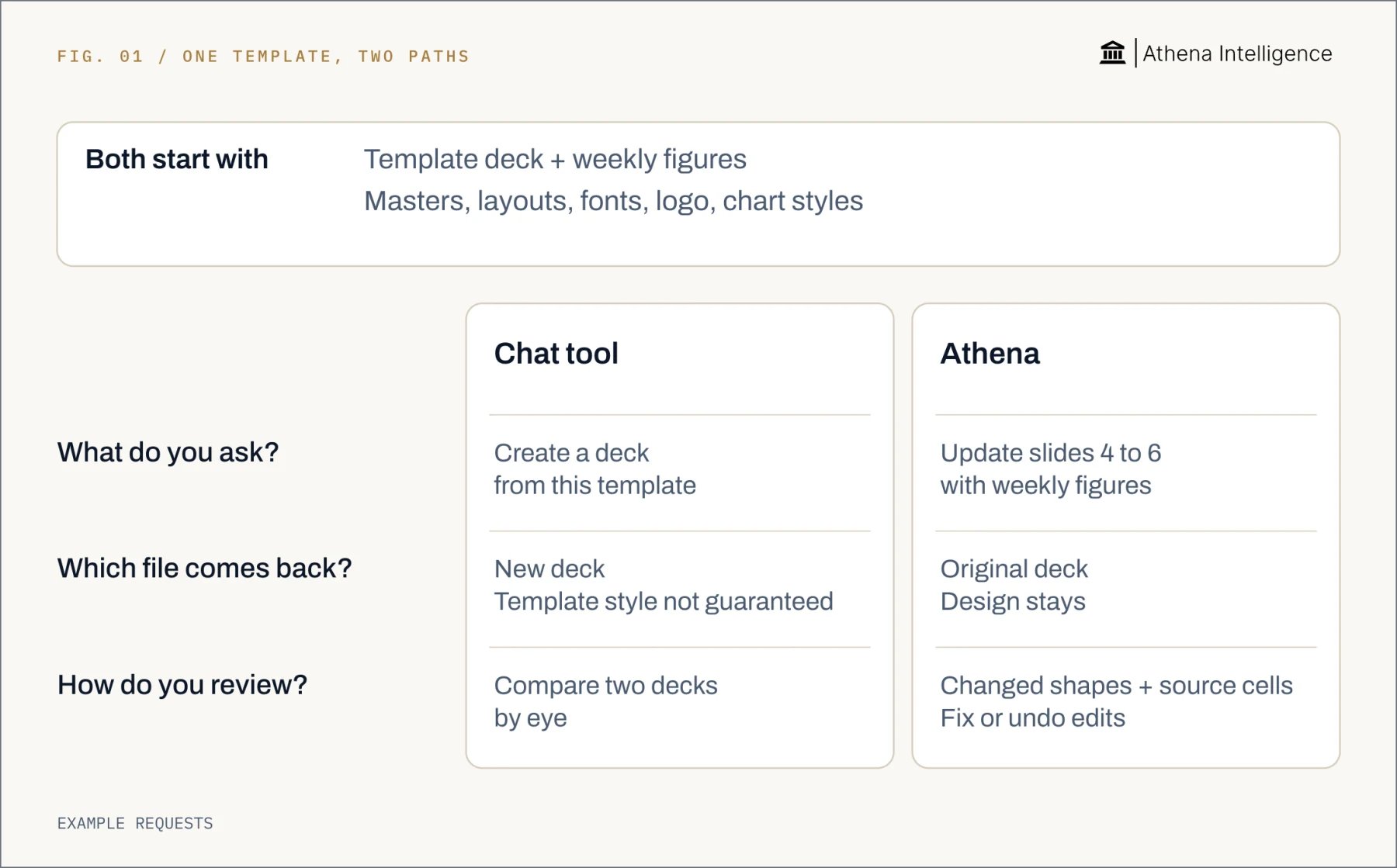
Ask for a specific update to an existing file. Name the slides and objects that may change. For example:Update only slides 4–6 with the attached weekly figures. Keep the existing masters, layouts, fonts and logo positions. Change only the figures and their labels. Before editing, list the objects you plan to change. Ask me before using a different layout.Before starting, save the accepted deck and identify the spreadsheet version containing this week’s figures. Write down the reporting period, units and rounding rule. List protected content, including disclosures and footnotes. After the edit, inspect the changed slides and the protected content. Check that charts remain editable, labels fit and figures match the intended workbook cells. Open the finished file in the application your recipient uses. Choose the editing workflow deliberately. OpenAI’s ChatGPT for PowerPoint revises an existing deck inside PowerPoint. OpenAI’s ChatGPT Work can create files from references and directly edit through specified Google Workspace and Excel integrations. For recurring updates, record which workflow produced the accepted file. Keep the reference deck, workbook and instructions together. That gives the next person a clear starting point and a finished example to compare against.
How do ChatGPT, Copilot, Gemini and Athena compare for templates?
OpenAI’s ChatGPT can edit an existing presentation, as can Microsoft’s Copilot can edit an existing presentation. Google’s Gemini can edit an existing presentation, and Athena edits the live shared presentation. Their template and revision controls differ. Choose the controls that suit the work your reviewer needs to do.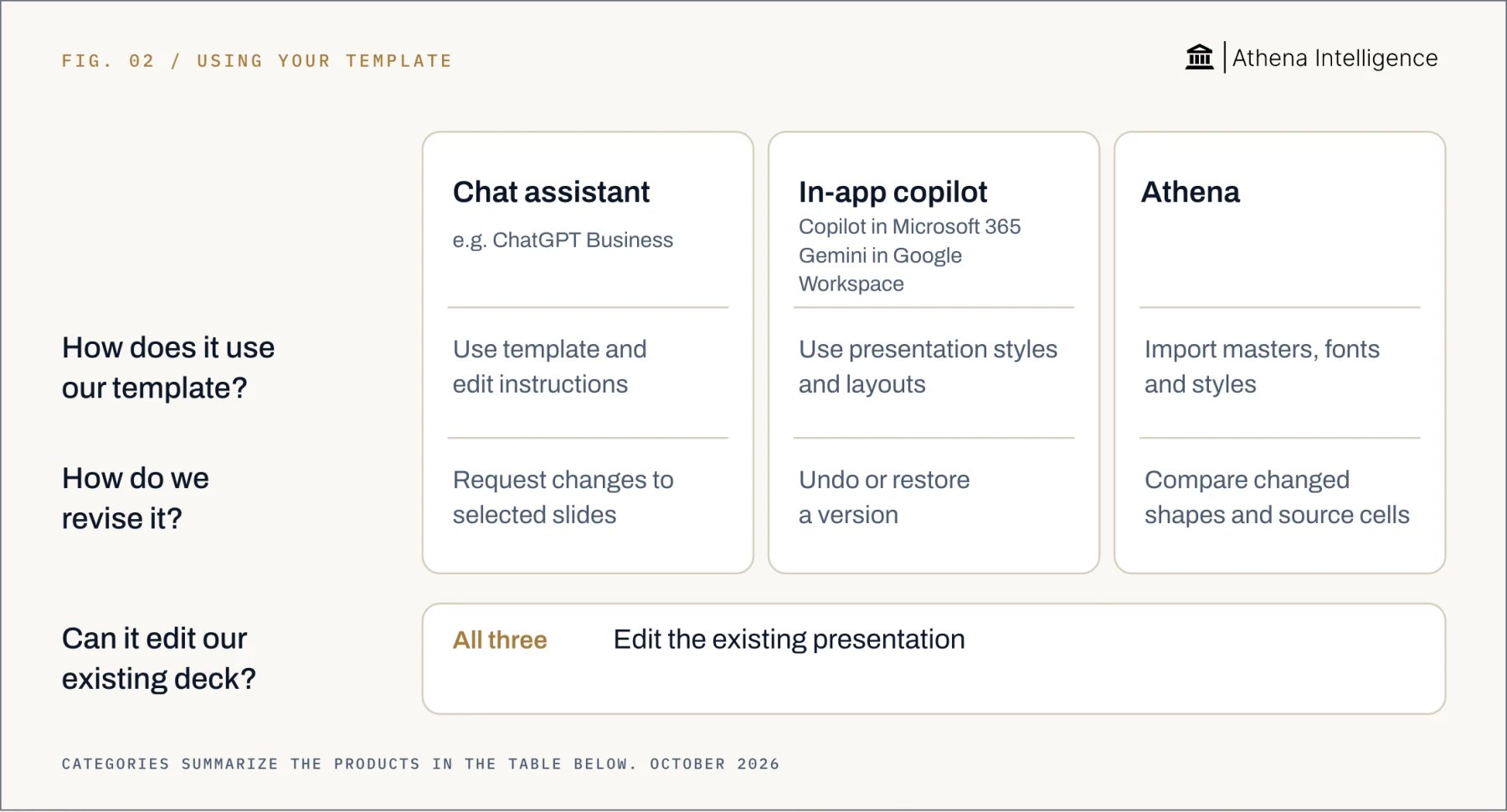
Full comparison with sources, October 2026
Full comparison with sources, October 2026
How does Athena edit the document in my template?
Open the company deck in PowerPoint Studio, attach the reporting spreadsheet, and ask Athena to update it. Masters, fonts, logo placement and chart styles import with the file. Athena edits the live shared document while you work on another slide. Open Compare to see outlines around changed shapes, such as text boxes and charts. Click a changed figure to inspect its link to the source spreadsheet cell. You can fix or undo an edit. Athena’s version history shows who changed what and when, with the session and message context. You can restore an earlier version of one slide while keeping other edits. Use the cell link to check the business measure behind a figure. Check the reporting period, units and calculation in the workbook. A reviewer should be able to explain why that cell belongs on that slide. For recurring work, ask Athena to create a Skill after a successful session. It captures the procedure, tools and checks. Administrators edit the shared library centrally, and agents load the procedures needed for a task. Athena’s library records versions and syncs with Git, which tracks changes. A Skill version can be rolled back. Keep the accepted deck and reporting rules alongside the procedure for the next update.What controls help AI follow an Excel or Google Sheets template?
Define what may change in the workbook. Name the input range, protected formulas, number formats and chart colors. Separate entered values from calculated results, and specify whether figures use pounds or thousands of pounds. Microsoft’s Copilot in Excel supports workbook rules in a visible worksheet named.Rules. These cover formatting conventions, functions and layouts. The worksheet travels with the workbook when shared.
Write short rules with examples. For instance, identify the input cells for the weekly figures and the number format for the summary. Check the proposed changes on a copy before using the reporting workbook.
Google’s Gemini in Sheets supports number formatting, table formatting and other spreadsheet actions. Its action preview lets you apply a proposed change. Undo reverses the last Gemini action until further edits.
Review formatting and calculations separately. Check an independently calculated reference total and several input rows. Confirm the extract covers the intended reporting period before accepting the totals.
What to plan for
OpenAI advises inspecting template matching and advanced PowerPoint edits before relying on them. Microsoft calls for checking presentations generated by Copilot; test Google’s Gemini style matching on difficult slides too. OpenAI says model output can vary between runs, so saved instructions do not guarantee identical results. Treat a Skill as a reusable procedure and inspect each finished deck. A prompt asking permission also needs a workflow that enforces the approval step. Check availability in the account your team will use. OpenAI’s ChatGPT Skills depend on workspace settings and rollout. Microsoft’s Copilot depends on a qualifying license, network and privacy settings and the PowerPoint app version in use. Google includes Business Standard among plans supporting slide generation and editing. OpenAI’s ChatGPT Work excludes PowerPoint from its desktop flow at launch. Microsoft’s Excel rules are fully supported only in English, and their behavior can change across models and over time. Google’s Gemini Sheets features require saving Excel files as Google Sheets. Test conversion with your formulas and charts. Athena Studios recreate Office editors, and unusual embedded objects may not survive import and export. Import reports elements that did not carry over. Test a representative file, then open the exported deck in the recipient’s application. Microsoft’s Office files stored in OneDrive or SharePoint support version restoration; Google Slides and Sheets also support restoring earlier versions. Test recovery before relying on it. Restoring a whole file and reversing one selected edit serve different needs. Assign a template owner and a reviewer for material figures. Retain the approved output, source workbook and rules used. Review again if the finished version changes before distribution.Questions teams ask
Why won't ChatGPT use my PowerPoint template?
Why won't ChatGPT use my PowerPoint template?
OpenAI recommends giving ChatGPT the actual deck and naming the slides, layouts and formatting to preserve.
How do I get AI to follow my company's formatting and brand template in Excel and PowerPoint?
How do I get AI to follow my company's formatting and brand template in Excel and PowerPoint?
Start with the approved file and specify what may change. Microsoft’s Copilot offers PowerPoint Brand Kit controls and Excel workbook rules.
Why does AI format every report differently, and how do I make it consistent?
Why does AI format every report differently, and how do I make it consistent?
OpenAI says model output can vary between runs. Reuse the approved file and written rules, then compare each result with an accepted report.
Why does AI keep rebuilding my deck from scratch instead of editing my PowerPoint?
Why does AI keep rebuilding my deck from scratch instead of editing my PowerPoint?
Ask for changes to named slides in the existing file. OpenAI’s ChatGPT for PowerPoint supports that editing workflow.
Can ChatGPT, Copilot or Gemini follow an existing presentation template?
Can ChatGPT, Copilot or Gemini follow an existing presentation template?
OpenAI’s ChatGPT uses existing templates. Microsoft’s Copilot Brand Kits can restrict generation to approved layouts, and Google’s Gemini can match an existing presentation’s style. Athena imports template settings and offers Compare for changed shapes and source-cell links.