

AI work is easier to audit when it preserves better evidence of changes, sources, calculations, and approval. Apply the same review standard to both, with a human owner responsible for release.
What makes work auditable?
Auditable work lets a reviewer reconstruct a change, check its evidence, and identify who approved the result. An AI agent carries out tasks using an AI model and tools. Keep five things together for either workflow:- The change: file version, cell or range, and old and new values or formulas.
- The reason: instruction, business purpose, and approved assumptions.
- The source: file or system, location, reporting period, and version.
- The calculation: inputs, formulas or code, and an independent recalculation.
- The decision: reviewer, date, and exact version accepted.
How do you audit work done by AI versus work done by a human analyst?
Use the same financial checks for both. For AI work, also preserve the instructions and permitted actions.- Define the deliverable. Name the reporting period, source systems, acceptance criteria, and human responsible for release.
- Preserve the starting point. Keep the original workbook and source versions. Retain agent instructions, settings, and workflow version.
- Inspect the changes. Compare values and formulas. Identify edits without an author or business reason.
- Recalculate material figures. Check currency, units, periods, and metric definitions against source records. Open citations and check the precise claim.
- Record the decision. Name the reviewer and accepted version. Retain rejected edits, corrections, and reasons.
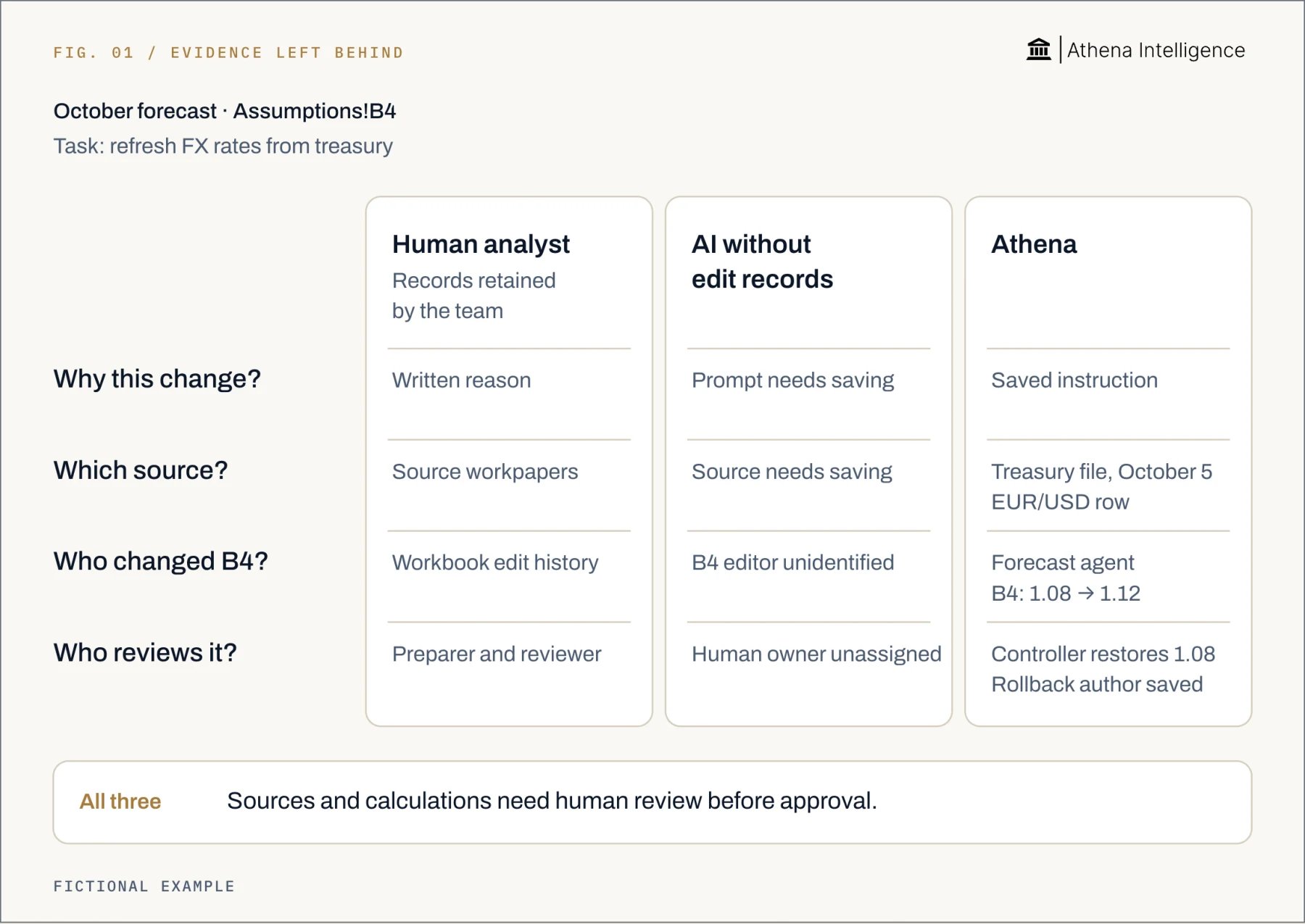
How can I tell which cells were changed by AI and which by a person?
Use recorded authorship. A plausible formula cannot identify its author. Microsoft says to select Review > Show Changes in Excel for the editor, location, time, and previous cell value. Filter by sheet, cell, or range. Microsoft says you can ask Copilot which changes it made. Narrow the question to a sheet, range, cell, or time period. Google says to right-click a cell in Sheets and select Show edit history. File version history shows earlier versions and their editors. Keep Gemini’s instruction and response alongside the workbook history. Google says Gemini conversation history requires administrator-enabled Gemini Beta. When someone pastes AI output into a workbook, retain the response and review decision alongside the paste. Identify the software that proposed the value and the person who accepted it separately.How do ChatGPT, Copilot, Gemini, and Athena compare for auditability?
Use one task for every product: update a forecast assumption, inspect the change, and recover if it is wrong. Compare the evidence your reviewer can actually use. This comparison covers OpenAI’s ChatGPT Business uploaded-file analysis with a Standard seat, Microsoft’s commercial Microsoft 365 Copilot in Excel, and Google’s Gemini in Sheets on Business Standard. Athena’s workflow below uses Athena Sheets.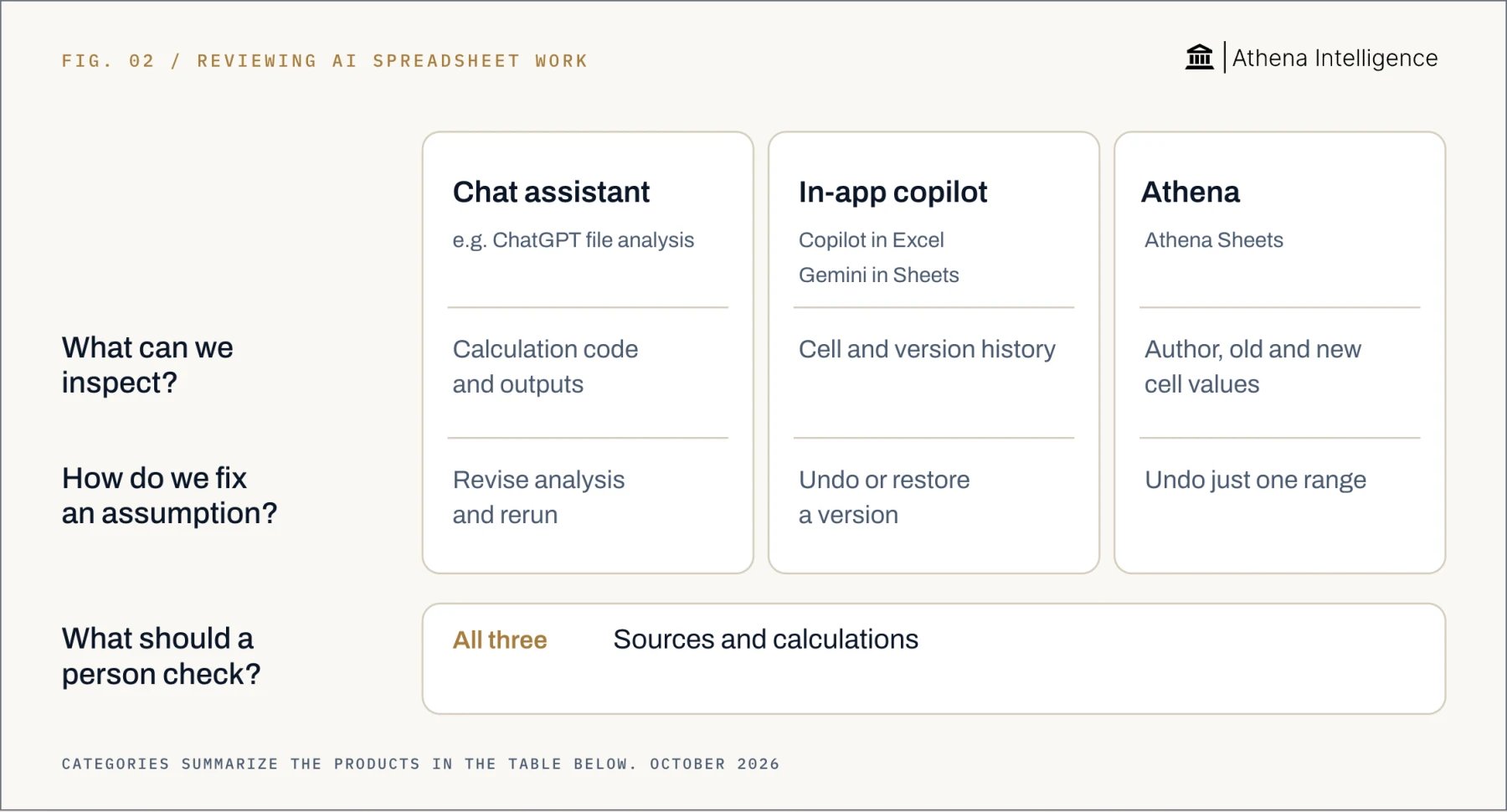
Full comparison with sources, October 2026
Full comparison with sources, October 2026
How does Athena handle attribution and approval?
Athena Sheets records the human or agent author, conversation, and before and after values for each save. Use that record to follow a forecast change:- Open the cell, column, or range. Inspect its author and changed values.
- Open Activity Monitor. Find the changed range and triggering message. Open the agent conversation to read its explanation.
- Open Compare in Editor. Review the before and after states side by side.
- Restore an unsupported range. Keep the remaining edits. Athena records the rollback’s author too.
Who is accountable when AI makes a mistake?
Assign a human owner before work runs. Define who approves release, investigates failures, and can stop the workflow. FINRA says generative AI does not remove member firms’ existing obligations. Technology-neutral rules, including supervision requirements, apply to internally built and third-party AI. Record the error and approved correction. Check whether released reports need replacement. Restoring a workbook cell does not recall a report already sent.What to plan for
A complete history can preserve a wrong decision. NIST warns that generated reasoning and citations can be false, so check explanations against sources and calculations. Recalculating an outdated extract checks arithmetic without proving the input is current. Athena history is per save. If a person and agent change the same cell within one save, the last writer is recorded. Keep approval tied to a stable version and review later material edits before release. Microsoft says Copilot’s answers depend on retained workbook history; unsupported edits may be missing. Google says cell history excludes formatting, row or column additions and deletions, and formula-driven changes. Google says Gemini can undo its last action before further edits. Google also says restoring a spreadsheet version clears prior cell edit history; copy the version first when you need that evidence. Some external actions, including sent emails and committed enterprise-system records, cannot be reversed through Athena’s recovery tools. Require approval before consequential actions and test recovery separately. Ask vendors how long they retain conversations, logs, and backups. Check export fields, reviewer access, and access to historical source versions.Questions teams ask
Is AI work more or less auditable than human work in finance?
Is AI work more or less auditable than human work in finance?
It depends on the evidence retained. Apply the same standard for changes, sources, calculations, and approval to either workflow.
How do you review AI and human analyst work?
How do you review AI and human analyst work?
Check sources, recalculate material figures, inspect changes, and approve a specific version. Also retain AI instructions and permitted actions.
How can I distinguish AI edits from human edits?
How can I distinguish AI edits from human edits?
Inspect recorded authorship; Athena records human or agent authors per save. When a person pastes AI output, retain its origin and their acceptance decision separately.
Can Copilot identify its spreadsheet changes?
Can Copilot identify its spreadsheet changes?
Yes: Microsoft says to ask which changes Copilot made, with a sheet, range, cell, or time period to narrow the answer.
Does AI make more errors than a human analyst?
Does AI make more errors than a human analyst?
Compare representative tasks with the same inputs and acceptance criteria. Count material errors and review effort separately, following NIST’s evaluation approach based on context.See Athena on your own work →