

Explain an agent’s work by keeping its instructions, source versions, completed actions, saved changes, and approvals together. Check its explanation against those records before accepting the result.
What is the difference between explainable AI and workflow traceability?
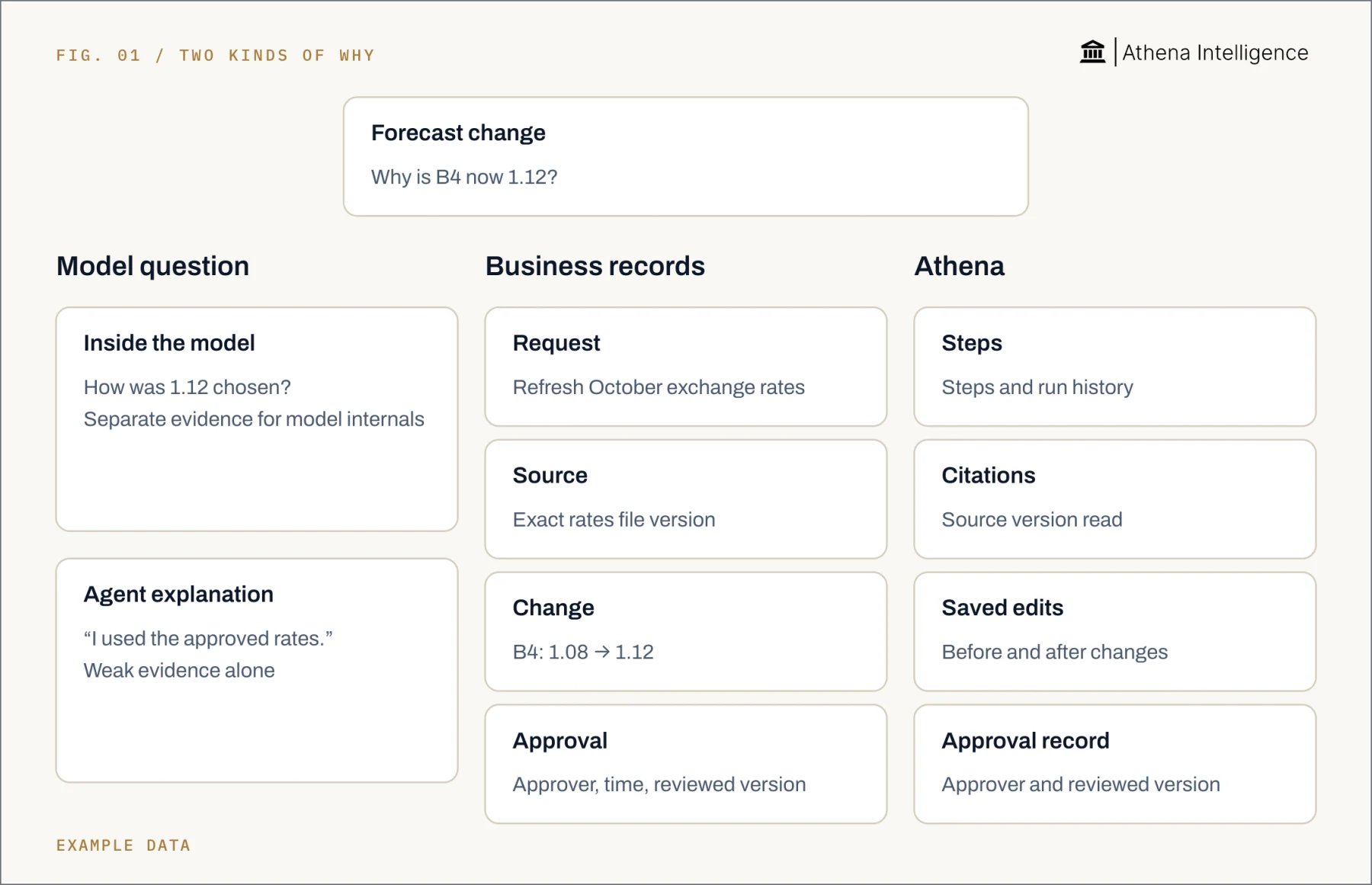
Model explainability asks how a model produced an output. NIST’s principles cover meaningful explanations, evidence for outputs, explanation accuracy, and knowledge limits. Workflow traceability asks what happened during a job. Follow the work from the original instruction to the accepted output. Treat “why” as two questions:- Which instruction, rule, or source supported the business action?
- Which internal model processes caused the choice?
How do we check the agent’s explanation?
Start with one important result. Ask the agent to identify the instruction, source, and completed action supporting it. Imagine a supplier update where the agent says the latest prices increased. Its link opens last month’s file, and the purchasing manager approved the output before the quantities changed. Use three checks:- Source: Open the exact version read during the run. Check the date, reporting period, and rows supporting the result.
- Action: Compare saved changes with the request. Distinguish completed work from proposed steps and failed attempts.
- Approval: Match the decision to the output version reviewed. Look for changes after that decision.
How do I make an agent’s work explainable to a reviewer?
Agree on the evidence before the first run. Use this checklist with any tool:- Define the job. Record the requester, reporting period, allowed sources, permitted actions, and standard of done. Include rules for missing data and exceptions.
- Identify the run. Give the request, actions, output, and approval one stable reference. Keep that reference when work continues in another system.
- Preserve the inputs. Keep source locations and versions, including workbook cells or document passages. For database work, retain query parameters and returned data.
- Record execution. Capture the tool, inputs, result, and time. Keep retries, corrections, changed values, and destination confirmations visible.
- Make approval specific. Record the approver, time, decision, and exact action or output version. Separate permission to start from permission to distribute.
- Explain the result briefly. State the request, changes, supporting rules, and unresolved exceptions. Ask another person to trace an important result back to its inputs.
Prepare an update using the approved October price file. Return the source rows, changed quantities and prices, calculation method, and unresolved exceptions. Hold distribution for the purchasing manager’s approval, and link the final output version to that approval.The reviewer can then follow a simple path: request, source, calculation, change, approval. Save that path with the output so the next review starts from the same evidence.
How do ChatGPT, Copilot, Gemini, and Athena compare?
OpenAI’s ChatGPT supports uploaded-file analysis with reviewable Python code and outputs. Microsoft 365 Copilot provides Purview audit records, while Google’s Gemini provides interaction logs across Workspace applications. Athena combines plain-language Agent Operating Procedures, or AOPs, with run history and saved-change context. Its citations open source locations and historical versions. Use the same supplier-price update to compare the evidence each product provides. These four rows show the starting points for review.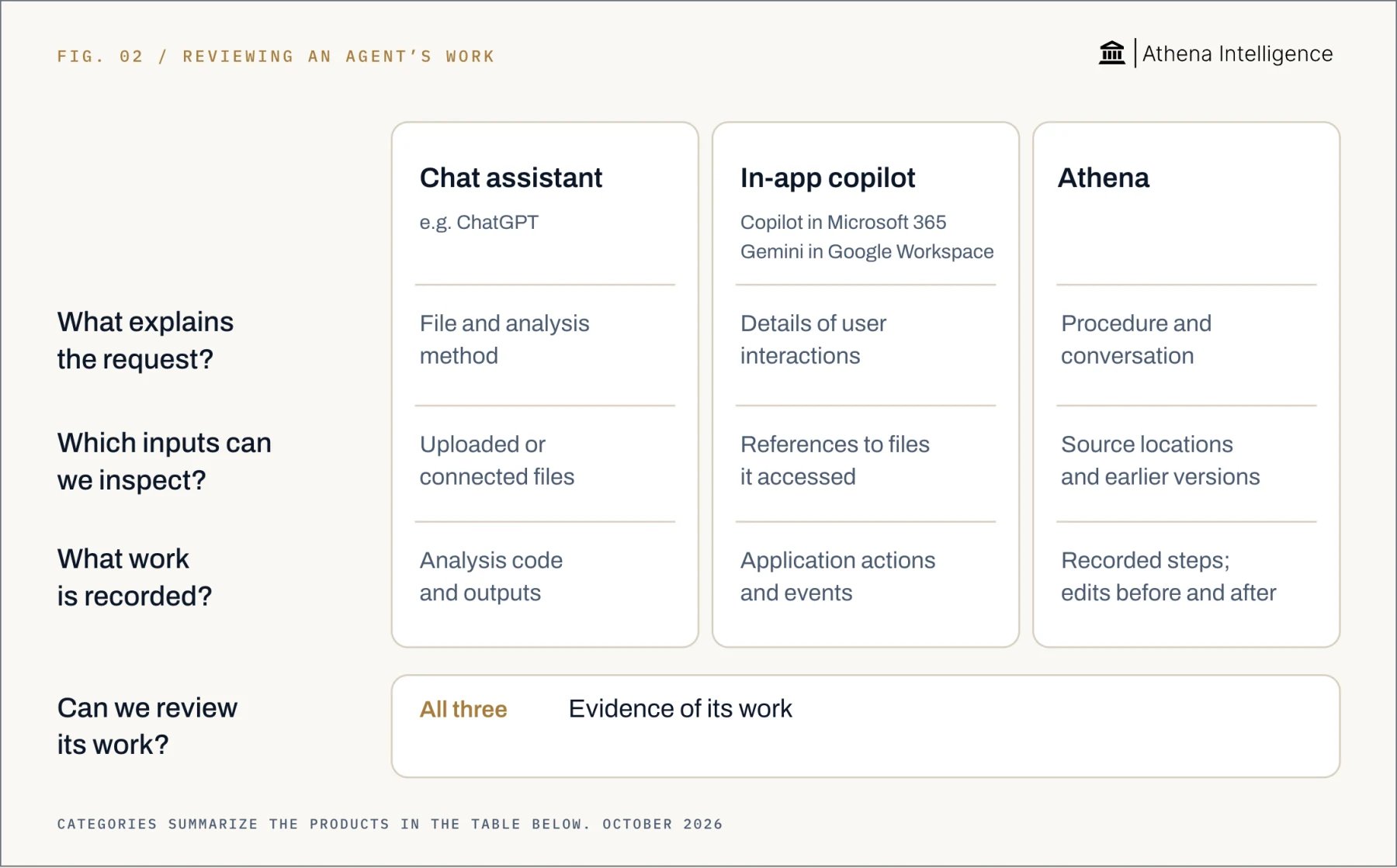
Full comparison with sources, October 2026
Full comparison with sources, October 2026
How does Athena help a business user review what happened?
Start in Athena Workflows. Athena AOPs contain plain-language steps, checks, and approvals. Review a supplier update in this order:- Read the procedure. Check the requested period, sources, and distribution rule. Athena pauses approval steps until a named person signs off.
- Review the run. The AOP editor shows run history, durations, row counts, costs, and approval states. Compare the recorded work with the requested update.
- Read the conversation. Athena Spaces lets invited teammates share the session thread. Use it to follow the request and later corrections.
- Inspect workbook changes. Athena’s Activity Monitor shows affected ranges, triggering conversations, and before-and-after values. Compare in Editor shows changes side by side.
- Follow citations and approval. Athena citations open the source version the agent read and provide access to historical sources. Work-product lineage links the agent, sources, human approver, and reviewed version.
What to plan for
An agent’s narrative can omit influences on its answer. Anthropic found this in controlled hint-based evaluations of Claude 3.7 Sonnet and DeepSeek R1. Keep independent evidence alongside explanations. Workflow records do not reveal every internal model computation. NIST treats explanation accuracy and decision accuracy as separate properties. Recompute important calculations even when the explanation sounds plausible. Athena’s first workflow run can expose ambiguities that need procedure revisions. Use early runs to tighten exception rules and approval scope. Athena Sheets attributes changes per save, using the last writer when people and agents edit the same cell within one save window. The before-and-after difference remains visible. Sent email and committed enterprise resource planning rows are examples of external actions Athena rollback cannot undo. Put approval before irreversible actions and check completion in the destination. For Copilot and Gemini, confirm which events administrators can retrieve. Google’s event attributes vary, and Gemini Drive content-access events cover access outside the user’s open file in Drive for web. Decide who can inspect records and how long to retain them. OpenAI’s SDK tracing can capture sensitive inputs and outputs, and is unavailable under OpenAI’s Zero Data Retention policy. Check logging settings and involve your compliance team when setting retention rules.Questions teams ask
What is explainable AI?
What is explainable AI?
Explainable AI provides understandable explanations for AI outputs or processes. NIST also calls for accurate explanations and attention to knowledge limits.
Does an AI black box prevent reviewing an agent's work?
Does an AI black box prevent reviewing an agent's work?
You can review recorded inputs, actions, and approvals. Start by tracing a specific business result through those records.
What should accompany an agent's written reasoning?
What should accompany an agent's written reasoning?
Keep the original instruction, exact source versions, completed actions, and approval records. Use them to check the proposed reason.
Can ChatGPT, Copilot, or Gemini provide review evidence?
Can ChatGPT, Copilot, or Gemini provide review evidence?
OpenAI’s ChatGPT exposes analysis code and outputs; Microsoft’s Copilot provides interaction records. Google’s Gemini in Workspace provides interaction and action logs.
What does Athena do differently for AI transparency?
What does Athena do differently for AI transparency?
Athena connects procedures and logged steps with saved-change context, version-aware source citations, and work-product approval lineage. Follow those records through a completed run.
What should we record about human approval?
What should we record about human approval?
Record the approver, time, decision scope, and action or output version reviewed. Keep subsequent changes visible for the next review.