

Catalogs from Google sign-in are personal: only the member who connected can query them. Teammates connect their own Google account to get their own catalogs. Google Cloud IAM, dataset permissions, and row-level and column-level security apply unchanged — Athena adds no access of its own.
What you get
- A BigQuery catalog for each BigQuery project your Google account can see, up to 50, or exactly the projects your administrator chose. Each catalog is titled after its project, for example
BigQuery (Acme Analytics · acme-analytics). - SQL against any of those catalogs from a notebook or a session, with the project’s datasets, tables and columns in the notebook schema browser.
- Optionally, a semantic model built on a catalog, where every viewer queries with their own Google connection.
Prerequisites
- Google Cloud: permission to create an OAuth client and enable the BigQuery API in a Google Cloud project.
- Athena: the workspace owner or administrator role to register the client.
- Members: a Google account with BigQuery roles on the projects they will query (see Google Cloud roles).
Administrator: create the Google OAuth client
1
Enable the BigQuery API
In the Google Cloud console, open the project that will own the client and enable the BigQuery API.
2
Configure the OAuth consent screen
Choose Internal if your company uses Google Workspace: only accounts in your organization can connect and no Google review is needed. External lets any Google account connect, but the BigQuery permission is a sensitive scope, so Google must verify the app before you publish it; while it is in testing, only listed test users can connect and they must reconnect every seven days.Add the scope
https://www.googleapis.com/auth/bigquery. It is the narrowest single scope that lets Athena list projects, run queries and cancel a query that runs too long; each member’s own permissions still decide what a query can read or change.3
Create the OAuth client
Create an OAuth client ID of type Web application and add this authorized redirect URI (replace the host with your deployment’s API host if you run Athena in your own cloud; the setup card in Athena shows the exact value):Copy the Client ID and Client secret.
Use a dedicated OAuth client for BigQuery rather than one registered for another Google connection. Google withdraws a person’s consent for a whole client at once, so a shared client ties the two connections together.
Administrator: register the client in Athena
1
Open the setup card
Open Workspace Settings › Integrations and find BigQuery (Google sign-in).
2
Save the client
Everyone: connect your Google account
1
Open the BigQuery card
Navigate to Integrations, find BigQuery under Data Warehousing & BI, and choose Google account.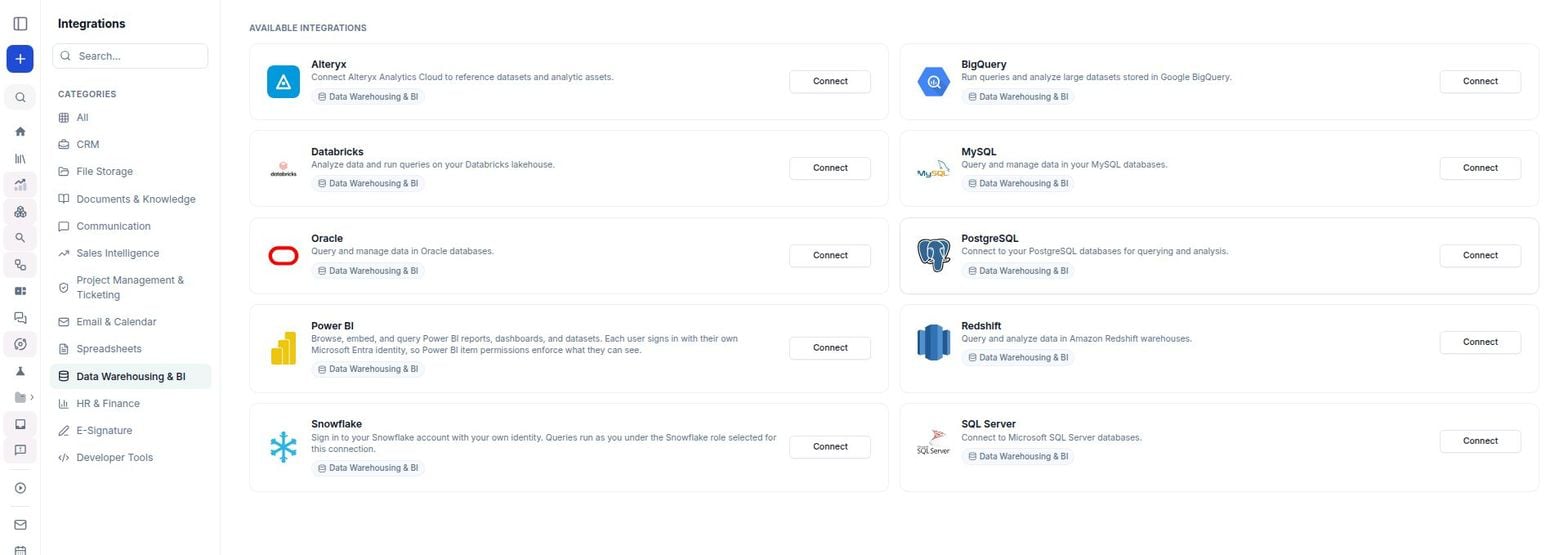
2
Sign in with Google
Click Connect and sign in with Google in the popup.
3
Approve BigQuery access
Keep View and manage your data in Google BigQuery ticked and approve. Athena creates one BigQuery catalog per project you can see.
Google Cloud roles
Grant each member, in each project they should query:- BigQuery Job User (
roles/bigquery.jobUser) on the project the catalog runs in. Queries run as jobs in that project and bill to it. - BigQuery Data Viewer (
roles/bigquery.dataViewer) on the datasets to read, or on the project. - BigQuery Data Editor (
roles/bigquery.dataEditor) only where the member may change data.
`project.dataset.table` from one of your catalogs.
Using the connection
- Notebooks: choose one of your BigQuery catalogs as a SQL cell’s connection. The schema browser lists the project’s datasets, tables and columns.
-
Sessions: mention a BigQuery catalog with
@and ask a question. Athena writes GoogleSQL, runs it in the catalog’s project and shows the first 100 rows. Statements that change data are refused unless the session is allowed to write, and BigQuery refuses them unless your Google account may make the change. - Semantic models: choose Create › Semantic Model and pick one of your BigQuery catalogs under Data Source. Everyone who opens the model queries it with their own Google connection, through their own BigQuery catalog for the same project, so their own Google Cloud permissions apply. A teammate who hasn’t connected BigQuery is asked to connect first. Your connection is never used for anyone else’s queries.
-
Computers: on a computer with one of your BigQuery catalogs attached, the catalog’s project is in
GOOGLE_CLOUD_PROJECTandathena-catalog-tokenprints a short-lived Google access token for your connection. The computer acts as you, so anyone you share it with can use your BigQuery access from it: attach a Google sign-in catalog only to a computer you don’t share, and use a service-account catalog on a shared one. Pass the token to the client explicitly:athena-catalog-tokenreturns the current token while it is fresh and gets a new one otherwise. With more than one BigQuery catalog attached, pass the catalog’s asset ID instead ofbigquery_oauth_directand setproject=to that catalog’s own project ID.
Automation: connecting with a service account
A service account keeps working when a person leaves or loses access, so use it for scheduled work and shared pipelines. Queries run as the service account, not as the person asking.1
Create a service account in Google Cloud
In the Google Cloud project that holds your datasets, create a service account. Grant it BigQuery Job User (Repeat the
roles/bigquery.jobUser) on the project and BigQuery Data Viewer (roles/bigquery.dataViewer) on the datasets to expose, then create a JSON key.With the gcloud and bq CLIs, granting read access to one dataset:GRANT for each dataset Athena should see.2
Upload the key file
On the Integrations page, find BigQuery, choose Service account, and upload the key file. Athena confirms the project ID and service-account email it read from the file. To bind the catalog to a different project than the key’s own, enter a Project ID (optional override).
athena-catalog-token bigquery_direct_v2 in the example above.
Known limits
- Google sign-in creates at most 50 catalogs per member unless your administrator limits the workspace to specific projects. Other projects stay reachable with fully-qualified table names.
- Each catalog runs its queries in one project.
- Catalogs cannot be shared. Teammates connect their own Google account, or you use a service account for shared work.
- A query that has not finished after about a minute is cancelled and reported as timed out. Filter on a partition column or select fewer columns, or run very long jobs in the BigQuery console.
- Other query limits and quotas are BigQuery’s.