

@ in your chat message.
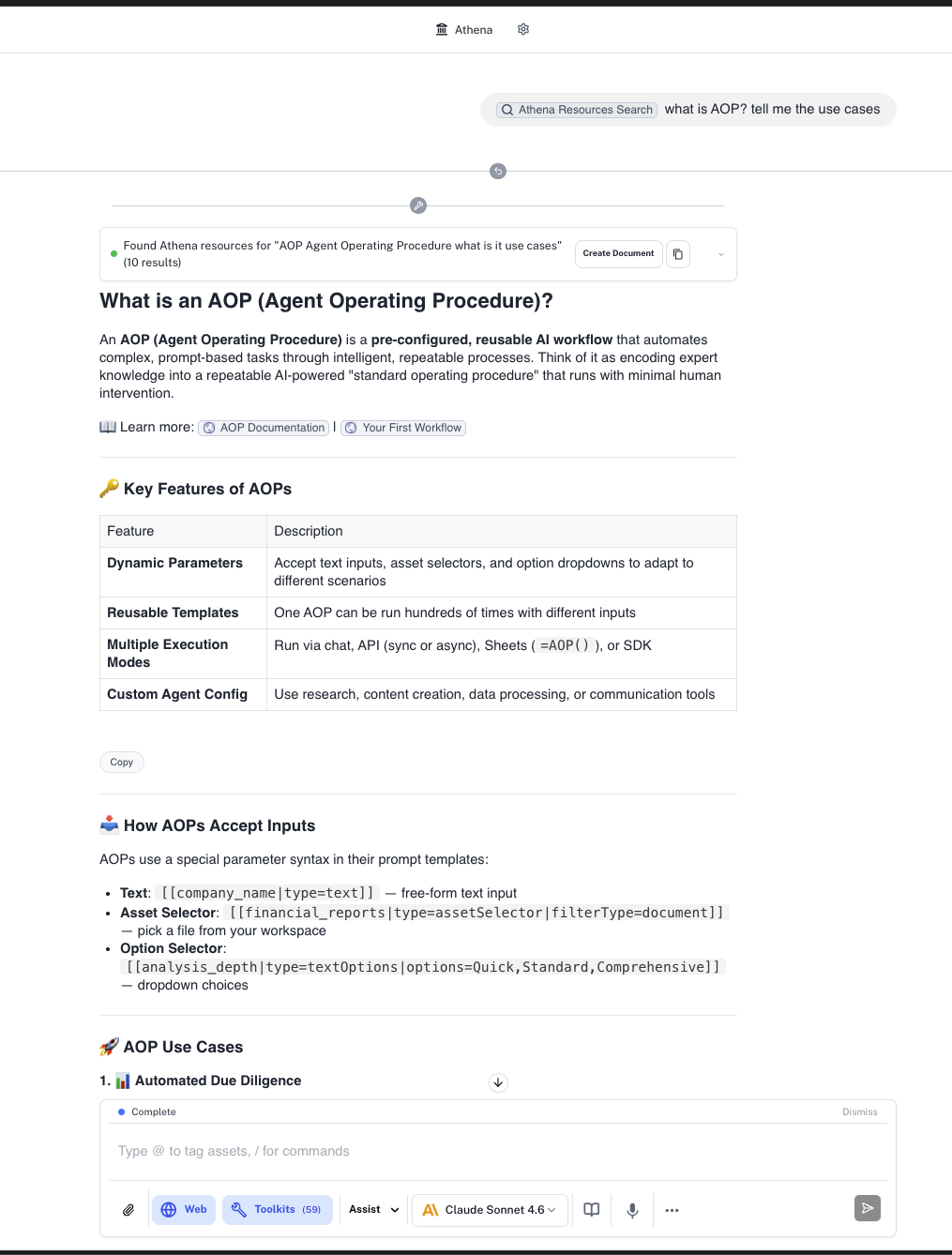
How It Works
Ask Athena Docs performs semantic and keyword searches across the Athena resources documentation at resources.athenaintel.com. When you ask a question about Athena’s features, the tool automatically queries the documentation, retrieves the most relevant pages, and presents the results directly in your chat.1
Ask a Question
In any chat session, ask Athena a question about its own features, capabilities, or how to accomplish a task. Athena will automatically use this tool when it recognizes you need help with Athena features, or you can explicitly invoke it by typing
@Athena Resources Search in your message. For example:- “How do I create an agent?”
- “What integrations does Athena support?”
- “How do AOPs work?”
2
Athena Searches the Docs
Athena automatically searches the resources documentation to find the most relevant pages matching your question. The search covers topics including getting started guides, agent configuration, integrations, applications, use cases, and AOPs.
3
Review the Results
Athena returns the relevant documentation content along with links to the source pages. You can expand the results to see the full content, copy it to your clipboard, or create a new document from the results.
What You Can Ask About
The Ask Athena Docs tool covers the full range of Athena’s resources documentation:- Getting Started - Setup, onboarding, and first steps with Athena
- Agents - Creating, configuring, and managing AI agents and agent teams
- Applications - Using Docs, Sheets, Browser, Voice, Email, and other Athena applications
- Integrations - Connecting data sources like Slack, SharePoint, Google Drive, databases, and more
- Workflows & AOPs - Building automated workflows with Agent Operating Procedures
- Use Cases - Industry-specific solutions and example workflows
- Knowledge Base - Managing contextual knowledge, memories, and workbench
Example Use Cases
Feature Discovery
Ask about Athena capabilities you haven’t explored yet, such as “What can I do with Athena Notebooks?” or “How does the meeting tool work?”
Setup Help
Get guidance on configuring integrations and connecting data sources, such as “How do I connect my Snowflake database?” or “How do I set up SharePoint?”
Workflow Guidance
Learn how to build automations and workflows, such as “How do I create an AOP?” or “How do I schedule a recurring task?”
Troubleshooting
Find answers to common questions and issues, such as “How do I share a space with my team?” or “How do I use browser profiles?”
Working with Results
When Athena returns documentation results, you have several options:- Read inline - Expand the results accordion to view the full documentation content directly in chat
- Copy to clipboard - Copy the results for use elsewhere
- Create a document - Save the results as a new Athena document in your workspace for future reference
- Follow up - Ask additional questions to dive deeper into a topic