

Athena gives you three ways to build and run software: a Computer where Athena writes and tests your code on a private machine, an Application that serves a fixed version at a permanent link with rollback, and a User Interface that runs in the viewer’s browser with no machine to manage. This guide shows you how to choose the right one for each stage of your work.
What is the difference?
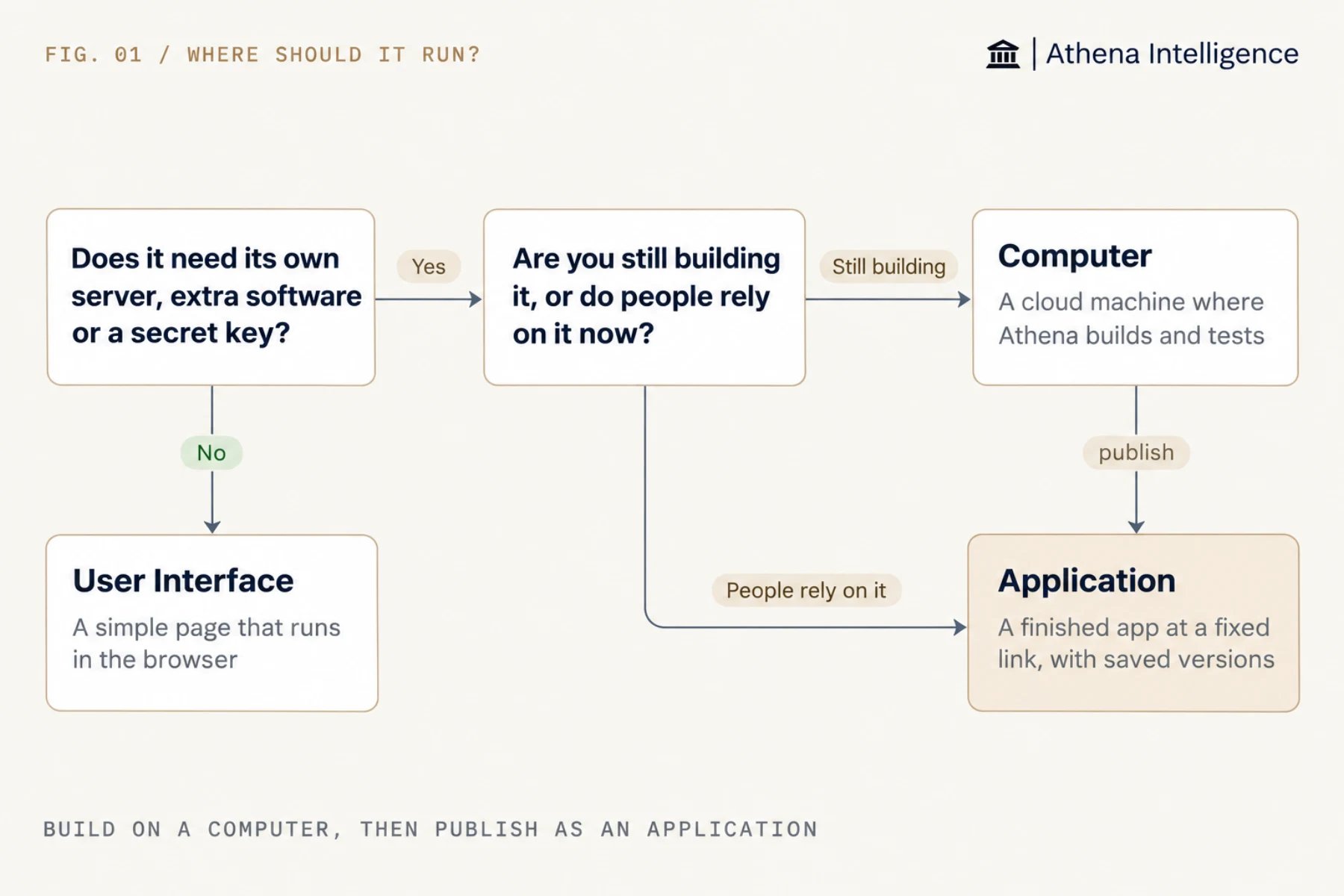
Why build on a Computer?
Athena writes code, runs it, reads the errors, and fixes them on a Computer. You can watch a live preview, open the same files, install software, and run several programs side by side. An admin can also resize the machine up to 16 CPU cores and 64 GiB of memory, within what your setup allows. See Computer. You can share a Computer link for a quick demo where viewers see every change the moment a file is saved. Publish an Application once people depend on the app, because programs you started by hand on a Computer may not come back when the machine sleeps or restarts. See Computer sleep and inactivity.Why publish an Application?
Athena gives your app its strongest protection when you publish it as an Application for other people to rely on:- Athena serves a fixed version, so work in progress on the Computer never reaches your users.
- Athena checks each new version before it goes live, making sure it starts and responds before switching the link to it. For an ordinary release, a failed check leaves the old version running.
- You can roll back to an earlier version at any time, and Athena will rebuild and serve it.
- Athena restricts access to signed-in people with permission, and making an app public takes an admin or someone an admin has allowed.
- An idle Application sleeps after 30 minutes by default and wakes on the next visit, or you can set an important app to never sleep.
- Athena recovers on its own if the program stops by rebuilding the live version on the next visit.
- When new code reaches GitHub, Athena can publish it as a new version and build a test copy for each suggested change.
athena-application.toml, that records how to build and start the app, so there is nothing for you to set up. See Manage application releases.
When is a User Interface enough?
Athena runs a User Interface as a single page in the viewer’s browser, where each viewer sees only the data they are allowed to see. Use it for dashboards, forms, and review screens. The page can read and write an Athena-managed database and start AOPs (Agent Operating Procedures). Choose a Computer or an Application when your app needs to keep a password or key secret, run on a schedule, or keep working after the tab closes, since a User Interface runs in the browser. See User Interfaces.How do they fit together?
- Describe the app on a Computer, and try it in the preview as Athena builds it.
- Keep records like orders, users, and statuses in a managed database so they survive each new version, leaving files on the machine for code.
- Publish an Application so Athena packages and deploys the working files, while the Computer stays as your workshop for the next change.
What to plan for
Keep business data in the database, or use shared storage if your app needs to keep files across releases. Local files on the app’s machine can be lost when you publish a new version, and while Athena tries to keep the/workspace/data folder up to a size limit, it does not promise to.
Test database changes on a database branch (a separate copy of the database) first, because rolling back to an earlier version moves your code without undoing database changes.
Publish apps that use shared storage outside working hours, and ask your admin if you are unsure whether your app uses it. Because shared storage keeps files across releases, the old version stops before the new one starts, which pauses the app briefly.
Put scheduled work in an Automation that calls your app or database, because an Application has no built-in schedule or background worker.
Hosted apps don’t come with a set uptime or recovery time, so plan your own recovery and test it once. See Security and operations. If an app needs more room, an admin can give it a bigger machine.
Make sure your setup has app hosting turned on. Applications are in beta and open to all customers.
Questions teams ask
Can I skip the Computer?
Can I skip the Computer?
Yes, if the code already exists. You can connect a GitHub repository or ask Athena to package a folder. Most people still build on a Computer because that is where Athena can run and fix the code.
Can the code live in our own GitHub?
Can the code live in our own GitHub?
Yes. On a Computer, Athena works with github.com and GitHub Enterprise Server. With the access you give it, Athena can clone, commit, push, and open pull requests, and an Application can publish from a branch of your repository. See Security and operations for review and release rules.
Can one Application run several services?
Can one Application run several services?
You can start several programs from an Application’s single start command and single port. When you need to set up each service separately, see Reference patterns.
Can people outside my company open it?
Can people outside my company open it?
Yes, when an admin makes it public. Public visitors can load the app without signing in, and that gives them no access to your Athena data.
What does it cost to run?
What does it cost to run?
If the app uses AI through the Computer’s own AI key, the cost shows up in Computer spending. Hosting terms depend on your agreement.
See it work
Thirty minutes, your workflow, and you leave with the work product.