

Athena gives you eight ways to build, from a reusable Skill in chat to full web apps, controlled workflows, analytics, and API integrations. Pick the simplest pattern that does the job, and connect multiple parts through a shared database, web calls, or embedded screens when your build grows.
What are the eight patterns?
1. Skill in chat or an Agent
Athena runs a reusable method as a Skill that people can mention in chat or ask a specialist Agent to use through Teams, Slack, email, or text, with nothing for you to host or release. Write the method once, and move to pattern 2 when the work needs a schedule or a record of each run. See Skills.2. Workspace tool
An AOP takes files or form answers and produces a spreadsheet, document, or email draft without you hosting or releasing an app. You can add a schedule later, wrap the AOP in an Automation when you need approvals, or move to pattern 3 or 4 when people need their own screen.3. Dashboard or form
A User Interface displays data from a database, the lakehouse, or a semantic model (shared metric definitions), and shows each viewer only what they are allowed to see. You can add buttons that start AOPs. Move to pattern 4 when your build needs to keep a key secret, run on a schedule, or keep working after the browser tab closes, because a User Interface runs in the viewer’s browser.4. Web app
Athena builds your web app on a Computer and stores records in a managed database, and you publish the result as an Application. Put scheduled or background work in an Automation that calls the app or writes to the database. Follow the build standard.5. App with AI inside
Athena’s Agents and AOPs can run inside a pattern 4 app when you embed the chat window from the React SDK or start AOPs and show their results. Have viewers sign in through Athena or your company login so the Agent runs with each viewer’s permissions, as visitors on a public link get no access to Athena’s Agents or data. See the SDK quickstart.6. Controlled workflow
An Automation controls when work starts, the order of steps, who approves, and how much the run can spend. Within the workflow, AOP steps read and judge information while connector steps update external systems, and you can add a User Interface if approvers want a queue to work from. Use this pattern for work that takes seconds to days rather than instant replies.7. Data and analytics
Athena copies tables on a schedule into the lakehouse, reshapes them for analysis, and uses a semantic model to name the metrics. Agents and User Interfaces read from that model, while connectors write any changes back to the source system.8. Your own app uses Athena
Athena’s API and SDK let an external app start Agents and AOPs and display the results while keeping its own hosting, sign-in, and release process. Use this pattern when your app already exists or must follow your own release rules. See the SDK quickstart.Can I build an app from several parts?
Yes. Athena lets Computers and Applications work together by sharing a database, calling each other, or displaying one inside another.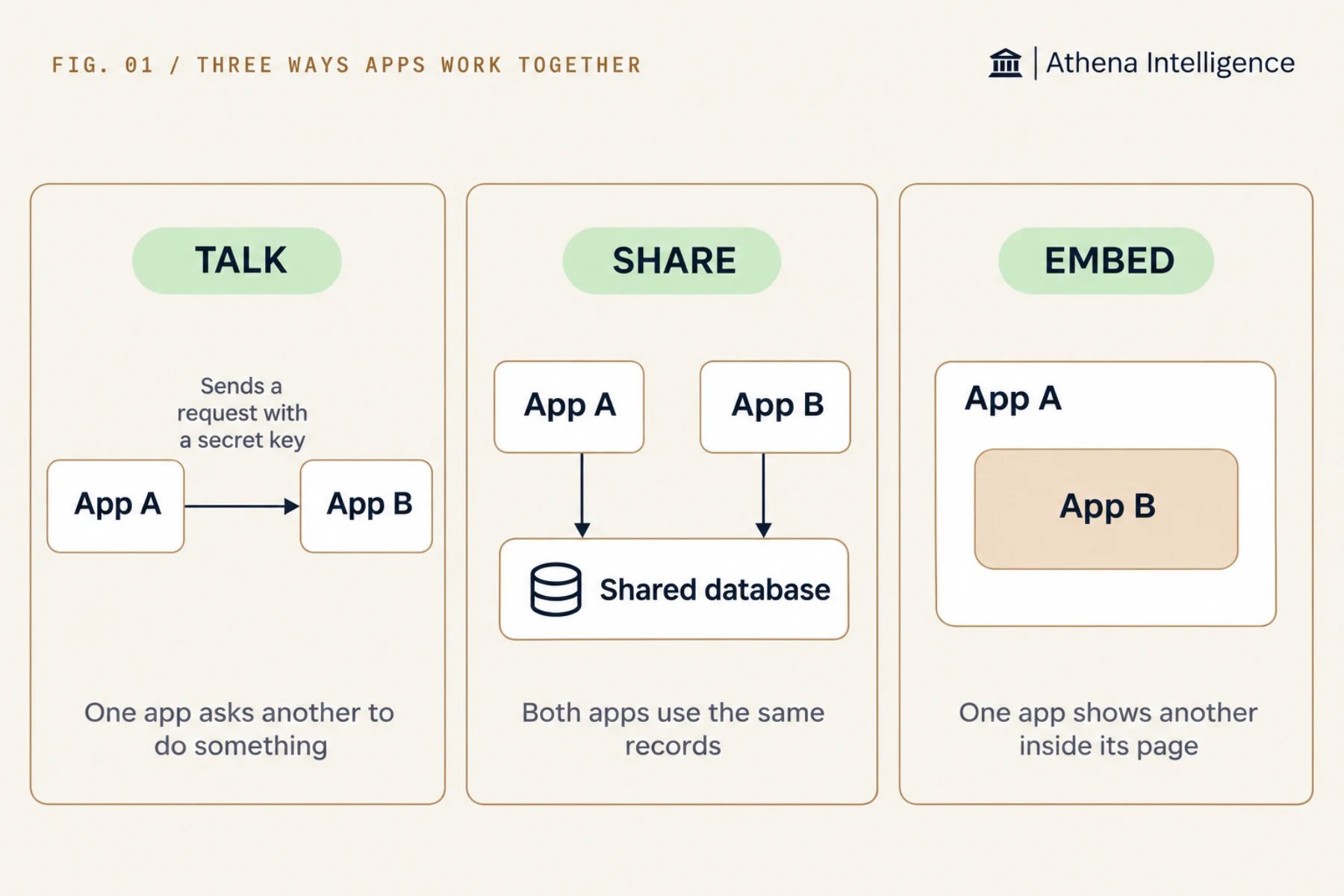
Athena provides a managed database that two apps can share when they work on the same data. Give each app its own database login so it reaches only the tables it needs.
When one part must act for another, call it over the web. Because a private app link expects a signed-in person, someone with edit access who is an admin, or has an admin’s permission, must make the receiving app public, and you should have Athena build the receiving app to check a shared Secret on every request.
An Automation can run parts in order by calling each app on a schedule with retries and approvals, which often replaces the need for a separate background service.
To show one app’s screen inside another, put its link in a frame on the host page. Public pages display right away, and for a private page, have the viewer sign in to the embedded app first because each app has its own sign-in. Use a frame when embedding an Application, and use either a frame or the React SDK when embedding a Computer’s screen, since the SDK embed covers Computers only.
You can also run several programs on one machine instead of splitting them across apps. A Computer can run as many programs as you like, and an Application’s single start command and public port can launch multiple programs that publish and roll back together.
What to plan for
- Add a retry in any calling app and set apps that others depend on to never sleep, because each app sleeps on its own and takes a short time to wake when called.
- Add background programs to a Computer’s startup settings so Athena restarts them after sleep, since programs you start by hand may not restart on their own.
- Athena publishes each Application on its own with its own link, versions, access checks, and Secrets, while multiple programs inside a single Application publish and roll back together.
- Check that your workspace setup includes the features your pattern needs: app hosting for web apps, Automations for controlled workflows, and the lakehouse for analytics.
Questions teams ask
Which pattern should a new builder start with?
Which pattern should a new builder start with?
Start with pattern 1, 2, or 3, since they require nothing to host and cover most initial requests. Move to pattern 4 when people need to enter records.
Can a Computer act as a small service for other apps?
Can a Computer act as a small service for other apps?
Yes. Other apps can call a Computer and embed its screen while you build. Once other apps depend on it, publish it as an Application so it runs a fixed version you can roll back.
How do I deliver an app to a client?
How do I deliver an app to a client?
See Build for a client.
See it work
Thirty minutes, your workflow, and you leave with the work product.