

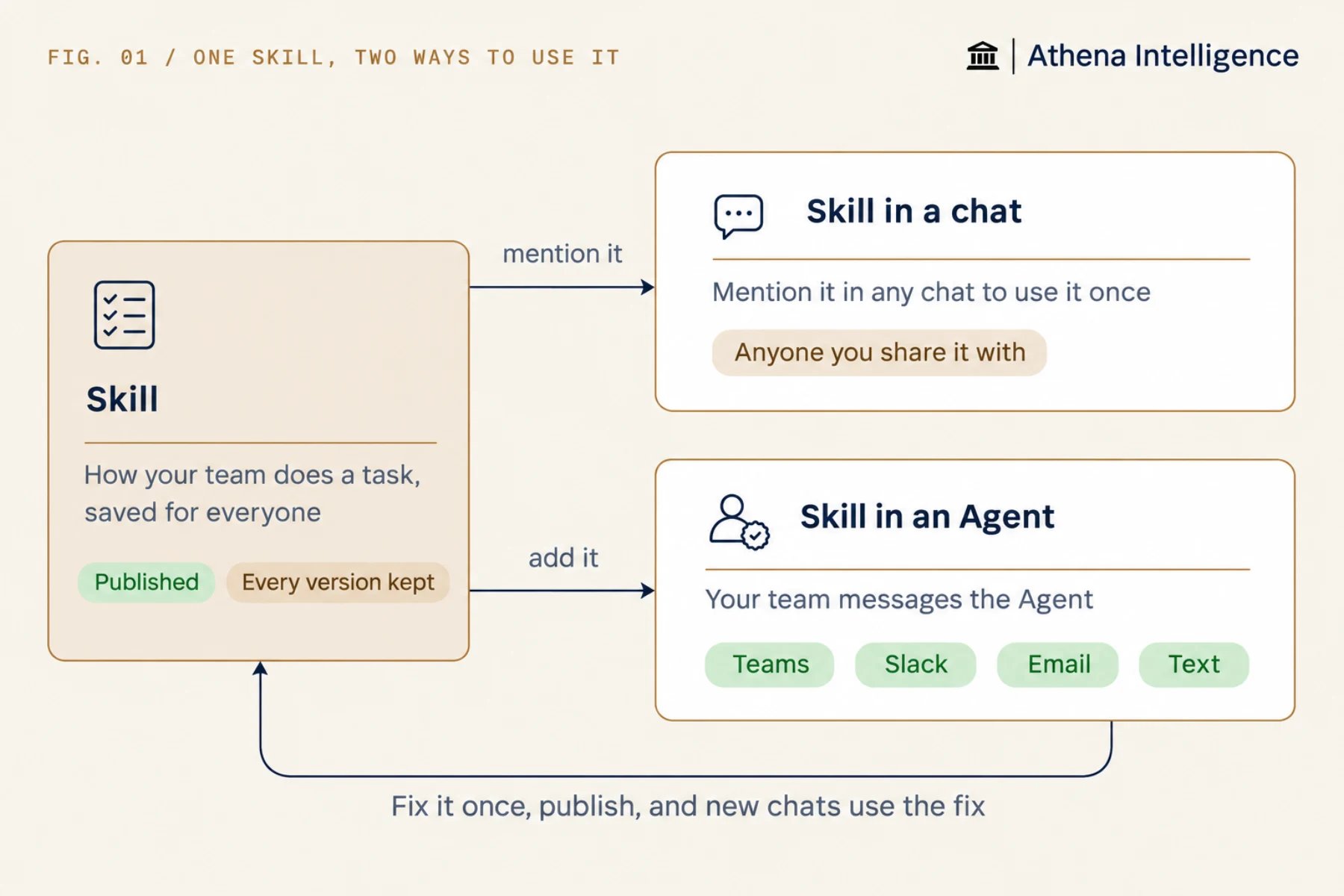
A Skill captures your team’s method once, such as a review checklist, a house style, or the steps for a monthly report, so Athena follows it every time. Mention a Skill in chat, or add it to a specialist Agent that your team can message from Teams, Slack, email, or text. This guide shows you how to write a Skill, add it to chat or an Agent, and decide when to combine it with other Athena building blocks.
What is a Skill?
A Skill gives Athena a repeatable method using three parts:- A name, such as
exception-review. - A one-line description of when to use it, which Athena reads to decide when the Skill applies.
- The instructions, written in plain steps.
How do I use a Skill in chat?
Athena reads your Skill’s steps and works through them whenever you invoke it in chat. Start a new chat, @-mention the Skill the same way you mention a file, and ask for the work. You can also select Skills for new chats under Skill Assets in the chat settings. Using a Skill in chat fits work people do on request:- Reviewing a contract or an invoice against your checklist
- Writing a client memo in your house style
- Building the monthly summary the same way every time
- Checking a model against your review rules
How do I give a Skill to a specialist Agent?
An Agent is a saved specialist with its own instructions, sources, and tools that can run your Skill across every channel you connect. Once you set up each channel, your team can message the Agent in Teams, Slack, email, or text, and the Agent’s Sessions tab brings its conversations together across channels for anyone with access. Follow these steps to build an Agent that uses your Skill:- Create the Agent and open its configuration.
- Add your sources under Knowledge base, such as the policy and the tracker it works from.
- Add the Skill under Workbench.
- Tell the Agent when to use the Skill in its instructions, for example: “Read exception-review before you review a dispute.”
- Publish and share the Agent with your team.
- A practice group’s matter desk where partners ask questions in Teams and get answers that follow the firm’s matter procedures.
- An audit team’s sampling helper that returns work to every auditor in the same shape.
- A freight dispute desk that the warehouse texts to check each dispute against the contract the same way.
When is a Skill enough?
A Skill handles repeatable methods in chat and specialist Agents, and you can pair it with other building blocks when your workflow needs more structure.
Put your Skill inside an AOP or an Automation when you want it to run on its own, follow a schedule, or keep a run history, since a Skill does not have those features built in.
What makes a good Skill?
- State when to use the Skill in the description. “Use when reviewing a freight dispute” works better than “Dispute stuff”.
- Put the steps in order, the way you would brief a new hire.
- Specify what the answer must contain, such as the carrier and ID first, the billed amount against the contract rate, the evidence named by document, and one recommended action.
- Cover one method per Skill, and split a long Skill into several smaller ones.
- End with a check by asking Athena to confirm each step before it answers.
Do Skills work when Athena builds software?
Yes. You can copy The build standard and the interview in Plan before you build and add both Skills to the Agent or chat that builds your apps. On a Computer, Athena’s coding agent can also use Skills stored with the code, including scripts it runs there.What to plan for
Add templates and reference files to the Agent’s sources or the chat, because a Skill saved in your workspace is a single instructions document that does not hold files. Publish your Skill after editing it to share the update, and start a new chat to test it, since an open chat may not pick up the change. Give users view access to the Skill, the Agent, and its sources so they can use them, and grant edit access to the people who will change or publish the Skill. You can combine up to 25 of your own Skills per run across Skills selected in chat and Skills added to the Agent, plus Athena’s built-in Skills, which do not count toward the 25-Skill limit. Ask your admin to turn on Skill creation in your Athena setup if you cannot create one.Questions teams ask
What is the difference between a Skill and an AOP?
What is the difference between a Skill and an AOP?
A Skill is a method Athena follows when the task calls for it. An AOP is a task you run from a form or on a schedule, with a record of each run. An AOP can use your Skills.
Can Athena write the Skill for me?
Can Athena write the Skill for me?
Yes. After a conversation goes well, ask Athena to save the method as a Skill, then review and publish it.
Does Athena come with Skills?
Does Athena come with Skills?
Yes. Athena includes built-in Skills for working with Excel, Word, and PowerPoint files and for processing documents. You can turn built-in Skills off for an Agent.
What if a Skill gives a wrong answer?
What if a Skill gives a wrong answer?
Fix the step in the Skill and publish it again. New chats and every Agent using the Skill get the fix, so you do not have to correct each conversation. Test the update in a new chat.
See it work
Thirty minutes, your workflow, and you leave with the work product.