

You do not need to be an engineer to publish a solid app on Athena. Athena already handles hosting, sign-in, secure links and versions. Give it the 18-rule build standard below and it also writes access checks, safe database code and release checks into your app, then reports how it met each rule. When the app goes public or gets busy, you can ask Athena to add more protection and have an engineer review it.
Who does what?
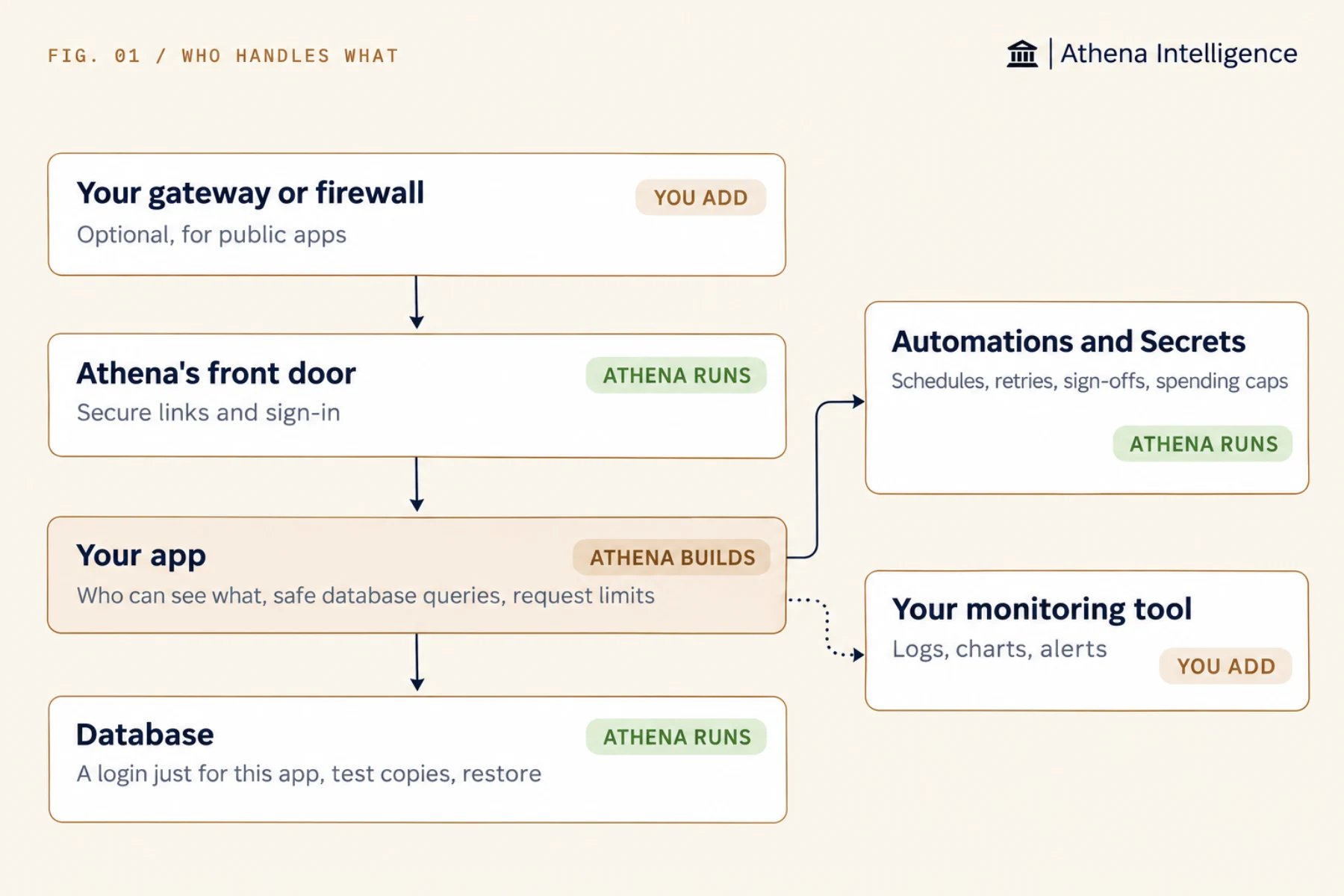
How do I use the standard?
Athena follows this 18-rule standard to write your app or audit an existing one, then gives you a rule-by-rule report. Save the text below as a Skill in your workspace and attach it to the Agent or conversation that builds your apps. Use this standard for every app with more than one user, and adjust the numbers and wording to match your own policies.- Athena checks every request against the signed-in user so only the right people see each record.
- Athena keeps passwords and keys hidden in Secrets, out of the code and logs.
- Athena handles user input safely so text from users cannot change database queries or run in someone’s browser.
- Athena stores records in the database without duplicates and tests changes on a copy first.
- Athena checks that each new version is healthy before release and records who changed what.
- Athena caps AI spending on each request and treats documents as data so AI features ignore hidden instructions.
What does Athena add when an app goes public or gets busy?
Athena can add the protections below when your app opens to the internet or starts carrying real work. Ask Athena for the ones you need.How much does my app need?
From first draft to everyday use lists the checks for each tier.
What to plan for
With the Skill attached, Athena writes a build report on every rule. Ask for that report after each build. A security scan does not run on every release. An admin can scan a version for exposed secrets and risky settings, and your workspace can require that scan before an app goes public, so ask your admin for one before a private app holds real data. Either way, have an engineer spot-check the access rules before real data goes in, since neither the report nor a scan checks whether your access rules make the right business decisions. Check Security and operations before you rely on a browser security setting sent by your app, as some settings may not arrive at the browser. Athena sends performance data to your monitoring tools, where you set the alert rules and decide who gets paged.Questions teams ask
Does every app need an engineer?
Does every app need an engineer?
You can build a personal or team tool on your own with the standard. Have an engineer check a team tool’s access rules before it holds real data, and bring one in for a full review when the app becomes critical, goes public, or holds regulated data.
Why a Skill and not a long prompt?
Why a Skill and not a long prompt?
A Skill saves your standard in one place with version history, so every Agent you attach it to uses the same rules instead of relying on pasted prompts that drift apart.
Can Athena check an app someone already built?
Can Athena check an app someone already built?
Yes. Athena reads existing code and marks each rule as met, not met, or not needed, along with the files involved. Open the app’s Computer, add the standard, and ask for the report.
Does this apply to Automations?
Does this apply to Automations?
An Automation already includes its own access, retries, approvals, budgets, and run history, so most of this standard is already handled for you.
See it work
Thirty minutes, your workflow, and you leave with the work product.