

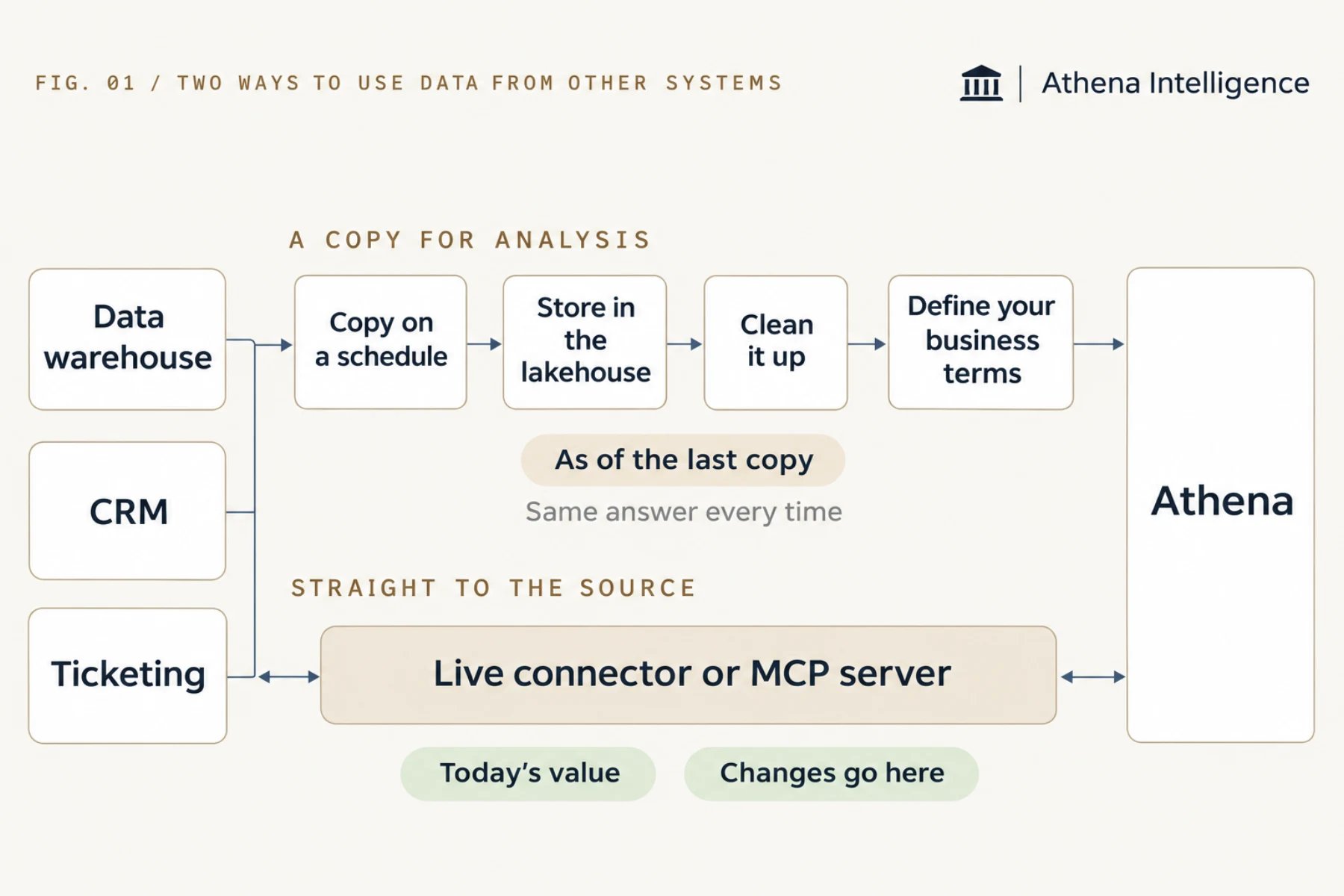
Athena gives you two ways to reach data in other systems: a scheduled lakehouse copy with shared business definitions and version history, and live connectors or MCP servers that read current records and write changes back to the source. Copy data into the lakehouse when you will analyze it repeatedly, combine sources, or need everyone to use the same definition of a number. Use a live connector or an MCP server when you need today’s value or want to change something in the source system.
What is the difference?
When should I use the lakehouse?
The lakehouse stores a scheduled copy of up to 200 tables from a source so you can analyze the data more than once:- Combine sources, such as revenue from your warehouse and deals from your CRM.
- Read large volumes of rows, such as three years of transactions every month.
- Give everyone the same definition. A semantic model (a shared layer of business definitions) defines a number like “active customer” once so every Agent and dashboard uses it.
- Track your data history. Athena saves each version of the steps that reshape the data and records which table fed which.
When should I use a live connector?
A live connector reads and updates records directly in the source system without copying data into Athena:- Look up a current record, such as an order’s status or the latest version of a file.
- Make a change in the source, such as creating a ticket or updating a deal.
- Enforce each person’s source permissions, since each person signs in to the source and Athena only sees what they can see.
When should I use an MCP server?
Athena supports MCP, an open standard for giving AI tools access to a system. Use an MCP server to connect internal systems your team has built or systems without a built-in Athena connector. You add the server’s web address to a toolkit and choose which tools Agents may use. Athena lets people sign in themselves or connects with a shared key stored as a Secret, and your workspace rules control which actions wait for approval. See MCP servers.Does my own API need an MCP server?
Athena can call your API either on a fixed step in an Automation or dynamically through an MCP server, depending on who decides when to make the call:- Use an Automation with an HTTP request step when a fixed step calls the API, for example to post each approved record every night. Athena stores the API key as a Secret and sends it in the request header after your admin approves the destination address.
- Put an MCP server in front of the API when Athena decides when to call it, so an Agent or chat can use the system while it works, such as looking up stock levels to answer a question. Your team builds the server, adds its web address in Athena with Add Custom Server, checks it with Test Setup and picks which tools to allow.
Which do I need?
Many builds combine both approaches. An Automation can read last night’s lakehouse tables to find accounts that need attention, then use the CRM connector to create a task for each one.
What to plan for
Choose a full copy unless your source table only adds rows and existing rows never change. A full copy replaces the table each time so edits and deletions come through, whereas an add-only copy brings in new rows, misses edits to old ones, and can duplicate an edited row. Display the time of the last copy next to any number from the lakehouse so readers know when the copy was made. Use the source connector (such as the CRM connector) when you want to update the source, because editing the lakehouse copy leaves the source unchanged. Check a connector’s caching settings if you need minute-by-minute values, since some connectors reuse recent results for up to an hour by default. Turn on approval rules in your workspace for MCP tools that send, delete or pay, as MCP tools run without approval until you require it. Plan backups and retries on the MCP server itself, because it is your team’s or a vendor’s code and Athena does not add them. Calculate totals inside your lakehouse query, since queries return up to 2,000 rows and run for up to 60 seconds by default.Questions teams ask
Does the lakehouse replace our data warehouse?
Does the lakehouse replace our data warehouse?
Your warehouse stays your main record while the lakehouse holds copies for Agents to analyze, copying from Snowflake, BigQuery and Databricks.
Can Agents write to lakehouse tables?
Can Agents write to lakehouse tables?
No. Agents can only read it. Data arrives through scheduled copies and the steps that reshape it, and a person with edit access can add rows through the API.
Can we add our own MCP server?
Can we add our own MCP server?
Yes. Add a remote server by its web address in a toolkit, or connect a local server started from the command line through the approved remote bridge.
Where does an Athena-managed database fit?
Where does an Athena-managed database fit?
It holds the records your own app creates. See Database or spreadsheet.
See it work
Thirty minutes, your workflow, and you leave with the work product.