

Model Context Protocol defines how an MCP server exposes tools or context to an AI application. Athena supports both directions: agents call external servers, and its Atlas gateway gives external clients access to workspace tools.
How does an MCP server connect AI to business tools?
In Model Context Protocol, a client connects an AI application to a server and discovers its tools. It then requests an operation, such as retrieving a document. Resources provide context, while prompts provide reusable message templates. For a monthly report, the instruction tells the agent what to prepare. A tool retrieves the figures. Model Context Protocol carries the request, and the server defines the available operations. Athena works on both sides of this connection. An Athena agent can call a configured Looker server while preparing a report. An external client can use Atlas to search workspace assets or read and edit an Athena document. Start with a specific task: retrieve this month’s figures and draft a report. Decide which tools it needs before adding a server. Keep reviewing the figures and proposed edits as part of the reporting process.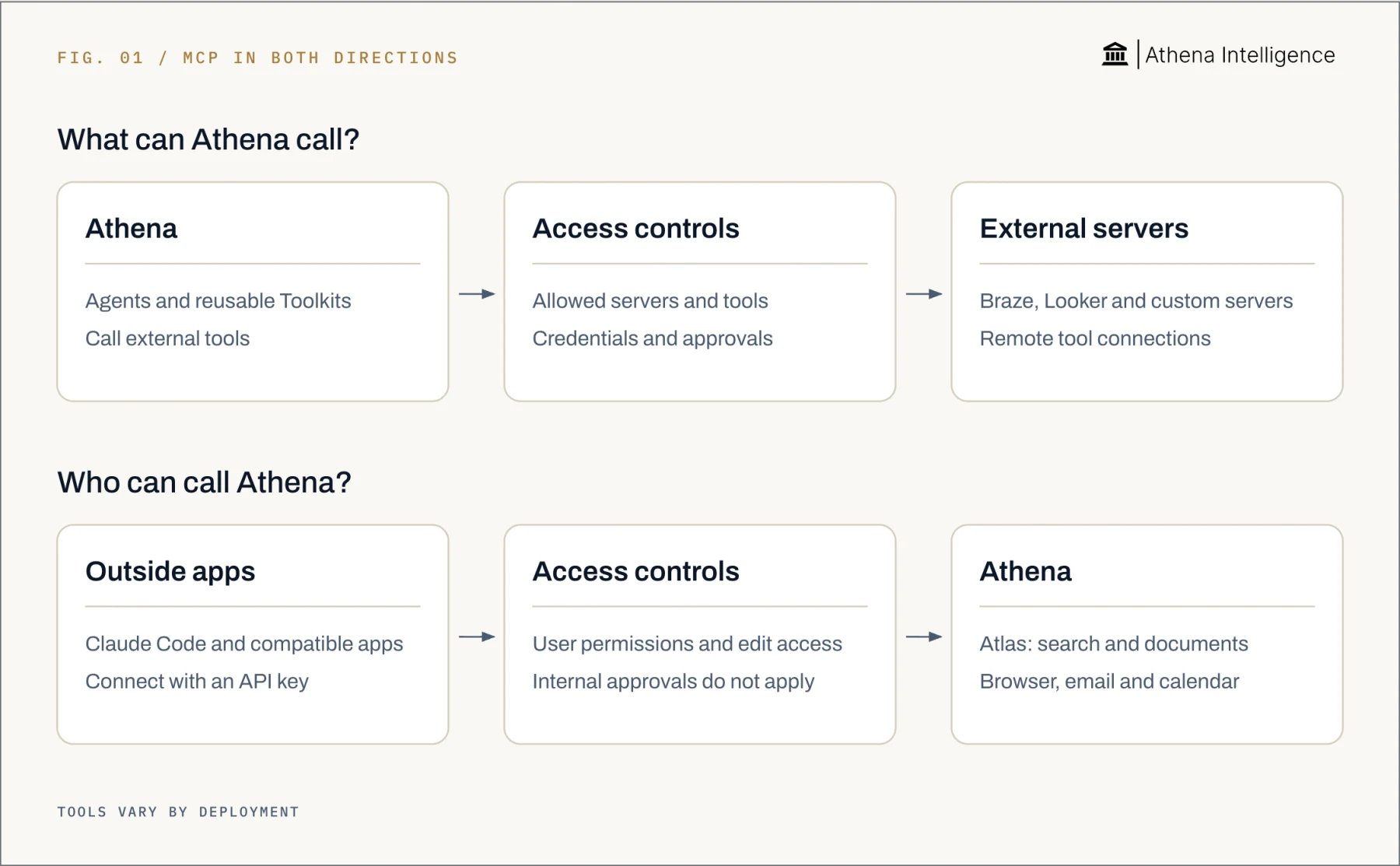
How does Athena MCP compare with ChatGPT, Claude, Gemini CLI, and Copilot Studio?
OpenAI’s ChatGPT custom MCP apps support reads and writes, as do Anthropic’s Claude remote connectors. Google’s Gemini CLI connects to external MCP servers, as does Microsoft’s Copilot Studio agent. Google’s comparison covers Gemini CLI, a command-line application using an individual free-tier account. Microsoft’s column covers Copilot Studio agents. The table compares how you attach tools and control their use. Choose the application that fits your team’s workflow, then try the same task with the same permitted actions.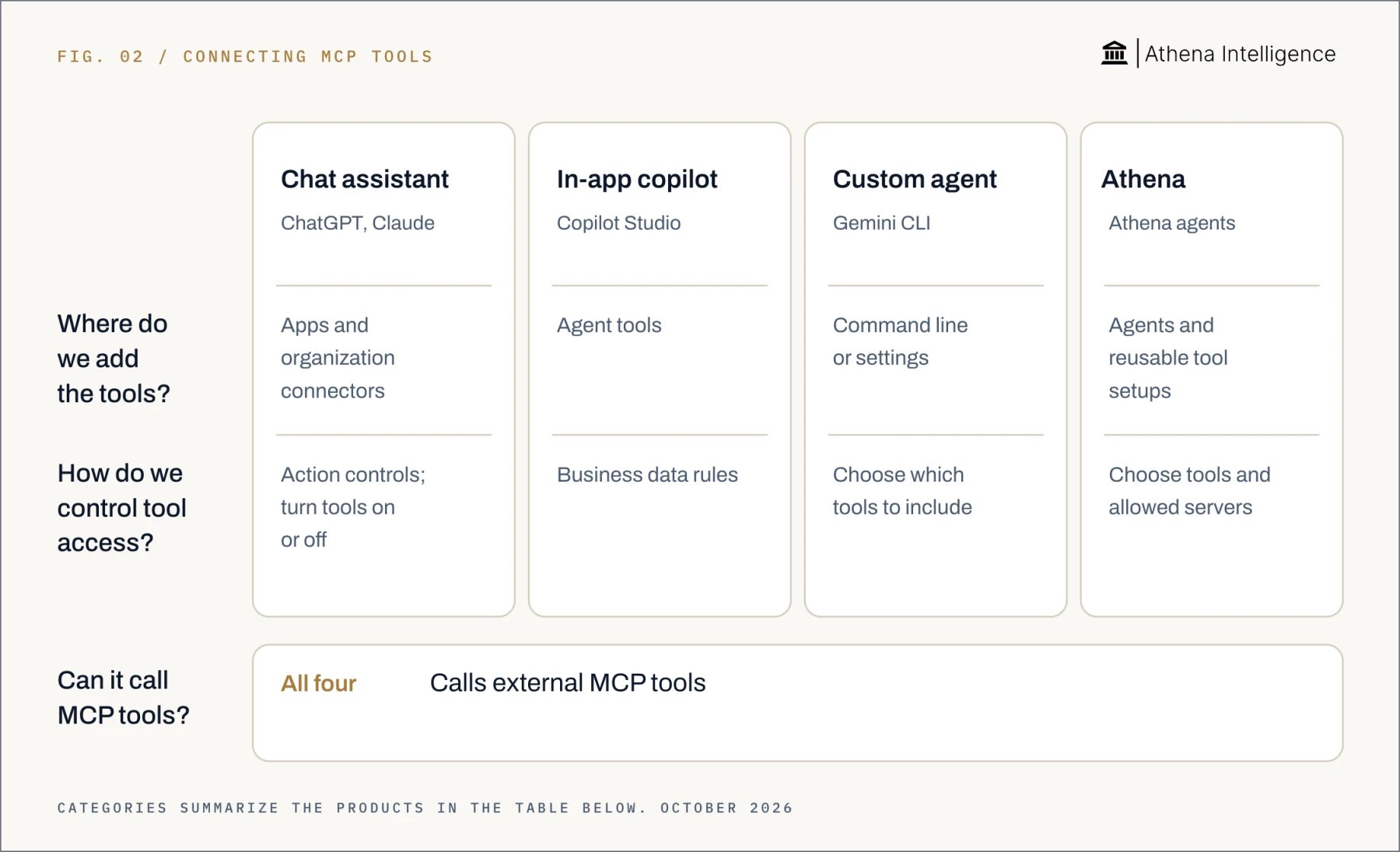
Full comparison with sources, October 2026
Full comparison with sources, October 2026
How do you add a custom MCP server to Athena?
Open MCP configuration from the composer, agent editor, or Toolkit editor. A Toolkit stores a reusable tool configuration. For a report-writing agent, add the server and keep the tools needed for the report.- Choose a server. Select one under Workspace MCP Servers, or use Add Custom Server. You can also import an existing JSON configuration.
- Enter the connection. Use Streamable HTTP URL for a direct remote connection. For remote SSE, use Remote MCP URL with the approved
mcp-remoteproxy. - Set credentials. Provide headers or an API key, or link a Secret asset where supported. For OAuth, select Connect and authorize your account.
- Run Test Setup. Check the connection and review the discovered tools.
- Choose tool access. Enable the server and allow or block individual tools.
- Save for reuse. Use Save as Toolkit where available to create a reusable Toolkit asset.
What Athena tools can an external MCP client use, and how can Claude connect?
Atlas exposes separate endpoints for different tasks. Its/mcp endpoint provides read-only keyword search and content retrieval for workspace assets. The /document/mcp endpoint reads, creates, and edits Athena documents.
Other endpoint families provide these operations:
- Meeting and collection search and retrieval.
- Search and retrieval from connected SharePoint, Google Drive, and iManage sources.
- Basic email and calendar search and fetch.
- Email reading, draft creation and editing, and attachment import through
/email-calendar/mcp. - Calendar reading and availability checks through that same endpoint.
- Hosted browser sessions, navigation, page interaction, and screenshots through
/browser/mcp.
X-API-KEY header. Browser and Document endpoints require header authentication. Get your deployment’s endpoint URL and API-key instructions from your administrator.
Anthropic’s Claude Code supports remote HTTP servers with authentication headers. This example selects Athena’s document endpoint. Set ATHENA_API_KEY first, then enter the base URL without a trailing slash:
claude mcp get athena-documents or /mcp to check connection status.
How do MCP, Skills, and connectors differ?
Model Context Protocol connects an application to tools through a standard protocol. A Skill packages a procedure, while an Athena connector provides a native integration. Athena has 150+ connectors with per-user credentials. For a report, the Skill can specify the reporting period and reviewer. MCP supplies access to an external server’s retrieval tools. A native connector offers access to a supported system through Athena’s integration. Athena inherits source-system permissions for native connected sources. External MCP access follows the credentials provided to the server. Administrators can restrict servers and individual tools, while the Tool Registry governs agent-consumed tools and configured approvals. Athena’s attribution system records human and agent saves with session context, prior states, comparison, and rollback. Use those records when reviewing document changes.What to plan for
Custom Athena configurations use remote HTTP or SSE throughmcp-remote, rather than arbitrary local stdio programs. Direct custom transport: "sse" configurations are unsupported. Configure servers on agents and Toolkits, rather than per project.
Atlas endpoint availability depends on deployment and user permissions. Existing-document edits require edit permission. Internal Athena approval steps do not automatically apply to external client calls.
Atlas uses API keys rather than browser sign-in. Its tools do not send or forward email, create or update calendar events, or access customer code repositories.
Additional built-in servers depend on deployment and administrator restrictions. Review a shared API key’s scope before distributing it.
Athena offers managed cloud, private cloud, on-premises, and air-gapped deployment options. Remote servers need a reachable network connection.
Before expanding access, test an allowed read, a denied read, and a write held for approval. Check data freshness, saved changes, and recovery from external actions. Stop if a required control fails.
Questions teams ask
Can ChatGPT use MCP tools to change data?
Can ChatGPT use MCP tools to change data?
Yes, OpenAI’s custom MCP apps support write and modify actions in the Business and Enterprise/Edu beta. Deep research uses custom apps for read/fetch actions only.
Does Athena support MCP?
Does Athena support MCP?
Yes, Athena agents call external servers, and Atlas exposes workspace tools to external MCP clients.
Can Claude connect to Athena?
Can Claude connect to Athena?
Yes, configure Anthropic’s Claude Code with a remote HTTP endpoint using Athena’s Atlas endpoint and an
X-API-KEY header.What is an MCP server?
What is an MCP server?
Model Context Protocol defines a server as a program that exposes tools or context. A client discovers and requests those capabilities.
What are some MCP server examples?
What are some MCP server examples?
Athena includes Braze and Looker configurations. Atlas is Athena’s gateway for workspace retrieval, documents, and hosted browser operations.
How should I choose an MCP server for Athena?
How should I choose an MCP server for Athena?
Choose one that supplies the tools your task needs. Run Test Setup, review the discovered tools, and restrict access before using it.See it work →