

Athena takes a working draft on a Computer to a published Application your team can rely on in ten steps: it moves records to a database, puts keys in Secrets, runs the build standard, packages a version preview, and publishes the healthy app to your workspace link. Before you start the technical steps, decide who will use the app, who owns it, and how far it needs to go, because apps usually stall when those decisions are missing.
Why do good drafts go nowhere?
Line up users, an owner, a clear goal, and a written plan before you push a draft live. Good drafts stall when any of those four are missing:- No one asked for the app because the builder only wanted to see if it could be done.
- No one owns the app after the builder moves on.
- No one defined what “live” means or agreed on what must happen first.
- No one wrote a plan, so nobody can tell whether the app works. See Plan before you build.
How far does my app need to go?
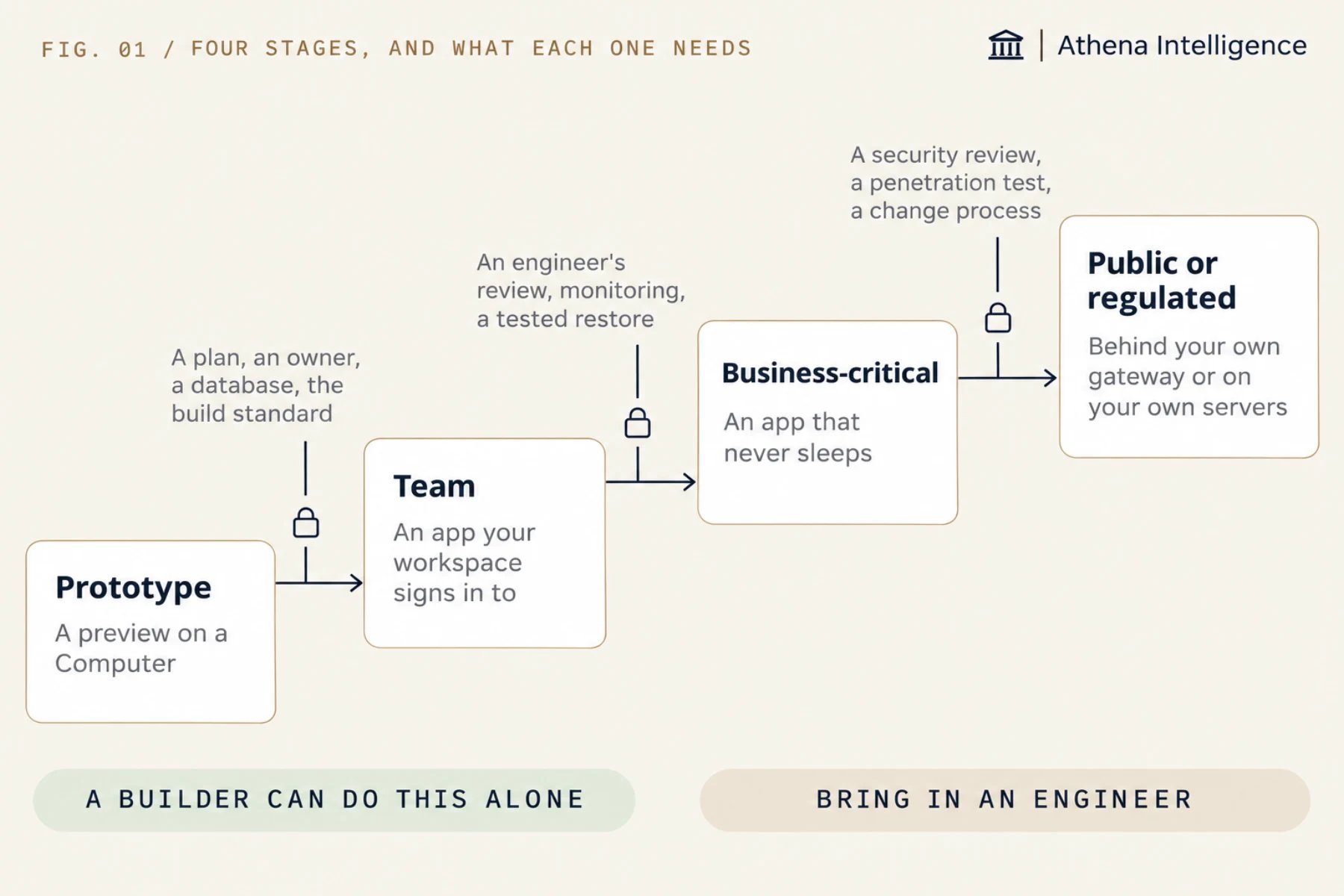
What are the ten steps to Team?
Athena can take your draft to Team and explain what it changed at each step. Ask it to work through this list:- Move business records from files or memory into database tables.
- Move every password and key out of the code and into Secrets.
- Athena writes the app’s settings file,
athena-application.toml. It records how to build and start the app, its port and its health check, so you never write it yourself. - Add a health check page that reads the database and reports that all is well.
- Run the build standard, ask for the report, and fix what it lists.
- Save a version so Athena packages the app without making it live, then open the preview and run your test cases.
- Publish the version. Athena builds it on a fresh machine, checks that it is healthy, and makes it live at your link.
- Share the app. By default, people in your workspace with access can open it.
- Set the sleep schedule. Keep the default of sleeping after 30 quiet minutes for occasional use, or turn sleep off if people keep the app open all day.
- Name an owner and a second person who can roll back to an earlier version.
What changes at the next stage?
For a Business-critical app, add the public-app protections from the build standard. Send monitoring data and alerts to your own tools, check the app from outside, practice a database restore, and require a reviewer in GitHub before each release. For a Public or regulated app, you can put your own gateway in front of your web address, with the app built to refuse requests that skip it, or run Athena in your own cloud account so data stays in your environment. Review Security and operations with your security team, and see deployment options.What should the one-page diagram show?
Athena can draft a one-page architecture diagram that shows reviewers how the app fits together. Ask Athena for “a one-page architecture of this app showing which Athena parts it uses” and check that it includes:- Who uses the app and how they sign in
- The Application, its link, and its current version
- The database, its main tables, and the login the app uses
- Each Automation and AOP (Agent Operating Procedure) the app uses, and what starts each one
- Every outside system the app reads from or writes to
- Secrets by name only, never their values
- The current stage, the owner, and who can roll back
What to plan for
- Use a database copy and a separate Application to rehearse with real data, because the version preview uses stand-in secrets.
- Plan database changes so the previous code version still works. Athena rolls back code versions, while database changes require manual rollback.
- Schedule releases for a quiet time if the app uses shared storage that keeps its files across releases, because the app stops briefly during those releases.
- Turn on Application hosting for your setup, as it is in open beta.
Questions teams ask
How long do the ten steps take?
How long do the ten steps take?
Athena carries out each step on request, and you do a quick check after each one. The total time depends on how much data the draft kept in files and how many keys were in the code.
Do we need separate test and live apps?
Do we need separate test and live apps?
Athena gives you a Computer to build on, a version preview to check each new release, and an Application to run the live app. Add a second Application only when you need a lasting test copy with its own data.
What about drafts that will not go live?
What about drafts that will not go live?
A stopped Computer keeps its files, so you can save the plan and what you learned and then stop the Computer.
Who decides the stage?
Who decides the stage?
The business owner decides with whoever handles risk at your company, using facts about users and data from the builder.
See it work
Thirty minutes, your workflow, and you leave with the work product.