> ## Documentation Index
> Fetch the complete documentation index at: https://resources.athenaintel.com/llms.txt
> Use this file to discover all available pages before exploring further.

# Review Acquisition Regulations with Athena

> Acquisition regulation review uploads files, asks about contracting and procurement roles, saves the question as a prompt, and reuses it on another file.

Athena facilitates the preservation and reuse of Chat instructions in the form of customizable and reusable prompts. Establish standardized processing criteria for acquisition regulations, and apply them across multiple documents without repetitive manual input.

By saving standard interactions as reusable prompts, Athena expedites repetitive document review to deliver consistent results in minutes instead of hours.

<Frame caption="Acquisition Regulation Analysis using Athena">
  <iframe width="560" height="315" src="https://www.youtube.com/embed/aBSNikWIi9Q" title="YouTube video player" frameborder="0" allow="accelerometer; autoplay; clipboard-write; encrypted-media; gyroscope; picture-in-picture" allowfullscreen />
</Frame>

## Step-by-step Instructions

<Steps>
  <Step title="Upload document">
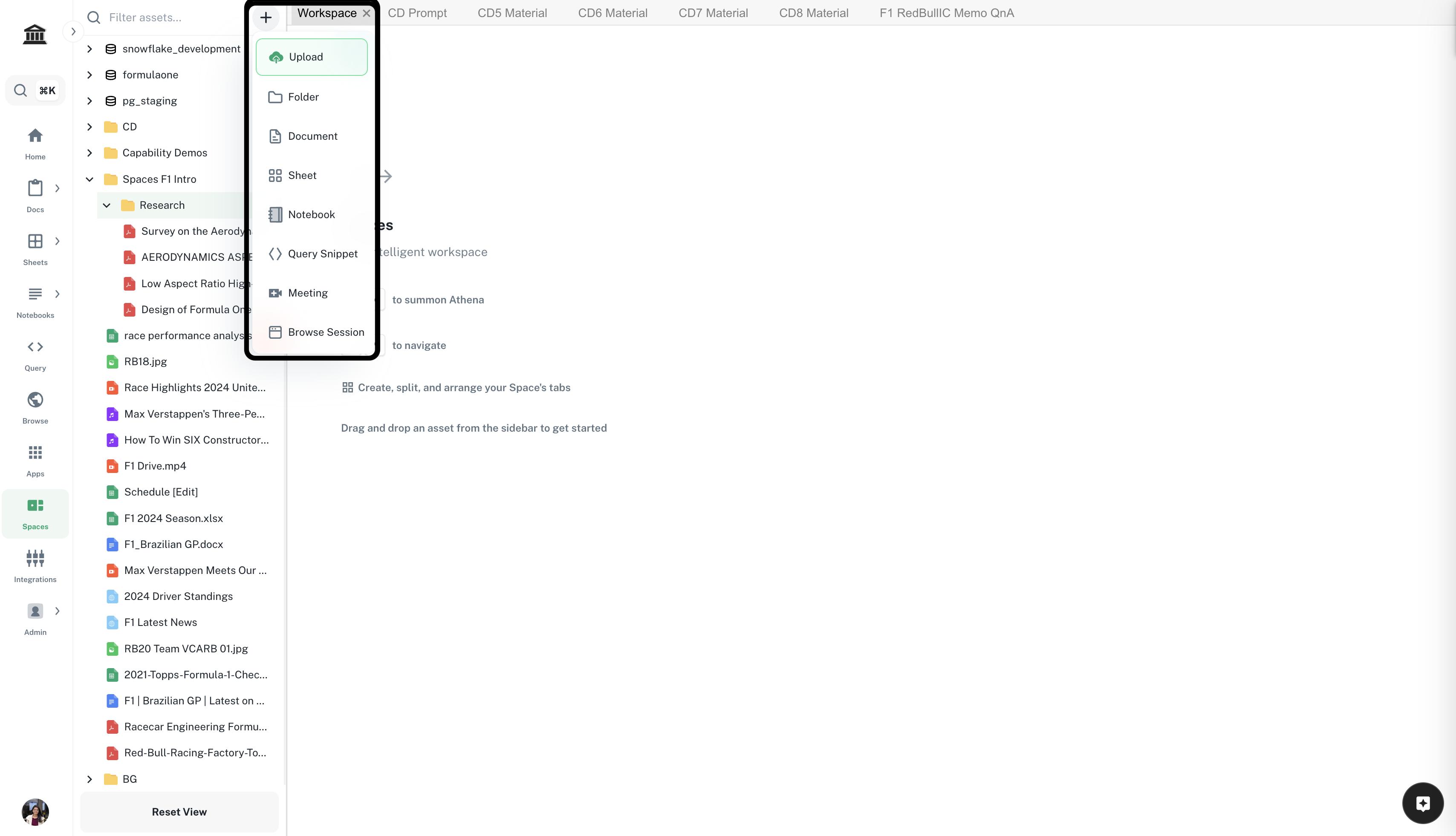
    Navigate to ***[Spaces](https://app.athenaintel.com/dashboard/workspaces/)***. Click on the **+** icon -> **Upload** on top of the left sidebar. Upload desired acquisition regulation.

    <Frame>
      <img src="https://mintcdn.com/athenaintelligence-e46bc9d3/Uv9JdE4EbB3zmCPu/images/financial-step1.png?fit=max&auto=format&n=Uv9JdE4EbB3zmCPu&q=85&s=e2dad4687c94b83c43f229ffb82b089a" width="3416" height="1962" data-path="images/financial-step1.png" />
    </Frame>
  </Step>

  <Step title="Enter your prompt">
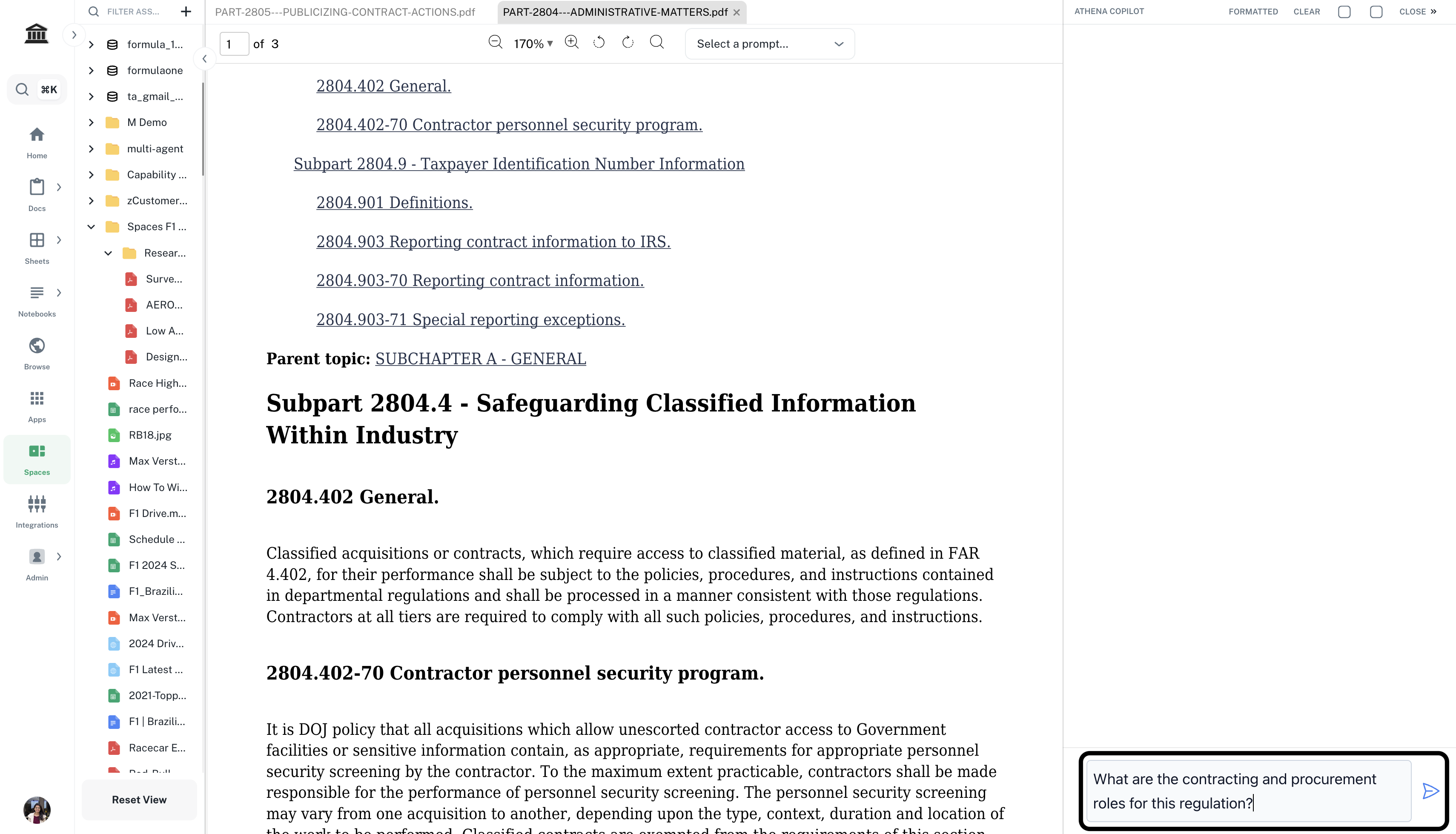
    Drag and drop the acquisition regulation onto your Space. In the right **Chat** sidebar, enter the following prompt and press **Enter**.

    <CodeBlock filename="Prompt">
      What are the contracting and procurement roles for this regulation?
    </CodeBlock>

    <Info>You can ask simple questions directly in Chat or use tools like **@In-Depth Analysis** and **@Read Every Page** based on the level of your analysis. Refer to [Chat](https://resources.athenaintel.com/docs/pillars/applications/chat#versatile-tools-and-agents) for exploring all the tools.</Info>

    <Frame>
      <img src="https://mintcdn.com/athenaintelligence-e46bc9d3/XOzR0DdNhB1vkjEH/images/regulation-step2.png?fit=max&auto=format&n=XOzR0DdNhB1vkjEH&q=85&s=0627362e8eca5ab705d61a775991af22" width="3420" height="1960" data-path="images/regulation-step2.png" />
    </Frame>
  </Step>

  <Step title="Save as a prompt">
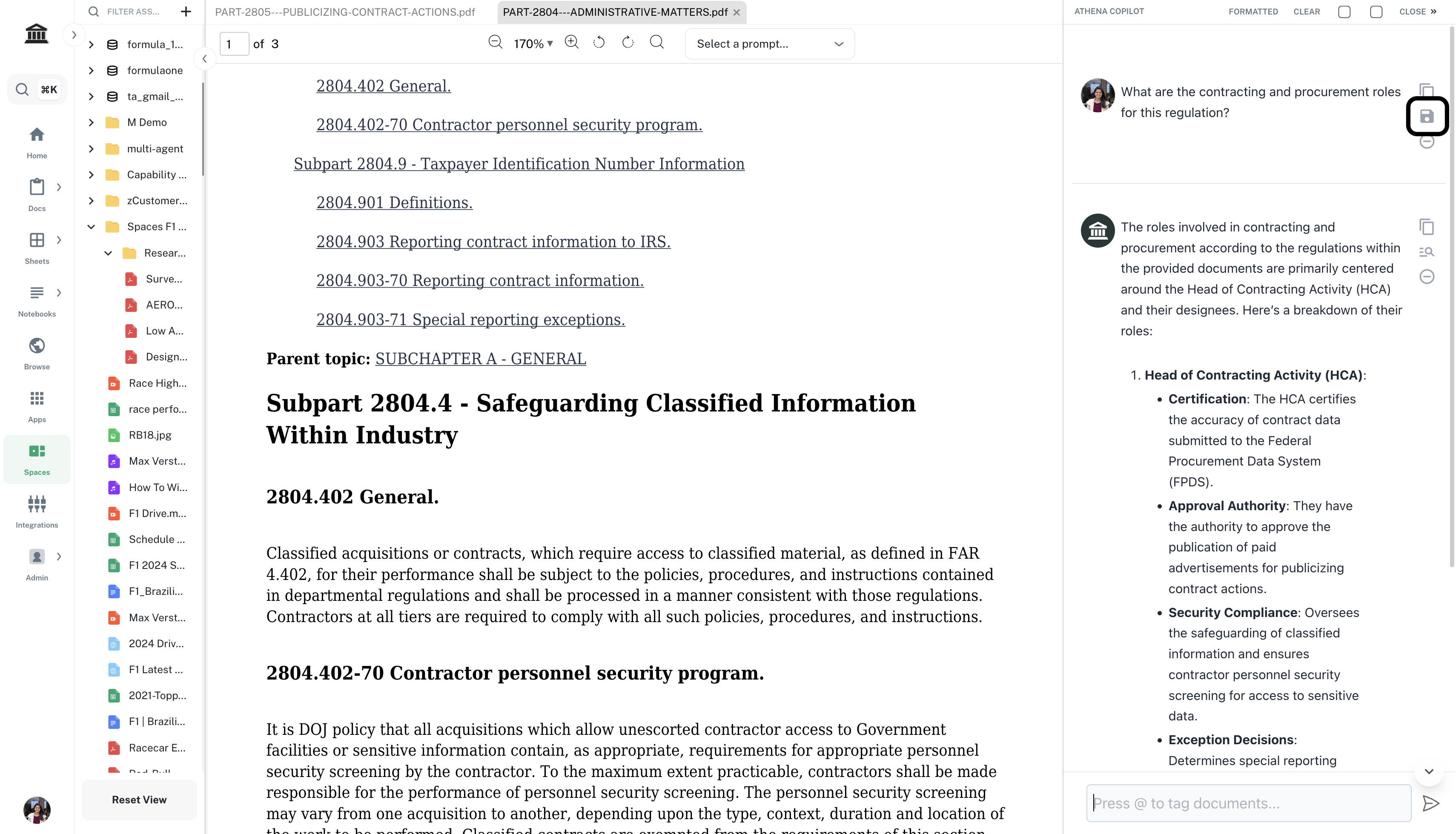
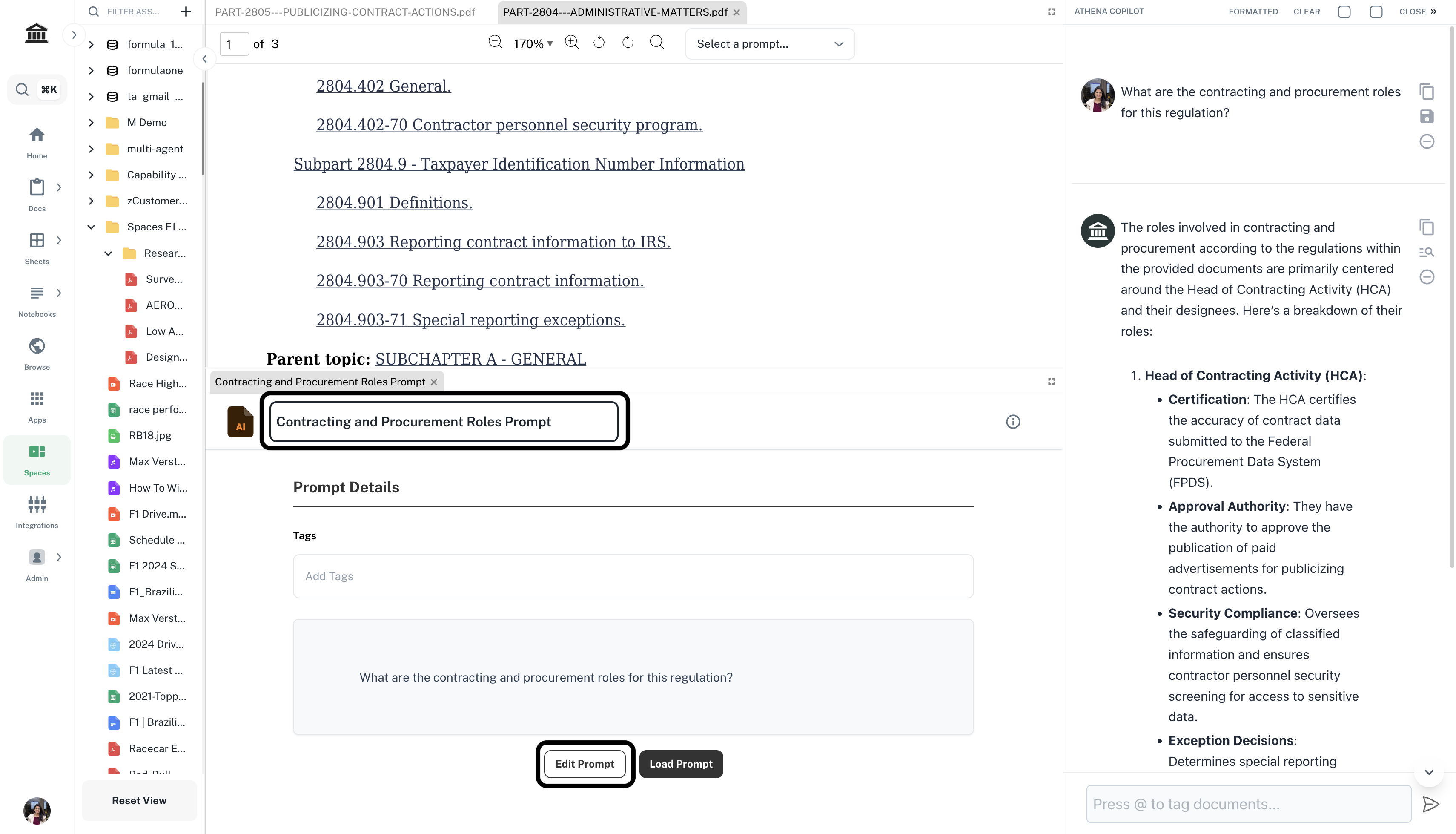
    In the right **Chat** sidebar, click on the save icon on top-right of your query. This will save the above question as a prompt and open it in your Space. You can edit and rename the prompt here.

    <Frame>
      <img src="https://mintcdn.com/athenaintelligence-e46bc9d3/XOzR0DdNhB1vkjEH/images/regulation-step3.1.png?fit=max&auto=format&n=XOzR0DdNhB1vkjEH&q=85&s=61620a3bf4f659b7e527d05a17ab5c81" width="3420" height="1960" data-path="images/regulation-step3.1.png" />
    </Frame>

    <Frame>
      <img src="https://mintcdn.com/athenaintelligence-e46bc9d3/XOzR0DdNhB1vkjEH/images/regulation-step3.2.png?fit=max&auto=format&n=XOzR0DdNhB1vkjEH&q=85&s=54c6d5c6cb8da60e3c555e149e1cfedd" width="3420" height="1958" data-path="images/regulation-step3.2.png" />
    </Frame>
  </Step>

  <Step title="Upload new document">
    Click on the **+** icon -> **Upload** on top of the left sidebar. Upload another acquisition regulation. Drag and drop it in your Space.

    <Frame>
      <img src="https://mintcdn.com/athenaintelligence-e46bc9d3/Uv9JdE4EbB3zmCPu/images/financial-step1.png?fit=max&auto=format&n=Uv9JdE4EbB3zmCPu&q=85&s=e2dad4687c94b83c43f229ffb82b089a" width="3416" height="1962" data-path="images/financial-step1.png" />
    </Frame>
  </Step>

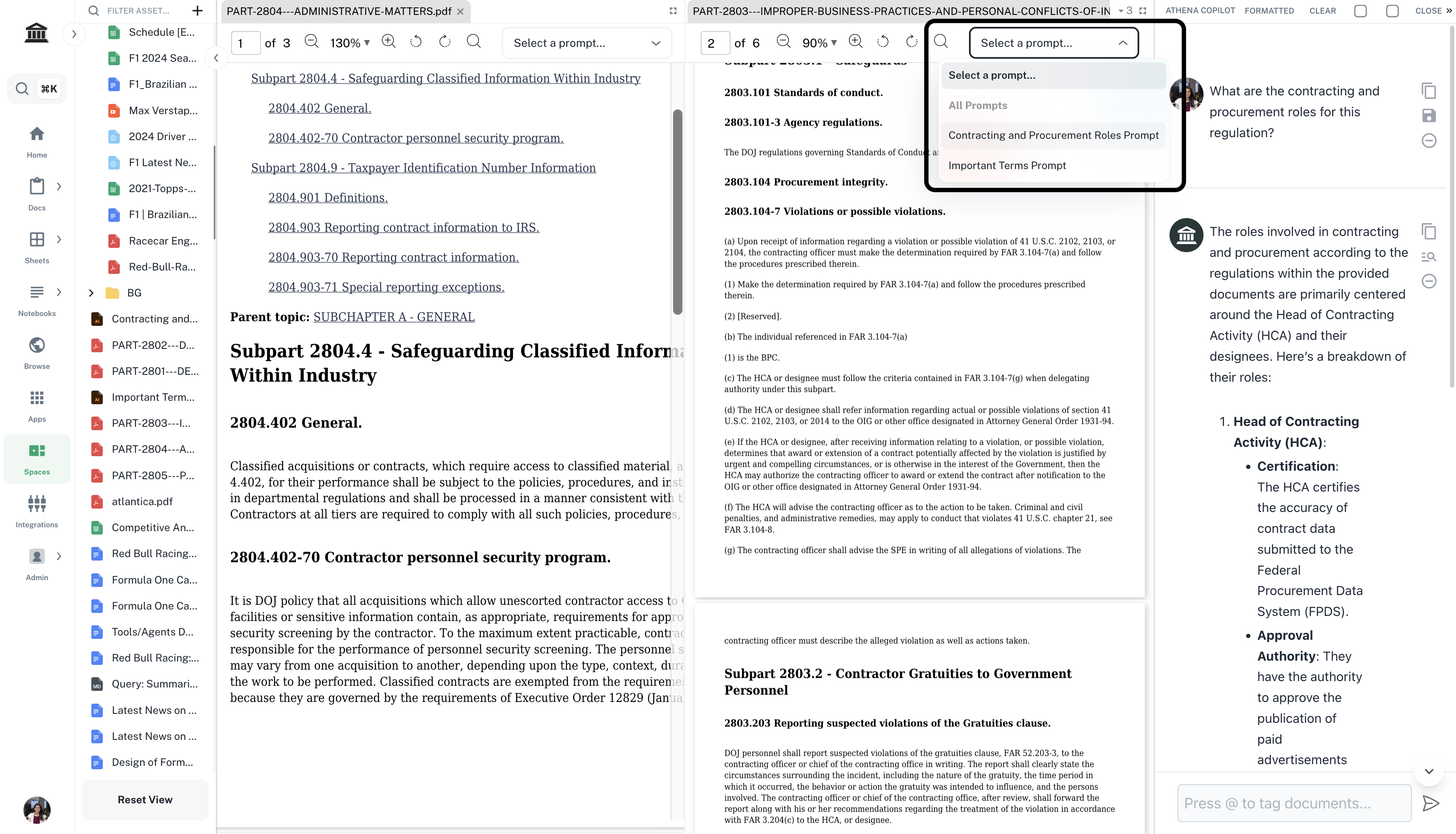
  <Step title="Select the prompt">
    From the **Select a prompt** dropdown on top the new document, select the prompt you just saved.

    <Frame>
      <img src="https://mintcdn.com/athenaintelligence-e46bc9d3/XOzR0DdNhB1vkjEH/images/regulation-step5.png?fit=max&auto=format&n=XOzR0DdNhB1vkjEH&q=85&s=c32d0322fcd1dcf504cc5837c960c809" width="3420" height="1958" data-path="images/regulation-step5.png" />
    </Frame>
  </Step>
</Steps>


This documentation is built and hosted on [Mintlify](https://mintlify.com), a developer documentation platform.