> ## Documentation Index
> Fetch the complete documentation index at: https://resources.athenaintel.com/llms.txt
> Use this file to discover all available pages before exploring further.

# Redact PDF Content with Athena's PDF Redactor

> PDF redaction covers uploading a PDF, choosing a custom prompt for names or figures, running the Redactor, and downloading the resulting redacted file.

Athena’s PDF Redactor eases information extraction and document security by providing swift and comprehensive PDF redaction in seconds. Eliminate the need for pulling out important data manually and focus on more strategic tasks.

Efficiently highlight key information about teams and drivers from the RedBull Annual Performance Report, allowing you to concentrate on performance improvement to get your P1 finish!

<Frame caption="PDF Redaction using Athena">
  <iframe width="560" height="315" src="https://www.youtube.com/embed/HQmttWd1tNk" title="YouTube video player" frameborder="0" allow="accelerometer; autoplay; clipboard-write; encrypted-media; gyroscope; picture-in-picture" allowfullscreen />
</Frame>

## Step-by-step Instructions

<Steps>
  <Step title="Open PDF Redactor">
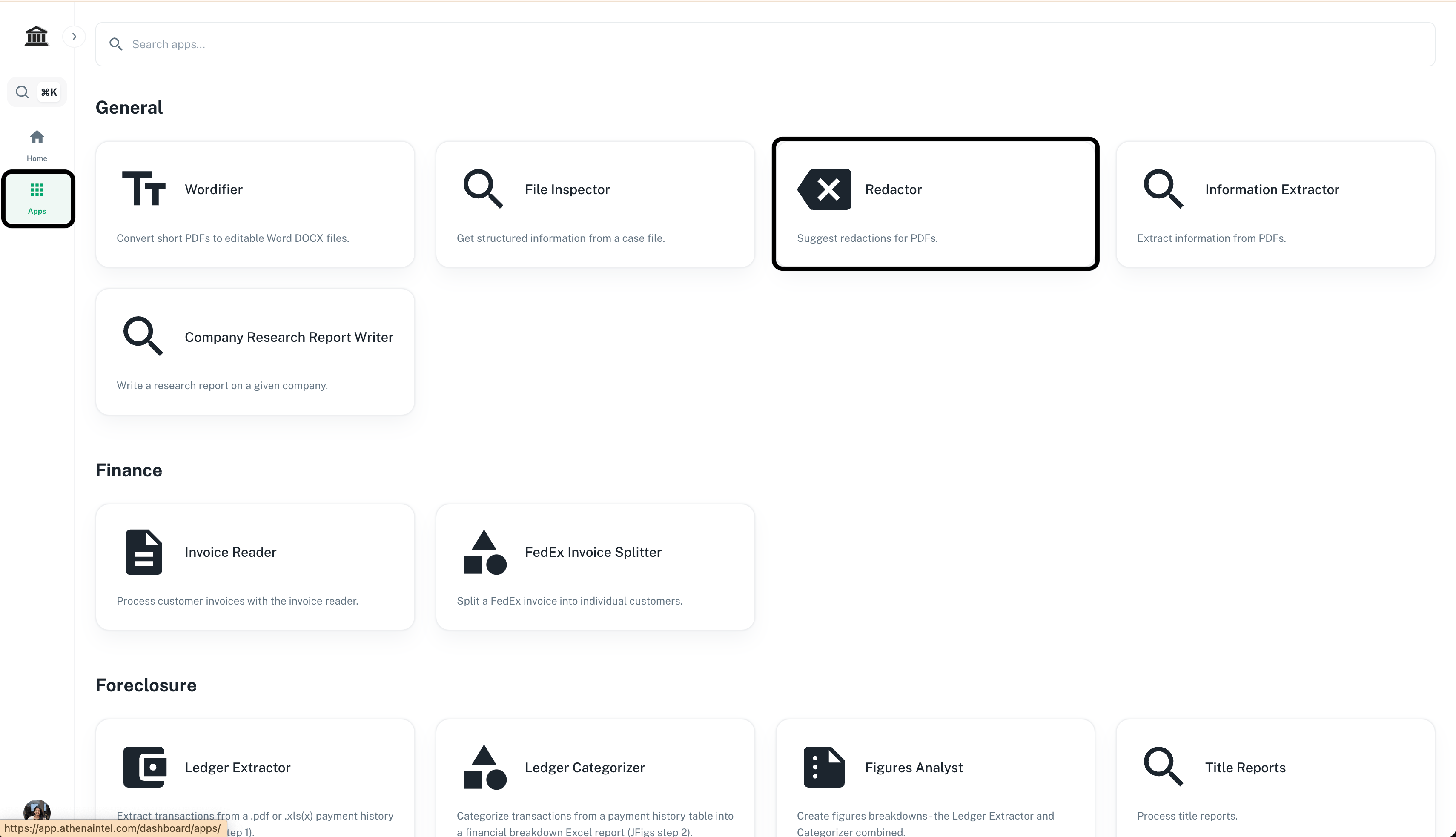
    Navigate to **Apps -> Redactor** from the applications sidebar on the left.

    <Frame>
      <img src="https://mintcdn.com/athenaintelligence-e46bc9d3/JOia5pER8hEU2s7U/images/contract-step1.png?fit=max&auto=format&n=JOia5pER8hEU2s7U&q=85&s=3c0d5cb6ccfceda4902bbe839d93d5e6" width="3420" height="1966" data-path="images/contract-step1.png" />
    </Frame>
  </Step>

  <Step title="Upload PDF">
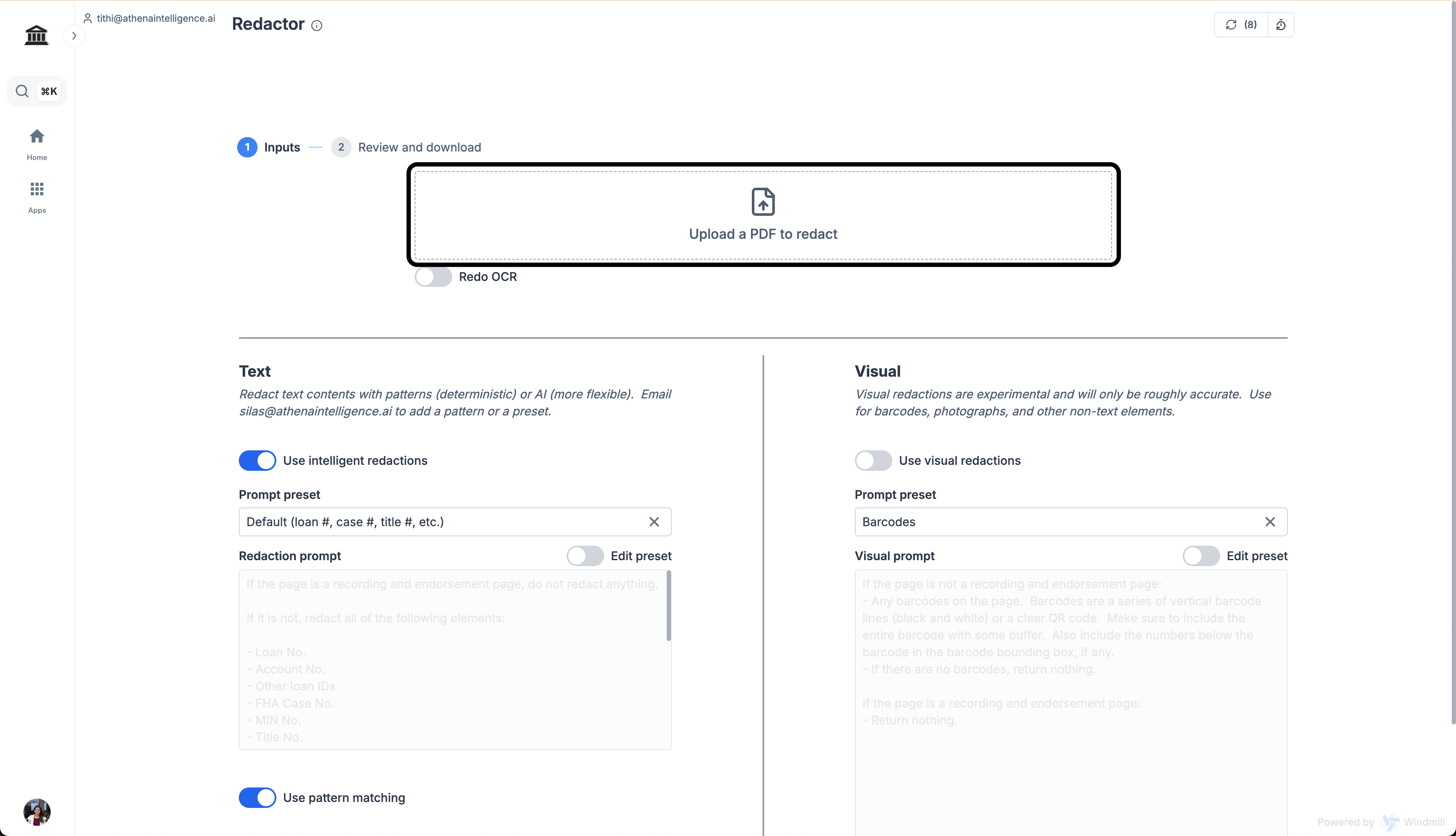
    Upload the PDF you wish to redact in **Upload a PDF to redact**.

    <Frame>
      <img src="https://mintcdn.com/athenaintelligence-e46bc9d3/JOia5pER8hEU2s7U/images/contract-step2.png?fit=max&auto=format&n=JOia5pER8hEU2s7U&q=85&s=b25425af150ef5d9a3cc516c0fbf937a" width="3420" height="1964" data-path="images/contract-step2.png" />
    </Frame>
  </Step>

  <Step title="Choose custom prompt">
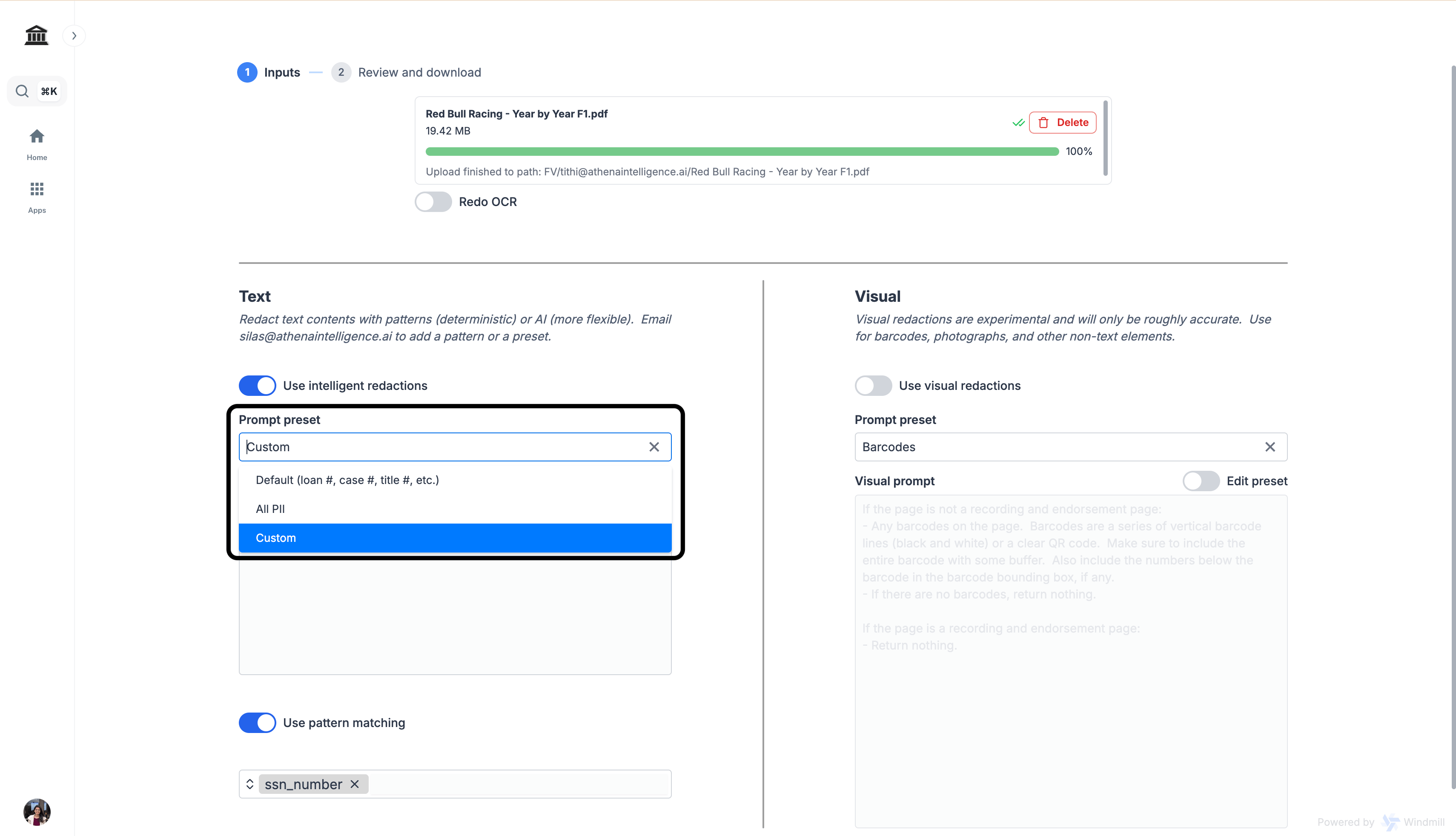
    From the **Prompt preset** dropdown, select **Custom**.

    <Frame>
      <img src="https://mintcdn.com/athenaintelligence-e46bc9d3/QJdvZ-zoMHrpUmMn/images/pdf-step3.png?fit=max&auto=format&n=QJdvZ-zoMHrpUmMn&q=85&s=3b579cfff5d0b2d7a205e3884b7adc04" width="3420" height="1964" data-path="images/pdf-step3.png" />
    </Frame>
  </Step>

  <Step title="Enter your prompt">
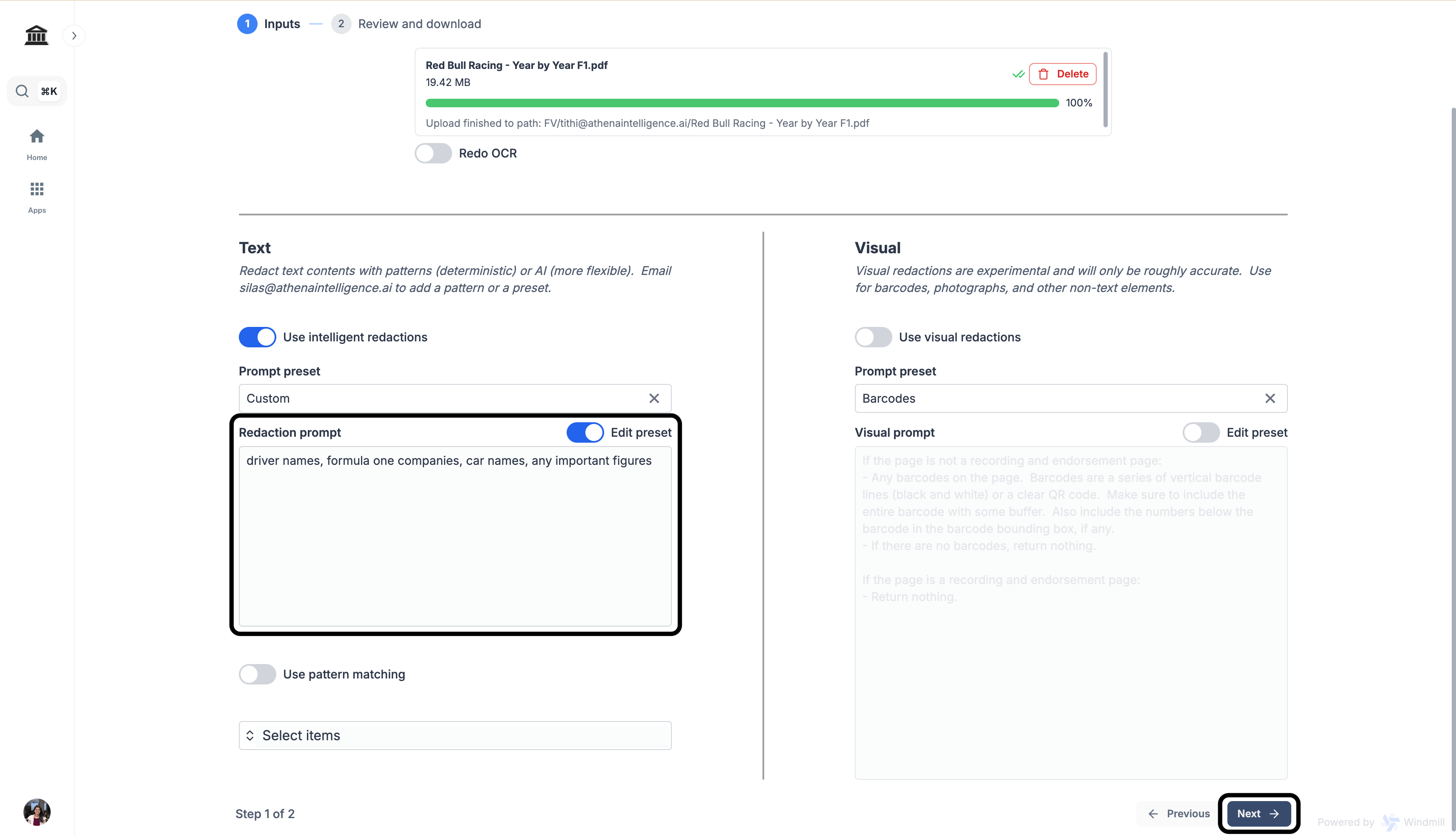
    In the **Redaction prompt**, enter the following prompt and click on **Next**.

    <CodeBlock filename="Prompt">
      driver names, formula one companies, car names, any important figures
    </CodeBlock>

    <Frame>
      <img src="https://mintcdn.com/athenaintelligence-e46bc9d3/QJdvZ-zoMHrpUmMn/images/pdf-step4.png?fit=max&auto=format&n=QJdvZ-zoMHrpUmMn&q=85&s=389df9c75bae085a68fa88fc3cbf730b" width="3420" height="1964" data-path="images/pdf-step4.png" />
    </Frame>
  </Step>

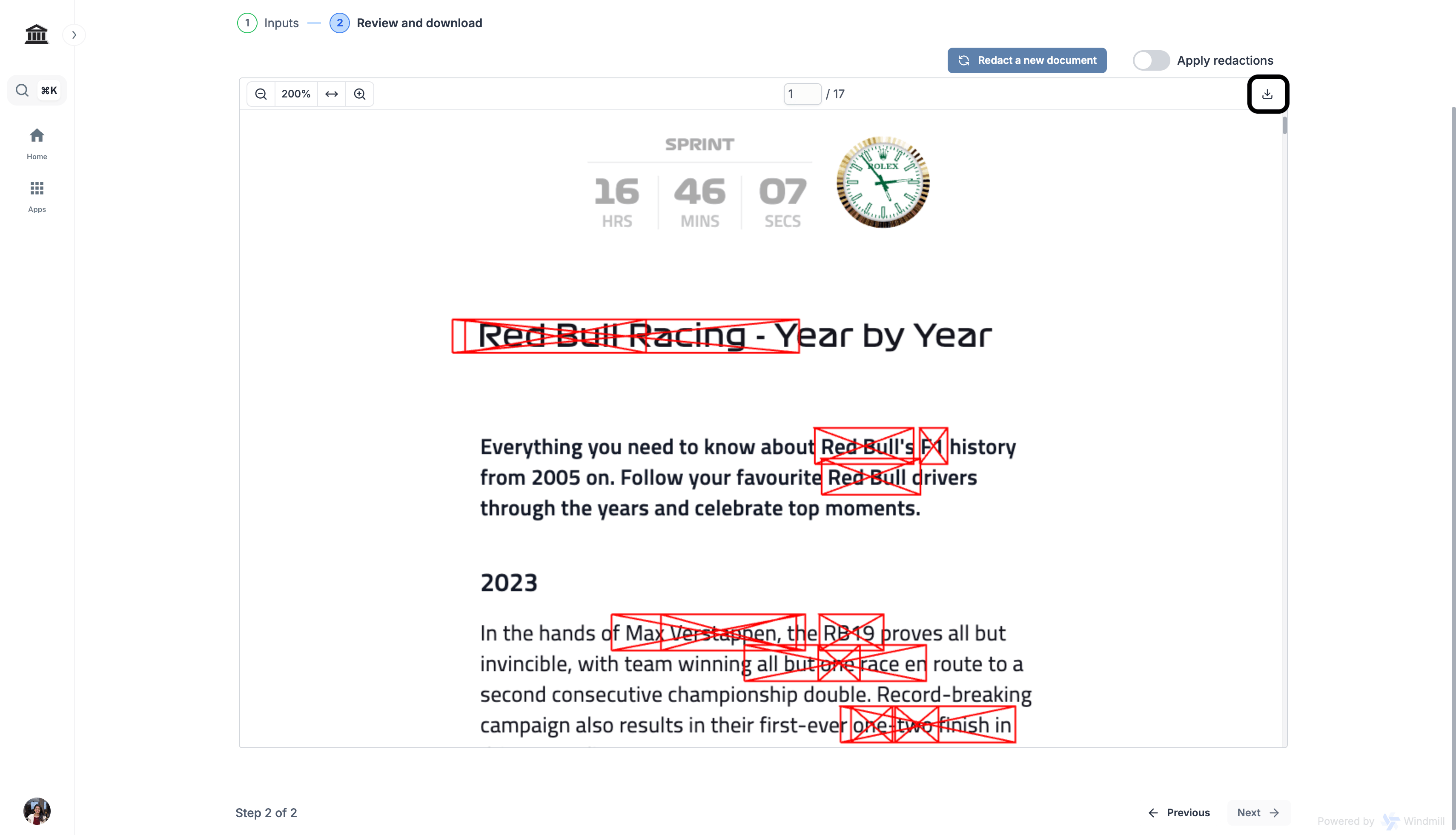
  <Step title="Download your redacted PDF">
    Once completed, click on the **Download** icon on the top-right corner of the PDF.

    <Frame>
      <img src="https://mintcdn.com/athenaintelligence-e46bc9d3/QJdvZ-zoMHrpUmMn/images/pdf-step5.png?fit=max&auto=format&n=QJdvZ-zoMHrpUmMn&q=85&s=536a879f48280232a202b2c206835ecc" width="3420" height="1962" data-path="images/pdf-step5.png" />
    </Frame>
  </Step>
</Steps>


This documentation is built and hosted on [Mintlify](https://mintlify.com), a developer documentation platform.