> ## Documentation Index
> Fetch the complete documentation index at: https://resources.athenaintel.com/llms.txt
> Use this file to discover all available pages before exploring further.
# Ontology, Object Explorer, and the Ontology Toolkit
> Model the entities your team works with as Object Types and Objects, browse and analyze them in Object Explorer, and let Athena query and update them with the Ontology toolkit.
The ontology is a curated, typed model of the things your workspace cares about — companies, business segments, vendors, stores, audit controls, matters. Instead of asking Athena to re-derive "our companies" from documents every time, you define each entity once and Athena (and your team) can search, aggregate, link, and update it consistently.
The ontology is enabled per workspace. If you don't see **Object Explorer** in the left navigation or the **Ontology** toolkit in the Tools menu, ask your Athena admin to enable it for your workspace.
## Core concepts
| Concept | What it is | Example |
| - | - | - |
| **Object Type** | A schema asset that defines a kind of entity: its name, properties, and link roles. Types start as a **draft** and become usable once **published**. | `Business Segment` with `segmentName`, `revenue`, `fiscalYear`, `segmentKind` |
| **Object** | One instance of an Object Type, stored as an asset with typed property values. | `Apple — iPhone` (`revenue: 201183`, `segmentKind: product`) |
| **Property** | A typed field on an Object Type. Supported types: `string`, `number`, `integer`, `boolean`, `date`, `datetime`, `enum`, `user`, `asset_ref`, `url`, `metric_ref`. | `revenue` (`number`) |
| **Link role** | A named, directional relationship from one Object Type to another. | Public Company **has segment** → Business Segment |
| **Rollup** | A property computed by the platform from linked objects (`count`, `sum`, `avg`, `min`, `max`, optionally filtered). Rollups are read-only. | Public Company `totalRevenue` = sum of linked segment `revenue` |
Use the ontology for curated, business-meaningful entities that people and agents edit and reason about. Keep raw, high-volume data (transaction tables, event logs) in a database, catalog, or semantic model and reference it from objects where needed.
### Validation status
Every object carries a validation status computed against its type's schema: **Valid**, **Needs attention** (a value fails the schema, e.g. a missing required property or a wrong type), or **Unverified**. You can filter and group by validation status in Object Explorer and with the toolkit.
## Enterprise use cases
The ontology fits best where a team keeps a few hundred to a few thousand important entities, links them to each other, and asks the same questions about them again and again. Each pattern below lists the Object Types, link roles and rollups to start with, and a prompt to try once the data is in place. Rename the types and properties to match your organization.
### Third-party and vendor risk (Procurement, Risk, InfoSec)
**Types:** `Vendor` (`tier` enum, `annualSpend` number, `owner` user, `renewalDate` date) · `Contract` (`contractValue`, `endDate`, `contractFile` asset\_ref) · `Risk Finding` (`severity` enum, `status` enum, `dueDate`)
**Links:** Vendor **has contract** → Contract · Vendor **has finding** → Risk Finding
**Rollups on Vendor:** total contract value (`sum` of `contractValue`), open high-severity findings (`count` filtered to `severity = high` and `status ≠ closed`)
> **Try:** "Which tier-1 vendors have annual spend over \$1M and at least one open high-severity finding? Sort by spend and include each vendor's owner and next renewal date."
### SOX and internal controls (Internal Audit, Finance)
**Types:** `Business Process` (`processOwner` user) · `Control` (`controlId`, `frequency` enum, `keyControl` boolean) · `Control Test` (`period`, `result` enum, `evidence` asset\_ref) · `Issue` (`severity`, `status`, `remediationDate`)
**Links:** Process **has control** → Control · Control **has test** → Control Test · Control **has issue** → Issue
**Rollups on Control:** failed tests (`count` filtered to `result = fail`), open issues (`count` filtered to `status ≠ closed`)
> **Try:** "For this quarter, list key controls with a failed test or an open issue, grouped by business process. For each one, show the owner and the remediation date."
### Supplier and supply-chain resilience (Operations, Sourcing)
**Types:** `Supplier` (`country`, `riskRating` enum) · `Facility` (`region`, `capacityUnits` number) · `Part` (`partNumber`, `criticality` enum, `annualVolume` number)
**Links:** Supplier **operates** → Facility · Part **sourced from** → Supplier
**Rollups on Part:** number of qualified suppliers (`count` of linked suppliers). **On Supplier:** number of critical parts it supplies (inbound `count` filtered to `criticality = critical`)
> **Try:** "Which critical parts have only one supplier? For each, show the supplier's country and risk rating, and total the annual volume exposed in each region."
### Contract and obligation management (Legal)
**Types:** `Counterparty` · `Agreement` (`agreementType` enum, `governingLaw`, `expirationDate`, `autoRenews` boolean, `document` asset\_ref) · `Obligation` (`obligationType` enum, `dueDate`, `responsible` user, `status`)
**Links:** Counterparty **party to** → Agreement · Agreement **creates** → Obligation
**Rollups on Agreement:** open obligations (`count` filtered to `status ≠ complete`)
> **Try:** "List agreements that auto-renew in the next 90 days and still have open obligations. Group them by counterparty and name the person responsible for each obligation."
### Application portfolio rationalization (IT, Enterprise Architecture)
**Types:** `Application` (`lifecycle` enum, `annualCost` number, `users` integer, `businessOwner` user) · `Business Capability` · `Technology Vendor`
**Links:** Application **supports** → Business Capability · Application **provided by** → Technology Vendor
**Rollups on Business Capability:** application count, total annual cost (`sum` of `annualCost`). **On Technology Vendor:** total spend
> **Try:** "Which business capabilities are served by three or more applications? For each one, show the total annual cost and the applications in the retire or tolerate lifecycle."
### Competitive and market intelligence (Strategy, Corporate Development)
**Types:** `Public Company` (`ticker`, `sector`, `headquarters`) · `Business Segment` (`revenue`, `fiscalYear`, `segmentKind`) · `Product` (`category`, `launchDate`)
**Links:** Company **has segment** → Business Segment · Segment **includes** → Product
**Rollups on Public Company:** segment count, total revenue, largest segment (the sample ontology on this page)
> **Try:** "Compare the services share of revenue for each company we track, and flag any company that earns more than 75% of its revenue from a single segment."
Start with one or two types and the links between them, import a few rows from an existing spreadsheet with **Import CSV**, and add rollups once the questions you ask repeatedly are clear. Owners set as `user` properties and documents attached as `asset_ref` properties make the answers actionable.
## Object Explorer
Open **Object Explorer** from the left navigation (the network icon). The left rail lists every published Object Type with its object count, any saved views, and draft types. Select a type to see its objects as a table.
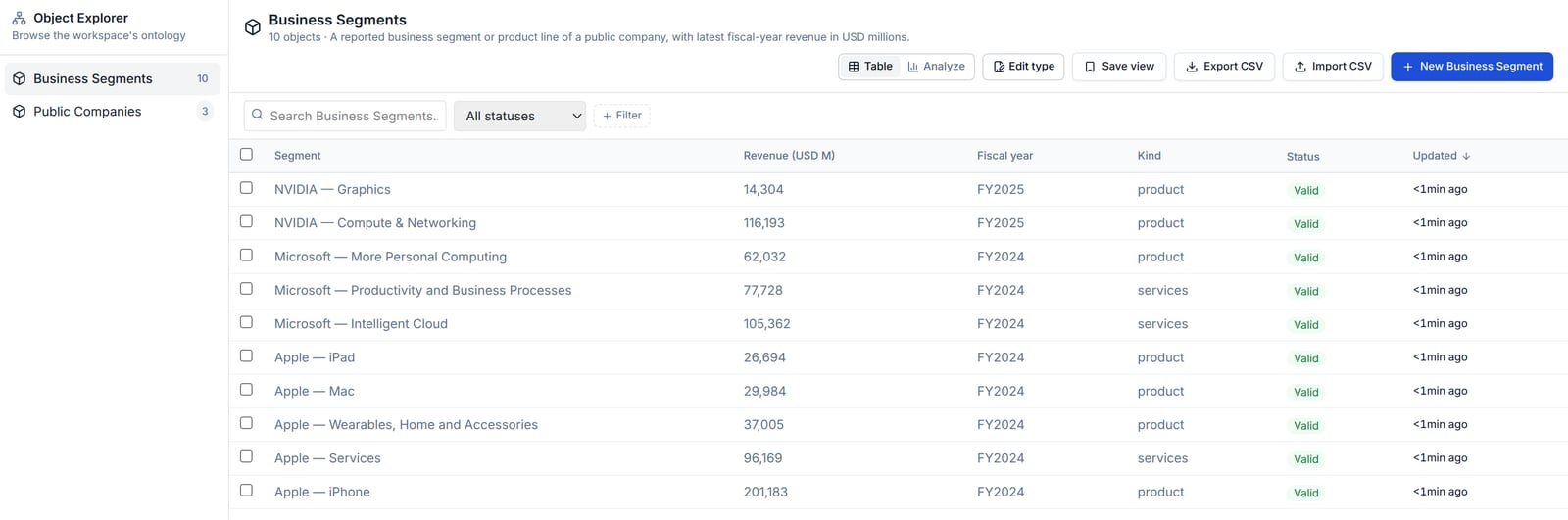 From the table you can:
* **Search** objects by title and **filter** by validation status or by property (`equals`, `not equals`, `in`, `greater/less than`, `contains`, `exists`).
* **Sort** by title, property columns, or **Updated**, and page through results.
* **Create** objects with **New \**, or bulk-load them with **Import CSV** (download the template bundle to get the exact columns).
* **Export CSV** of the current filtered view.
* **Save view** to store the current filters as a reusable, shareable view that appears under *Saved views* in the rail.
* **Edit type** to open the type designer and change properties, link roles, and rollups.
* Select rows to archive objects in bulk.
### Linked objects and rollups
Columns marked with **Σ** are rollups computed from linked objects. In this example each company's *Segments*, *Total revenue*, and *Largest segment* are derived from the business segments linked through the **has segment** role — nobody types them in, and they stay current as segments change.
From the table you can:
* **Search** objects by title and **filter** by validation status or by property (`equals`, `not equals`, `in`, `greater/less than`, `contains`, `exists`).
* **Sort** by title, property columns, or **Updated**, and page through results.
* **Create** objects with **New \**, or bulk-load them with **Import CSV** (download the template bundle to get the exact columns).
* **Export CSV** of the current filtered view.
* **Save view** to store the current filters as a reusable, shareable view that appears under *Saved views* in the rail.
* **Edit type** to open the type designer and change properties, link roles, and rollups.
* Select rows to archive objects in bulk.
### Linked objects and rollups
Columns marked with **Σ** are rollups computed from linked objects. In this example each company's *Segments*, *Total revenue*, and *Largest segment* are derived from the business segments linked through the **has segment** role — nobody types them in, and they stay current as segments change.
 When a type has link roles, use **Pivot…** to jump from the current set of objects to the objects they link to (for example, from a filtered set of companies to all of their business segments).
### Analyze
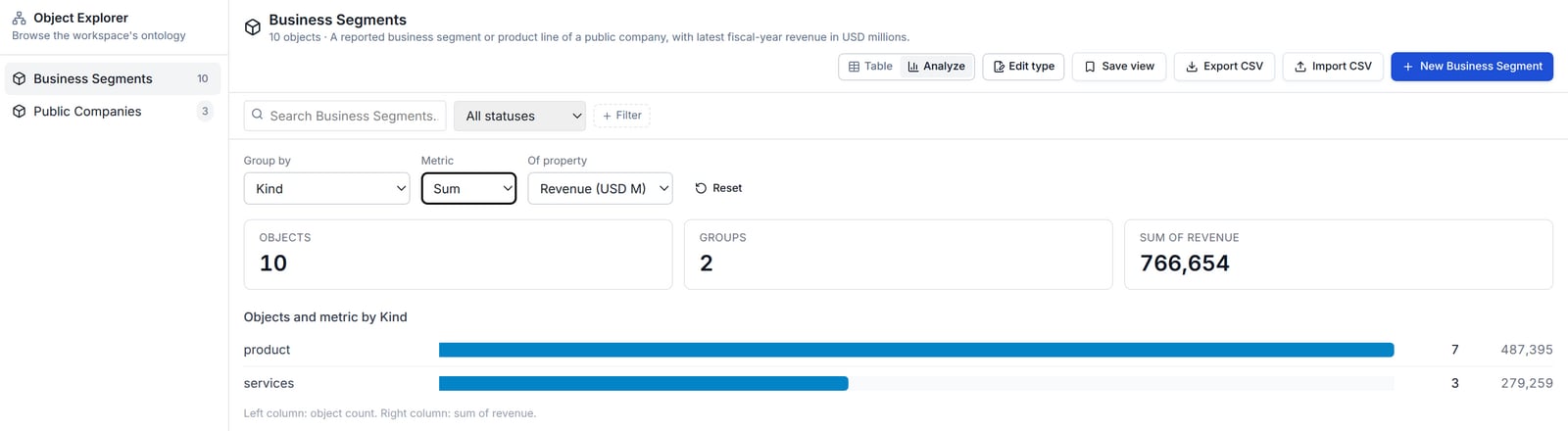
Switch to **Analyze** to aggregate the current filtered set without writing a query. Pick a **Group by** property (or *Validation status* / *Object type*), a **Metric** (`Count`, `Sum`, `Average`, `Minimum`, `Maximum`) and, for numeric metrics, the property to aggregate. Click a bar to filter the table to that group, except when grouping by *Object type*: select the type in the left rail instead.
When a type has link roles, use **Pivot…** to jump from the current set of objects to the objects they link to (for example, from a filtered set of companies to all of their business segments).
### Analyze
Switch to **Analyze** to aggregate the current filtered set without writing a query. Pick a **Group by** property (or *Validation status* / *Object type*), a **Metric** (`Count`, `Sum`, `Average`, `Minimum`, `Maximum`) and, for numeric metrics, the property to aggregate. Click a bar to filter the table to that group, except when grouping by *Object type*: select the type in the left rail instead.
 ## The Ontology toolkit
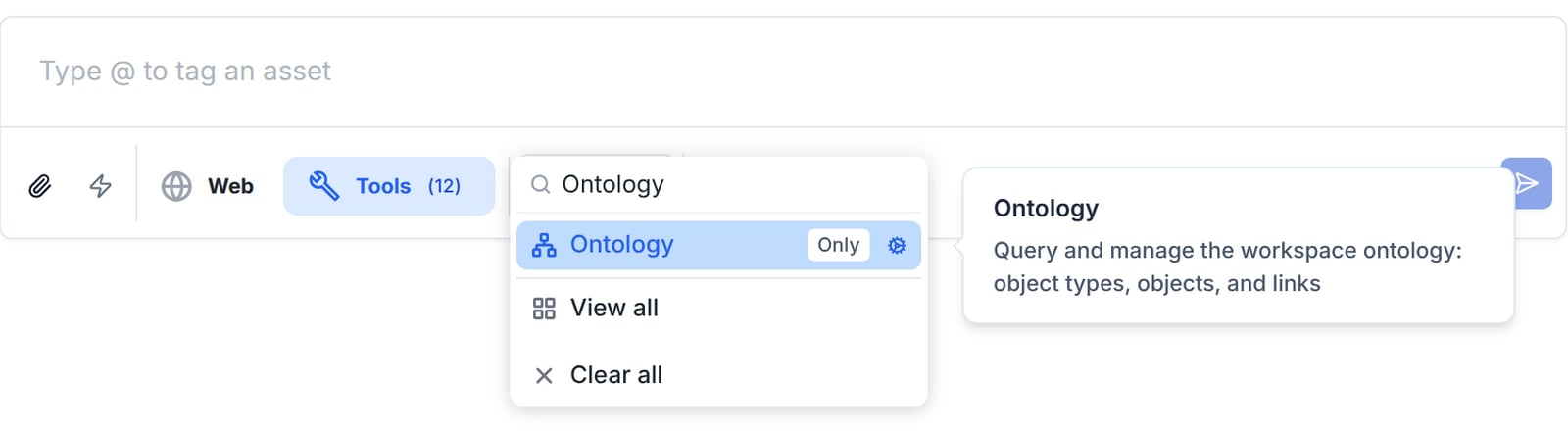
The **Ontology** toolkit (`ontology_toolkit`) gives Athena direct, typed access to the same data you see in Object Explorer. Turn it on for a session from **Tools** in the composer — search for "Ontology" and select it — or @-mention it in your message.
## The Ontology toolkit
The **Ontology** toolkit (`ontology_toolkit`) gives Athena direct, typed access to the same data you see in Object Explorer. Turn it on for a session from **Tools** in the composer — search for "Ontology" and select it — or @-mention it in your message.
 ### Tools in the toolkit
| Tool | What it does |
| - | - |
| **List Object Types** | Lists Object Types with their properties, link roles, and object counts. Athena usually calls this first to learn the schema. |
| **Search Objects** | Finds objects of a type using property filters, title search, validation status, `updated_since`, sorting, pagination, and filters on linked objects (`linked_from`). |
| **Aggregate Objects** | Groups objects by a property and computes `count`, `sum`, `avg`, `min`, or `max`. Accepts property filters, title search, validation status, and linked-object filters, but not `updated_since`. |
| **Get Object Links** | Returns an object's inbound and outbound links. |
| **Create Object Type** / **Update Object Type** | Drafts a new type or edits an existing one, and can publish it. |
| **Create Object** / **Create Objects (Batch)** | Creates one object or many objects of a type. |
| **Update Object** | Changes property values or notes on an object. |
| **Archive Object** | Archives an object, optionally removing its links. |
| **Link Objects** / **Unlink Objects** | Adds or removes a link between two objects for a given link role. |
Write tools follow your workspace's tool approval settings, so Athena may ask you to approve a create, update, link, or archive before it runs. Rollup properties are computed by the platform and cannot be written directly.
Workspaces with governed ontology workflows may also expose the **Ontology Actions** toolkit, which applies predefined, logged, reversible actions to objects. It is admin-managed and not required for the examples on this page.
### Example: aggregate and look up objects
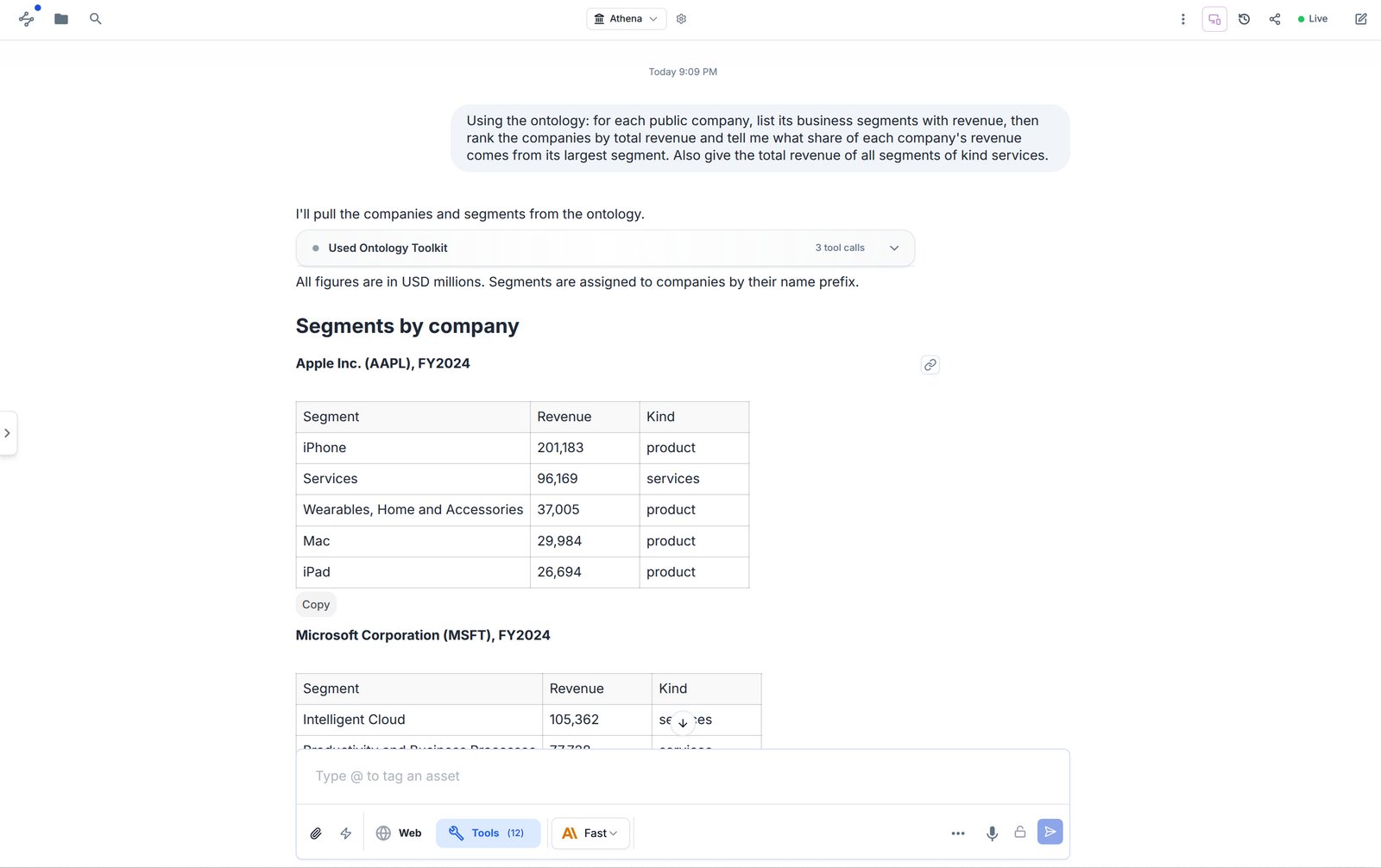
The following prompt was run on the sample ontology shown above (three public companies and their FY2024/FY2025 reported segments, in USD millions) with only the Ontology toolkit enabled:
```text theme={null}
Using the ontology: for each public company, list its business segments with revenue,
then rank the companies by total revenue and tell me what share of each company's
revenue comes from its largest segment. Also give the total revenue of all segments
of kind services.
```
Athena made three tool calls — **Search Objects** on Public Companies, **Search Objects** on Business Segments, and **Aggregate Objects** on segments grouped by `segmentKind` — and returned a per-company segment breakdown plus:
| Rank | Company | Total revenue | Largest segment | Share of total |
| - | - | - | - | - |
| 1 | Apple Inc. | 391,035 | iPhone, 201,183 | 51.4% |
| 2 | Microsoft Corporation | 245,122 | Intelligent Cloud, 105,362 | 43.0% |
| 3 | NVIDIA Corporation | 130,497 | Compute & Networking, 116,193 | 89.0% |
Services segments total **279,259** across three segments (Apple Services, Microsoft Intelligent Cloud, Microsoft Productivity and Business Processes); the other seven product segments total 487,395. These match the rollup columns and the Analyze view above.
### Tools in the toolkit
| Tool | What it does |
| - | - |
| **List Object Types** | Lists Object Types with their properties, link roles, and object counts. Athena usually calls this first to learn the schema. |
| **Search Objects** | Finds objects of a type using property filters, title search, validation status, `updated_since`, sorting, pagination, and filters on linked objects (`linked_from`). |
| **Aggregate Objects** | Groups objects by a property and computes `count`, `sum`, `avg`, `min`, or `max`. Accepts property filters, title search, validation status, and linked-object filters, but not `updated_since`. |
| **Get Object Links** | Returns an object's inbound and outbound links. |
| **Create Object Type** / **Update Object Type** | Drafts a new type or edits an existing one, and can publish it. |
| **Create Object** / **Create Objects (Batch)** | Creates one object or many objects of a type. |
| **Update Object** | Changes property values or notes on an object. |
| **Archive Object** | Archives an object, optionally removing its links. |
| **Link Objects** / **Unlink Objects** | Adds or removes a link between two objects for a given link role. |
Write tools follow your workspace's tool approval settings, so Athena may ask you to approve a create, update, link, or archive before it runs. Rollup properties are computed by the platform and cannot be written directly.
Workspaces with governed ontology workflows may also expose the **Ontology Actions** toolkit, which applies predefined, logged, reversible actions to objects. It is admin-managed and not required for the examples on this page.
### Example: aggregate and look up objects
The following prompt was run on the sample ontology shown above (three public companies and their FY2024/FY2025 reported segments, in USD millions) with only the Ontology toolkit enabled:
```text theme={null}
Using the ontology: for each public company, list its business segments with revenue,
then rank the companies by total revenue and tell me what share of each company's
revenue comes from its largest segment. Also give the total revenue of all segments
of kind services.
```
Athena made three tool calls — **Search Objects** on Public Companies, **Search Objects** on Business Segments, and **Aggregate Objects** on segments grouped by `segmentKind` — and returned a per-company segment breakdown plus:
| Rank | Company | Total revenue | Largest segment | Share of total |
| - | - | - | - | - |
| 1 | Apple Inc. | 391,035 | iPhone, 201,183 | 51.4% |
| 2 | Microsoft Corporation | 245,122 | Intelligent Cloud, 105,362 | 43.0% |
| 3 | NVIDIA Corporation | 130,497 | Compute & Networking, 116,193 | 89.0% |
Services segments total **279,259** across three segments (Apple Services, Microsoft Intelligent Cloud, Microsoft Productivity and Business Processes); the other seven product segments total 487,395. These match the rollup columns and the Analyze view above.
 ### More prompts to try
Replace the type and property names with the ones in your workspace — Athena reads the schema with **List Object Types** first, so plain-language names work.
**Explore the schema**
```text theme={null}
What object types are in our ontology? For each, list its properties and link roles.
```
**Filter and sort**
```text theme={null}
Show the Business Segments of kind "services", sorted by revenue descending.
```
**Filter through links**
```text theme={null}
Find all Business Segments linked to a Public Company in the Semiconductors sector.
```
**Data quality**
```text theme={null}
How many objects of each type need attention? Show me the ones that are failing validation and why.
```
**Recent changes**
```text theme={null}
Which Vendor objects were updated in the last 7 days?
```
**Create and link**
```text theme={null}
Create a Business Segment "Microsoft — Gaming" with revenue 21503, fiscal year FY2024
and kind product, then link it to Microsoft Corporation with the "has segment" role.
```
**Extract from documents**
```text theme={null}
Read the attached vendor contracts and create a Vendor object for each one, filling in
the vendor name, contract value and renewal date. Show me the list before creating them.
```
**Design a new type**
```text theme={null}
Draft an Object Type called "Earnings Report" with properties company (link to Public Company),
report date (date), fiscal quarter (string), EPS (number) and guidance (enum: raised,
maintained, lowered). Don't publish it yet.
```
### What the tools accept
Athena builds these inputs for you, but knowing the shape helps when you want precise results or are writing automations.
**Property filters** are a list of `{ key, op, value }` entries combined with AND. Supported `op` values: `eq`, `neq`, `in`, `gt`, `gte`, `lt`, `lte`, `contains`, `exists`.
```json theme={null}
{
"object_type_id": "",
"property_filters": [
{ "key": "segmentKind", "op": "eq", "value": "services" },
{ "key": "revenue", "op": "gte", "value": 50000 }
],
"sort_by": "revenue",
"sort_ascending": false,
"limit": 25
}
```
**Linked filters** (`linked_from`) restrict results to objects linked to objects that match another filter — for example, segments whose company is in the Semiconductors sector:
```json theme={null}
{
"object_type_id": "",
"linked_from": {
"objectTypeId": "",
"roleKey": "hasSegment",
"direction": "inbound",
"propertyFilters": [{ "key": "sector", "op": "eq", "value": "Semiconductors" }]
}
}
```
**Aggregations** take a `group_by` property and a list of `metrics`:
```json theme={null}
{
"object_type_id": "",
"group_by": { "key": "segmentKind" },
"metrics": [{ "op": "count" }, { "op": "sum", "key": "revenue" }]
}
```
## Tips
* **Name properties for people.** Display names like "Total revenue (USD M)" are what Athena and your team see; keys like `totalRevenue` are what filters use.
* **Prefer links over copied fields.** Link a segment to its company instead of typing the company name on every segment, then add rollups on the company.
* **Ask for a preview before bulk writes.** "Show me what you'll create before creating it" keeps batch imports reviewable.
* **Save the views you use often.** Saved views keep filters (including filters on rollups) and re-evaluate every time they open.
## Related
* [Tools](/docs/pillars/contextual-knowledge/tools) — turning toolkits on and off for a session
* [Asset Organization](/docs/pillars/contextual-knowledge/asset-organization) — where Object Types and Objects live alongside your other assets
This documentation is built and hosted on [Mintlify](https://mintlify.com), a developer documentation platform.
### More prompts to try
Replace the type and property names with the ones in your workspace — Athena reads the schema with **List Object Types** first, so plain-language names work.
**Explore the schema**
```text theme={null}
What object types are in our ontology? For each, list its properties and link roles.
```
**Filter and sort**
```text theme={null}
Show the Business Segments of kind "services", sorted by revenue descending.
```
**Filter through links**
```text theme={null}
Find all Business Segments linked to a Public Company in the Semiconductors sector.
```
**Data quality**
```text theme={null}
How many objects of each type need attention? Show me the ones that are failing validation and why.
```
**Recent changes**
```text theme={null}
Which Vendor objects were updated in the last 7 days?
```
**Create and link**
```text theme={null}
Create a Business Segment "Microsoft — Gaming" with revenue 21503, fiscal year FY2024
and kind product, then link it to Microsoft Corporation with the "has segment" role.
```
**Extract from documents**
```text theme={null}
Read the attached vendor contracts and create a Vendor object for each one, filling in
the vendor name, contract value and renewal date. Show me the list before creating them.
```
**Design a new type**
```text theme={null}
Draft an Object Type called "Earnings Report" with properties company (link to Public Company),
report date (date), fiscal quarter (string), EPS (number) and guidance (enum: raised,
maintained, lowered). Don't publish it yet.
```
### What the tools accept
Athena builds these inputs for you, but knowing the shape helps when you want precise results or are writing automations.
**Property filters** are a list of `{ key, op, value }` entries combined with AND. Supported `op` values: `eq`, `neq`, `in`, `gt`, `gte`, `lt`, `lte`, `contains`, `exists`.
```json theme={null}
{
"object_type_id": "",
"property_filters": [
{ "key": "segmentKind", "op": "eq", "value": "services" },
{ "key": "revenue", "op": "gte", "value": 50000 }
],
"sort_by": "revenue",
"sort_ascending": false,
"limit": 25
}
```
**Linked filters** (`linked_from`) restrict results to objects linked to objects that match another filter — for example, segments whose company is in the Semiconductors sector:
```json theme={null}
{
"object_type_id": "",
"linked_from": {
"objectTypeId": "",
"roleKey": "hasSegment",
"direction": "inbound",
"propertyFilters": [{ "key": "sector", "op": "eq", "value": "Semiconductors" }]
}
}
```
**Aggregations** take a `group_by` property and a list of `metrics`:
```json theme={null}
{
"object_type_id": "",
"group_by": { "key": "segmentKind" },
"metrics": [{ "op": "count" }, { "op": "sum", "key": "revenue" }]
}
```
## Tips
* **Name properties for people.** Display names like "Total revenue (USD M)" are what Athena and your team see; keys like `totalRevenue` are what filters use.
* **Prefer links over copied fields.** Link a segment to its company instead of typing the company name on every segment, then add rollups on the company.
* **Ask for a preview before bulk writes.** "Show me what you'll create before creating it" keeps batch imports reviewable.
* **Save the views you use often.** Saved views keep filters (including filters on rollups) and re-evaluate every time they open.
## Related
* [Tools](/docs/pillars/contextual-knowledge/tools) — turning toolkits on and off for a session
* [Asset Organization](/docs/pillars/contextual-knowledge/asset-organization) — where Object Types and Objects live alongside your other assets
This documentation is built and hosted on [Mintlify](https://mintlify.com), a developer documentation platform.