> ## Documentation Index
> Fetch the complete documentation index at: https://resources.athenaintel.com/llms.txt
> Use this file to discover all available pages before exploring further.
# Computer
> Create governed cloud workspaces where Athena agents and users can build, run, preview, and deploy custom applications.
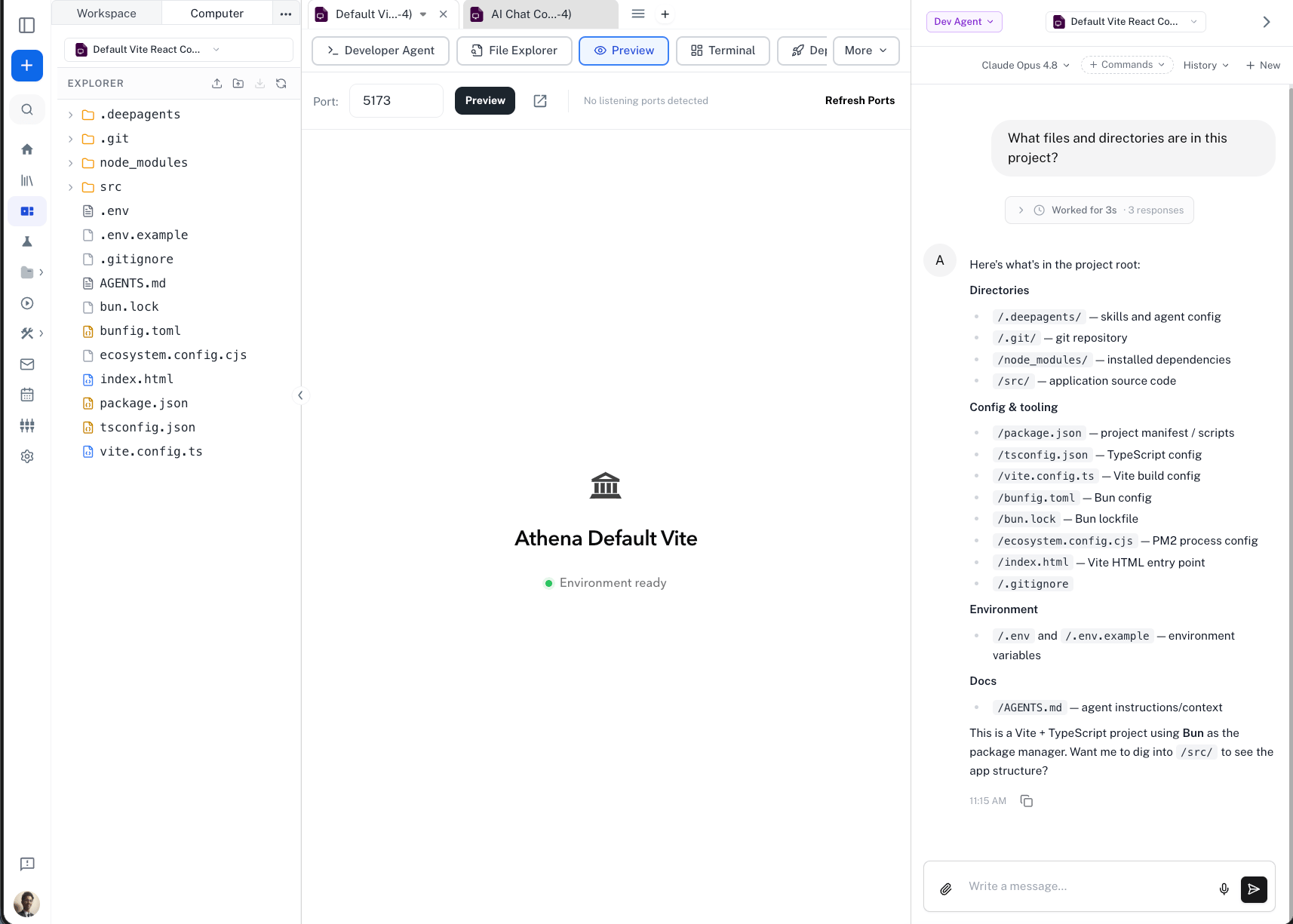
Computer is Athena's cloud execution environment for building and running software inside your workspace. It gives teams a governed sandbox with files, terminal access, live app previews, deployment links, and agent support, all represented as an Athena asset.
Use Computer when a task needs more than a document, spreadsheet, notebook, or front-end mockup. It is designed for work that benefits from a full development environment: custom applications, internal tools, dashboards, prototypes, data utilities, and agent-built workflows that need to run code.
The name "Computer" comes from the idea that Athena is giving an agent and a user a real computing surface, not just a chat window. A Computer has a filesystem, terminal, runtime, preview surface, deployment flow, and developer agent, so software can be planned, built, tested, and shared from one governed place.
Computer is especially useful when you want Athena to move from answering a question to creating a working tool that answers the next hundred questions.
Computer is available from the asset creation menu in Athena. Template options and advanced settings may vary based on workspace or organization policy.
## What Computer Helps You Do
Create apps, dashboards, intake tools, and client-specific workflows from natural language requirements.
Run a web app in the sandbox and preview it directly from Athena before sharing it with others.
Ask Athena's developer agent to inspect files, make edits, debug errors, and improve the application.
Keep work inside an isolated asset with workspace permissions, linked secrets, and controlled access.
## Key Features
### Cloud sandbox
Each Computer asset runs in an isolated cloud environment. The sandbox includes a project workspace, common development tools, and enough runtime access to build and test applications without setting up a local machine.
Computers are designed for on-demand work. Teams can spin up a runtime when an app needs to be built, reviewed, or updated, then let the environment stop when it is no longer active. This keeps compute usage focused on real work while preserving the asset as the durable place to return to later.
### File explorer
Browse project files, inspect generated code, and review assets created inside the Computer. This is useful when you want to understand what the agent changed or confirm that a generated app contains the expected files.
### Terminal and SSH access
Use terminal access for package installs, test commands, server logs, and debugging. For advanced workflows, authorized users can use SSH access when deeper inspection is needed.
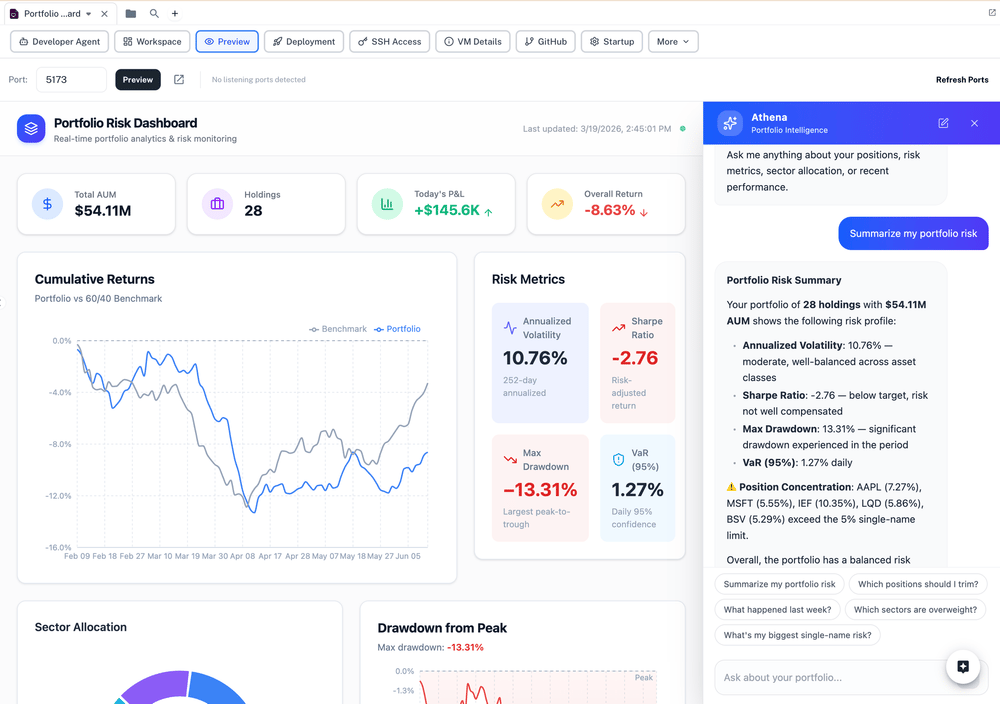
### Live preview
Preview running apps by opening the port used by the development server. This turns the Computer into a fast feedback loop: ask for a change, let the agent update the app, then review the result in the preview.
 ### Deployment links
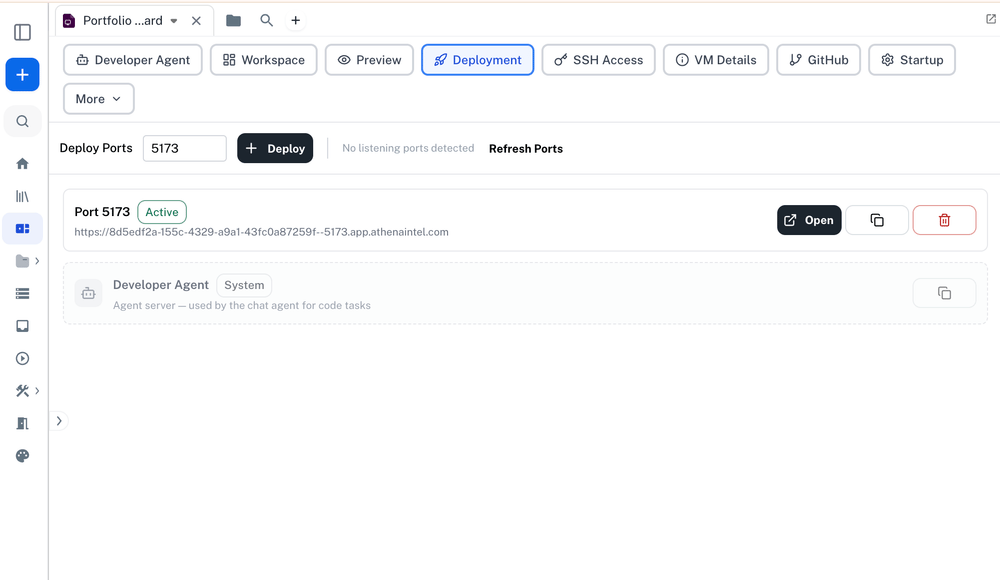
Computer apps can be opened through Athena-hosted deployment links. This makes prototypes and internal tools easier to share with teammates while keeping access controlled by Athena.
### Deployment links
Computer apps can be opened through Athena-hosted deployment links. This makes prototypes and internal tools easier to share with teammates while keeping access controlled by Athena.
 ### Startup configuration and secrets
Computer assets can use linked secret assets for environment variables such as API keys, service tokens, or customer-specific configuration. This avoids hardcoding credentials in generated apps.
### Developer Agent
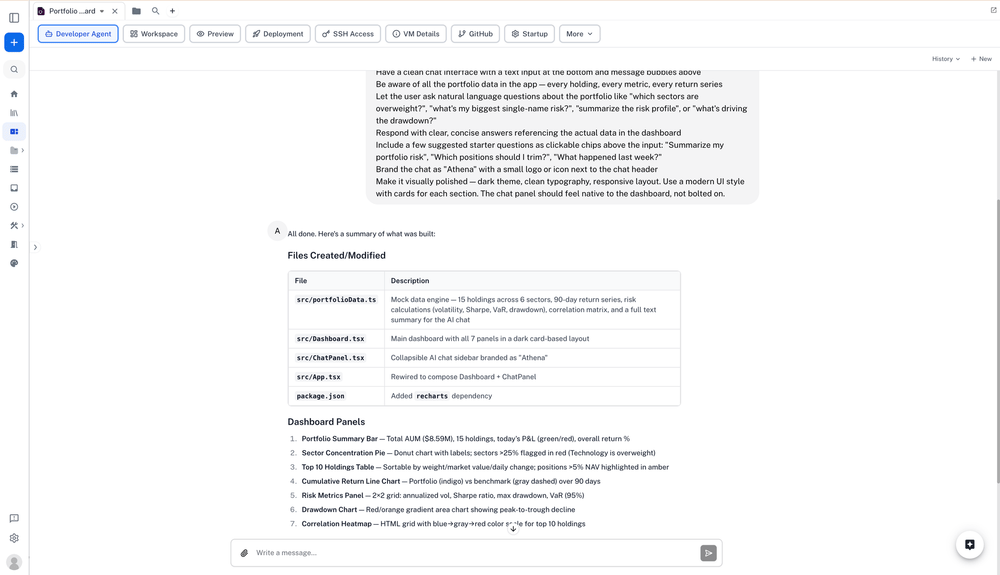
The Developer Agent is the agentic coding layer inside Computer. It can read and edit files, run commands, investigate errors, and iterate on an application with you.
Computer is built for both the agent and the user. The agent can make changes, run checks, and diagnose issues, while users can inspect files, use the terminal, review previews, and approve what should be shared or deployed.
### Startup configuration and secrets
Computer assets can use linked secret assets for environment variables such as API keys, service tokens, or customer-specific configuration. This avoids hardcoding credentials in generated apps.
### Developer Agent
The Developer Agent is the agentic coding layer inside Computer. It can read and edit files, run commands, investigate errors, and iterate on an application with you.
Computer is built for both the agent and the user. The agent can make changes, run checks, and diagnose issues, while users can inspect files, use the terminal, review previews, and approve what should be shared or deployed.
 ### Templates
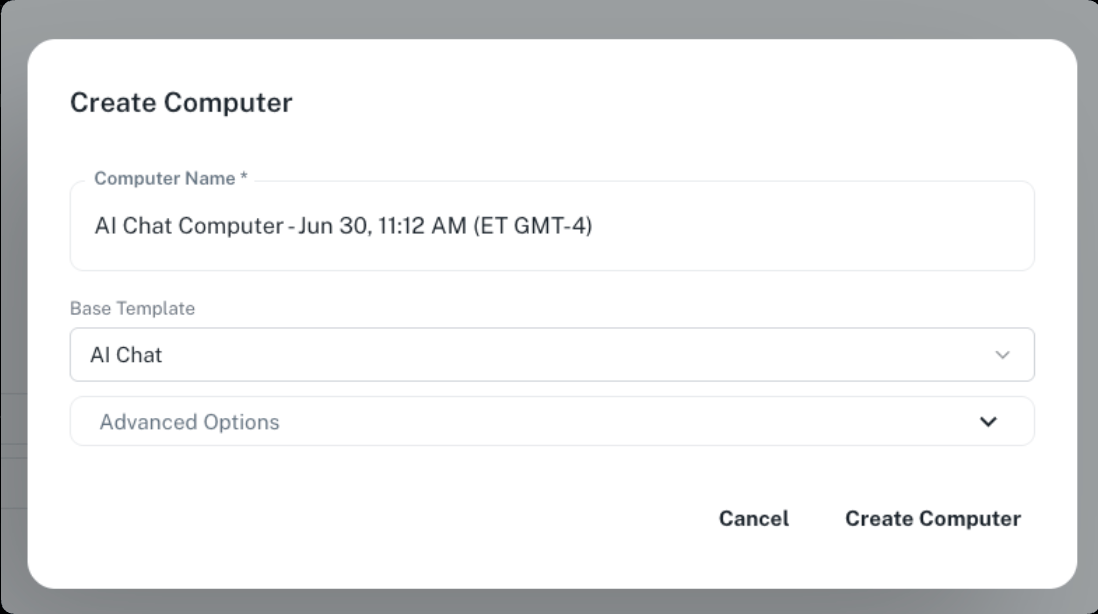
Computer can start from templates such as a basic app, an AI chat app, a standalone virtual machine, or a larger engineering workspace. Templates help teams start from a known-good environment instead of rebuilding setup from scratch.
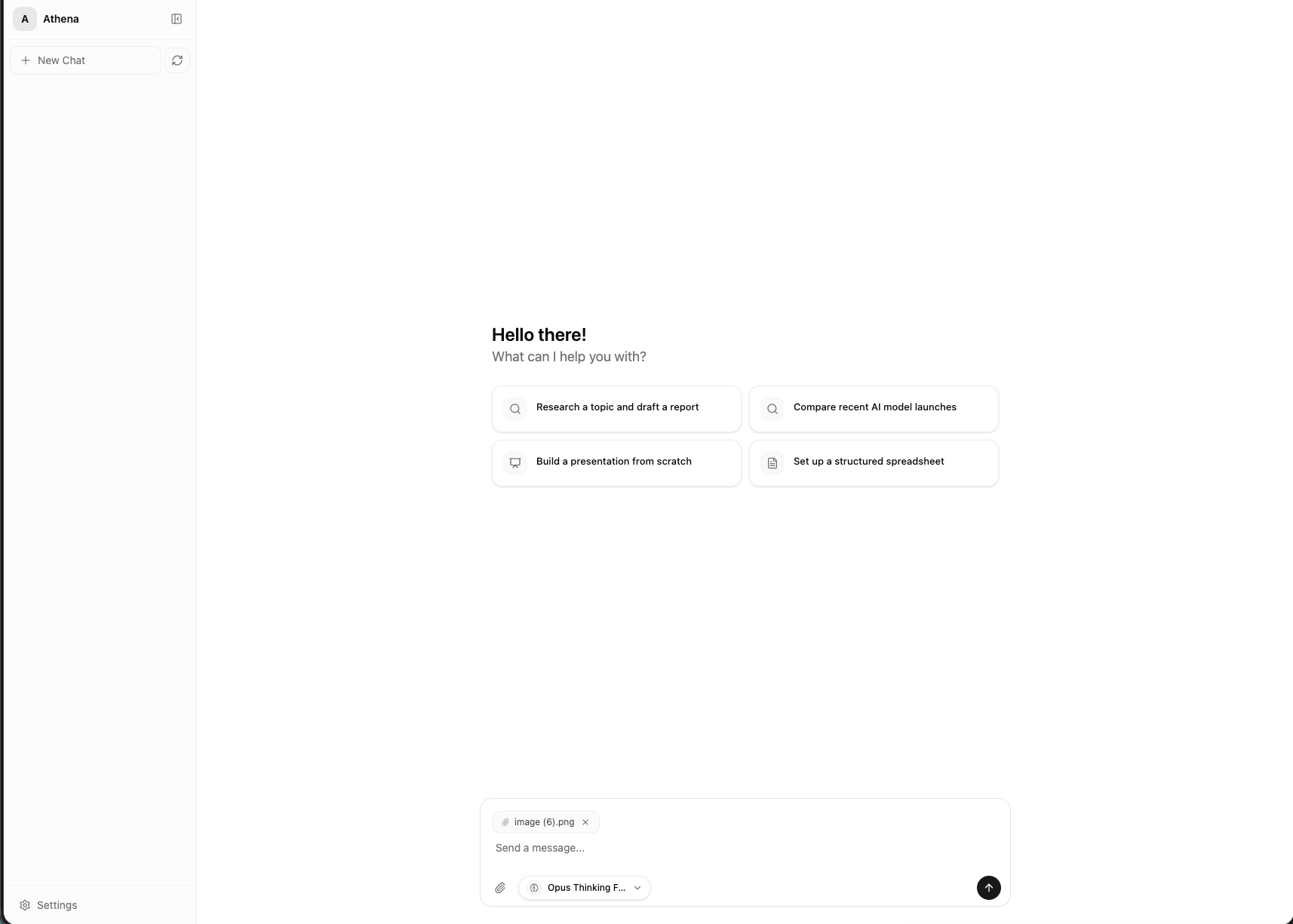
The AI Chat template is a strong starting point for enterprise ChatGPT-style applications. It gives teams a customizable base app that can use Athena's asset rendering capabilities, tools, toolkits, and workspace context while still reflecting your organization's brand, workflows, and access model. Teams can use the [Athena React SDK](https://www.npmjs.com/package/@athenaintel/react) to embed Athena-powered chat and asset experiences into custom applications.
### Templates
Computer can start from templates such as a basic app, an AI chat app, a standalone virtual machine, or a larger engineering workspace. Templates help teams start from a known-good environment instead of rebuilding setup from scratch.
The AI Chat template is a strong starting point for enterprise ChatGPT-style applications. It gives teams a customizable base app that can use Athena's asset rendering capabilities, tools, toolkits, and workspace context while still reflecting your organization's brand, workflows, and access model. Teams can use the [Athena React SDK](https://www.npmjs.com/package/@athenaintel/react) to embed Athena-powered chat and asset experiences into custom applications.
 ## Enterprise Application Patterns
Computer is useful when a team wants to own the experience around Athena instead of only using the default Athena workspace. Common patterns include:
* **Branded AI chat applications** that behave like an enterprise ChatGPT experience while still using Athena assets, tools, toolkits, and connected resources.
* **Audit and compliance workbenches** that let reviewers inspect evidence, track procedures, and connect conclusions back to source files.
* **Client or project dashboards** that combine data, charts, filters, and workflow-specific actions in one custom interface.
* **Internal operations apps** for onboarding, intake, triage, approvals, reporting, and other repeatable business processes.
* **Codebase-connected workflows** where Athena works against an existing repository, follows team conventions, runs checks, and prepares changes for review.
For enterprises, the main advantage is not just faster prototyping. Computer lets teams build custom software in the same environment where Athena already understands workspace assets, permissions, data sources, and review workflows.
## When To Use Computer
Use Computer for work like:
* Creating a custom dashboard for a specific client, project, or dataset
* Building an internal workflow app around Athena assets
* Prototyping a customer-facing app before investing in a full engineering project
* Creating an audit or compliance workbench that ties results back to source evidence
* Testing a generated app with real package installs, servers, and logs
* Letting an Athena agent make code changes and verify them in a live environment
* Running tools that need a filesystem, terminal, or long-running process
## Computer vs. User Interfaces
Athena also supports [User Interfaces](/docs/pillars/applications/user-interfaces), which are lightweight, browser-based app surfaces for dashboards, forms, and interactive front ends.
Computer is the next step when the work needs a full runtime environment.
| Capability | User Interfaces | Computer |
| ------------------- | -------------------------------- | -------------------------------------------------------------- |
| Best for | Lightweight dashboards and forms | Full apps, dev environments, and deployable tools |
| Runtime | Browser-based interface sandbox | Cloud workstation / sandbox |
| Code scope | Front-end interface code | Front-end, backend, packages, scripts, and services |
| Terminal access | No | Yes |
| File system access | Limited to UI files | Full project workspace |
| Agentic development | UI editing and interface tools | Developer Agent with code, shell, preview, and deployment loop |
## Example Workflows
### Create a client-specific dashboard
Start from a dataset, spreadsheet, or connected resource and ask Athena to create a dashboard. The Computer can host the app while the agent iterates on filters, charts, navigation, and data-loading behavior.
### Prototype an internal tool
Describe an operational process, such as intake, triage, approval, or reporting. Athena can build a working tool, preview it, and refine it before your team decides whether to productize it.
### Extend Athena with a branded app
Use Computer to create custom Athena-powered applications that reflect your organization's workflows and brand. This is useful for teams that want a focused app experience instead of a general chat interface.
### Build an audit workbench
Ask Athena to create an app for reviewing evidence, tracking control tests, and linking conclusions back to source files. The Computer gives the agent a place to build the app, run it, and refine the workflow with reviewer feedback.
## Recommended Workflow
Create a new Computer from the asset creation menu, or open an existing Computer from your workspace.
Select a template that matches the task. Use a simple app template for lightweight prototypes, the AI Chat template for Athena-powered chat experiences, or a fuller workspace template for deeper engineering work.
In chat or the Developer Agent tab, describe the workflow, audience, data sources, and expected output. Be specific about what users should be able to see and do.
Use the Preview tab to review the running app. Ask for changes to layout, data flow, copy, validation, error states, or business logic.
Link approved secret assets or connected resources when the app needs external APIs, databases, or customer-specific configuration.
Connect GitHub or your preferred source-control workflow when the app should move from prototype to maintained software. The Developer Agent can help inspect repositories, apply changes, run checks, and prepare reviewable updates.
Use the deployment link when the app is ready for teammates to review. Keep sensitive prototypes inside the workspace until they have been reviewed.
## Enterprise Application Patterns
Computer is useful when a team wants to own the experience around Athena instead of only using the default Athena workspace. Common patterns include:
* **Branded AI chat applications** that behave like an enterprise ChatGPT experience while still using Athena assets, tools, toolkits, and connected resources.
* **Audit and compliance workbenches** that let reviewers inspect evidence, track procedures, and connect conclusions back to source files.
* **Client or project dashboards** that combine data, charts, filters, and workflow-specific actions in one custom interface.
* **Internal operations apps** for onboarding, intake, triage, approvals, reporting, and other repeatable business processes.
* **Codebase-connected workflows** where Athena works against an existing repository, follows team conventions, runs checks, and prepares changes for review.
For enterprises, the main advantage is not just faster prototyping. Computer lets teams build custom software in the same environment where Athena already understands workspace assets, permissions, data sources, and review workflows.
## When To Use Computer
Use Computer for work like:
* Creating a custom dashboard for a specific client, project, or dataset
* Building an internal workflow app around Athena assets
* Prototyping a customer-facing app before investing in a full engineering project
* Creating an audit or compliance workbench that ties results back to source evidence
* Testing a generated app with real package installs, servers, and logs
* Letting an Athena agent make code changes and verify them in a live environment
* Running tools that need a filesystem, terminal, or long-running process
## Computer vs. User Interfaces
Athena also supports [User Interfaces](/docs/pillars/applications/user-interfaces), which are lightweight, browser-based app surfaces for dashboards, forms, and interactive front ends.
Computer is the next step when the work needs a full runtime environment.
| Capability | User Interfaces | Computer |
| ------------------- | -------------------------------- | -------------------------------------------------------------- |
| Best for | Lightweight dashboards and forms | Full apps, dev environments, and deployable tools |
| Runtime | Browser-based interface sandbox | Cloud workstation / sandbox |
| Code scope | Front-end interface code | Front-end, backend, packages, scripts, and services |
| Terminal access | No | Yes |
| File system access | Limited to UI files | Full project workspace |
| Agentic development | UI editing and interface tools | Developer Agent with code, shell, preview, and deployment loop |
## Example Workflows
### Create a client-specific dashboard
Start from a dataset, spreadsheet, or connected resource and ask Athena to create a dashboard. The Computer can host the app while the agent iterates on filters, charts, navigation, and data-loading behavior.
### Prototype an internal tool
Describe an operational process, such as intake, triage, approval, or reporting. Athena can build a working tool, preview it, and refine it before your team decides whether to productize it.
### Extend Athena with a branded app
Use Computer to create custom Athena-powered applications that reflect your organization's workflows and brand. This is useful for teams that want a focused app experience instead of a general chat interface.
### Build an audit workbench
Ask Athena to create an app for reviewing evidence, tracking control tests, and linking conclusions back to source files. The Computer gives the agent a place to build the app, run it, and refine the workflow with reviewer feedback.
## Recommended Workflow
Create a new Computer from the asset creation menu, or open an existing Computer from your workspace.
Select a template that matches the task. Use a simple app template for lightweight prototypes, the AI Chat template for Athena-powered chat experiences, or a fuller workspace template for deeper engineering work.
In chat or the Developer Agent tab, describe the workflow, audience, data sources, and expected output. Be specific about what users should be able to see and do.
Use the Preview tab to review the running app. Ask for changes to layout, data flow, copy, validation, error states, or business logic.
Link approved secret assets or connected resources when the app needs external APIs, databases, or customer-specific configuration.
Connect GitHub or your preferred source-control workflow when the app should move from prototype to maintained software. The Developer Agent can help inspect repositories, apply changes, run checks, and prepare reviewable updates.
Use the deployment link when the app is ready for teammates to review. Keep sensitive prototypes inside the workspace until they have been reviewed.
 ## Governance and Security
Computer is designed for enterprise workflows where control matters:
* Each Computer is an Athena asset with workspace access controls.
* Sandboxes are isolated so experiments do not run on a shared workstation.
* Runtime environments can be started for active work and stopped when idle.
* Secrets can be linked through Athena secret assets instead of pasted into code.
* Deployment links can remain behind Athena authentication.
* Apps can be shared through Athena-hosted links, with access governed by the workspace and deployment settings.
* The asset model keeps generated software discoverable, permissioned, and auditable.
Computer is also designed for enterprise deployment models where infrastructure, networking, and data residency matter. Athena can support Computer-backed workflows in customer-controlled environments, with the exact deployment pattern configured to match the organization's cloud, security, and governance requirements.
## Advanced Workflows
* Start from the AI Chat template when you want an enterprise chat app that can render Athena assets, invoke tools, and expose a focused experience for a team or client.
* Use the Athena React SDK when you want to build a custom front end around Athena chat, assets, tools, and toolkits.
* Connect GitHub so generated applications can become reviewable software projects with source control, pull requests, and deployment workflows.
* Use browser-based testing workflows to verify generated apps end-to-end as they become more complex.
* Link secret assets and workspace resources for environment-specific configuration instead of hardcoding credentials into the app.
* Use Computer as a bridge from lightweight prototypes to maintained internal software by combining templates, developer-agent iteration, source control, and deployment links.
## Best Practices
* Start with a narrow workflow and expand after the first preview works.
* Describe the target user, input data, expected actions, and success criteria.
* Ask the Developer Agent to run checks or tests after meaningful changes.
* Review generated code before sharing an app broadly.
* Use linked secrets for credentials and configuration.
* Keep business-critical automations reviewed by a human owner.
* Archive Computers that are no longer needed to reduce clutter.
## Related Documentation
Build lightweight interactive dashboards and app surfaces.
Create custom tools that Athena agents can invoke.
Build repeatable AI workflows for analysis, operations, and automation.
Read the Athena perspective on Computer and service-as-software workflows.
Learn how Athena organizes work into durable, shareable assets.
## Governance and Security
Computer is designed for enterprise workflows where control matters:
* Each Computer is an Athena asset with workspace access controls.
* Sandboxes are isolated so experiments do not run on a shared workstation.
* Runtime environments can be started for active work and stopped when idle.
* Secrets can be linked through Athena secret assets instead of pasted into code.
* Deployment links can remain behind Athena authentication.
* Apps can be shared through Athena-hosted links, with access governed by the workspace and deployment settings.
* The asset model keeps generated software discoverable, permissioned, and auditable.
Computer is also designed for enterprise deployment models where infrastructure, networking, and data residency matter. Athena can support Computer-backed workflows in customer-controlled environments, with the exact deployment pattern configured to match the organization's cloud, security, and governance requirements.
## Advanced Workflows
* Start from the AI Chat template when you want an enterprise chat app that can render Athena assets, invoke tools, and expose a focused experience for a team or client.
* Use the Athena React SDK when you want to build a custom front end around Athena chat, assets, tools, and toolkits.
* Connect GitHub so generated applications can become reviewable software projects with source control, pull requests, and deployment workflows.
* Use browser-based testing workflows to verify generated apps end-to-end as they become more complex.
* Link secret assets and workspace resources for environment-specific configuration instead of hardcoding credentials into the app.
* Use Computer as a bridge from lightweight prototypes to maintained internal software by combining templates, developer-agent iteration, source control, and deployment links.
## Best Practices
* Start with a narrow workflow and expand after the first preview works.
* Describe the target user, input data, expected actions, and success criteria.
* Ask the Developer Agent to run checks or tests after meaningful changes.
* Review generated code before sharing an app broadly.
* Use linked secrets for credentials and configuration.
* Keep business-critical automations reviewed by a human owner.
* Archive Computers that are no longer needed to reduce clutter.
## Related Documentation
Build lightweight interactive dashboards and app surfaces.
Create custom tools that Athena agents can invoke.
Build repeatable AI workflows for analysis, operations, and automation.
Read the Athena perspective on Computer and service-as-software workflows.
Learn how Athena organizes work into durable, shareable assets.