> ## Documentation Index
> Fetch the complete documentation index at: https://resources.athenaintel.com/llms.txt
> Use this file to discover all available pages before exploring further.
# Live Assets
Live Assets are a way to connect your external data into Athena **without Athena permanently storing your data**. Files, folders, and records stay in their original systems—SharePoint sites, Google Drive folders, iManage workspaces, Salesforce, and other enterprise platforms—and Athena works with them in real time through secure, per-user connections.
Technically, Athena connects to an external data provider, obtains credentials scoped to a specific user, authenticates as that user, pulls the data in real time, and hands it to the agent to do real work—generating insights, drafting documents, answering questions—without migrating your content into Athena or keeping a durable copy of it.
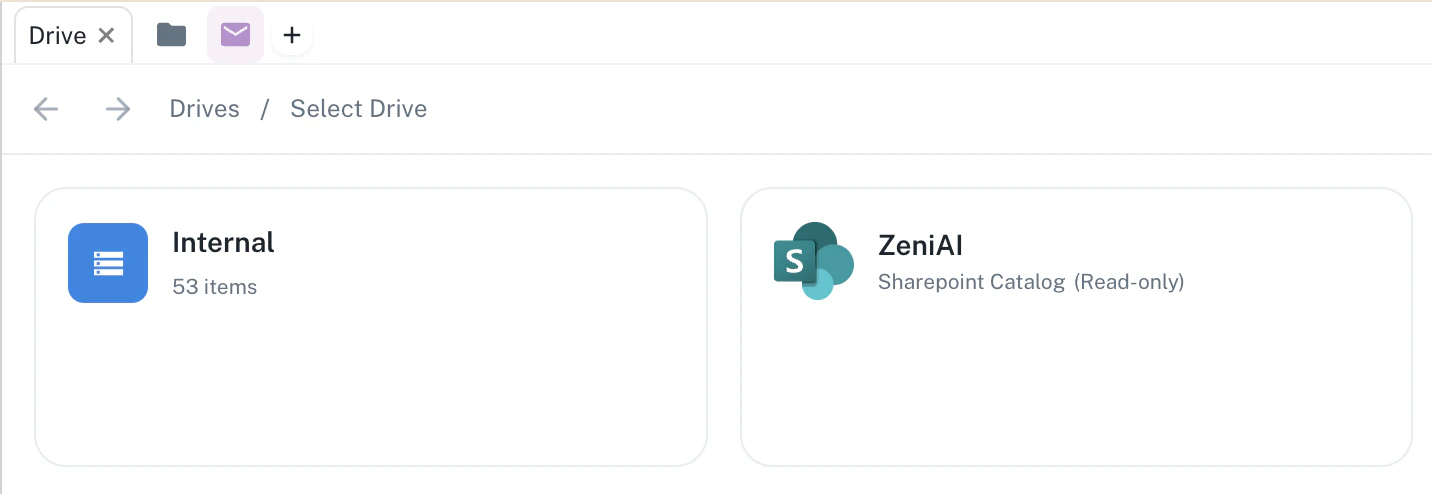 Live Assets integrate seamlessly with [Spaces](https://resources.athenaintel.com/docs/pillars/applications/spaces), [Projects](https://resources.athenaintel.com/docs/pillars/contextual-knowledge/projects), and [Athena Agents](https://resources.athenaintel.com/docs/agents/athena-agents) for enhanced workflow automation!
## Why Live Assets
Many organizations operate in regulated industries and cannot let their data leave their environment. Live Assets let Athena do real work with your real data **without compromising security and without keeping a durable copy of it**—reducing both security and compliance risk.
Instead of importing documents into a separate system (which creates a permanent second copy to secure, govern, and keep in sync), Athena reaches into the source system on demand, authenticates as the requesting user, and works with the data live. Your source of truth stays exactly where it already is.
Live Asset connections are managed per-user. Multiple team members can independently connect to the same provider resources while maintaining their own individual authentication and access scope.
## Key Concepts
### Live Assets vs Regular Assets
Understanding the distinction between Live Assets and regular assets is crucial for effective workflow automation:
**Regular Assets**
* Uploaded directly to Athena's secure storage
* Processed and converted by Athena (PDF conversion, embedding generation, etc.)
* Static content that doesn't change unless explicitly updated
* Permanently stored with dedicated storage keys
**Live Assets**
* Remain in external provider systems (SharePoint, Google Drive, iManage, etc.)
* Accessed via provider APIs using secure, per-user authentication
* Dynamic content that reflects the real-time state of the external file
* Fetched on-demand—Athena keeps no durable copy of the file contents
* Honor the permissions of the source system in real time
Live Assets integrate seamlessly with [Spaces](https://resources.athenaintel.com/docs/pillars/applications/spaces), [Projects](https://resources.athenaintel.com/docs/pillars/contextual-knowledge/projects), and [Athena Agents](https://resources.athenaintel.com/docs/agents/athena-agents) for enhanced workflow automation!
## Why Live Assets
Many organizations operate in regulated industries and cannot let their data leave their environment. Live Assets let Athena do real work with your real data **without compromising security and without keeping a durable copy of it**—reducing both security and compliance risk.
Instead of importing documents into a separate system (which creates a permanent second copy to secure, govern, and keep in sync), Athena reaches into the source system on demand, authenticates as the requesting user, and works with the data live. Your source of truth stays exactly where it already is.
Live Asset connections are managed per-user. Multiple team members can independently connect to the same provider resources while maintaining their own individual authentication and access scope.
## Key Concepts
### Live Assets vs Regular Assets
Understanding the distinction between Live Assets and regular assets is crucial for effective workflow automation:
**Regular Assets**
* Uploaded directly to Athena's secure storage
* Processed and converted by Athena (PDF conversion, embedding generation, etc.)
* Static content that doesn't change unless explicitly updated
* Permanently stored with dedicated storage keys
**Live Assets**
* Remain in external provider systems (SharePoint, Google Drive, iManage, etc.)
* Accessed via provider APIs using secure, per-user authentication
* Dynamic content that reflects the real-time state of the external file
* Fetched on-demand—Athena keeps no durable copy of the file contents
* Honor the permissions of the source system in real time
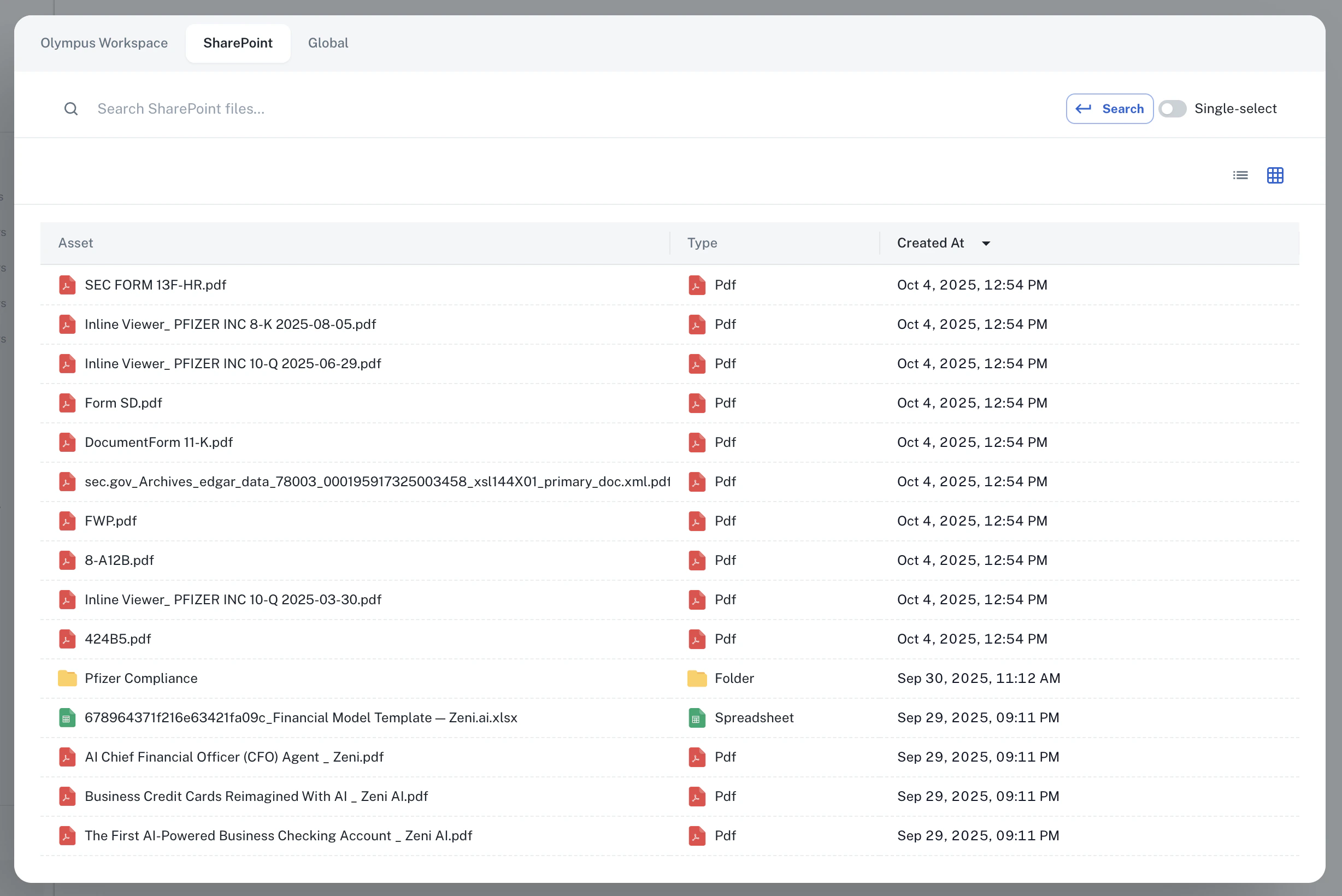 ### The Catalog System
Live Assets are organized through a **Catalog-based architecture**. A **catalog** is Athena's representation of a connection to an external data source.
1. **Catalog Asset**: Represents your connection to an external provider (e.g., a specific SharePoint site or Google Drive account)
* Contains provider metadata and connection settings
* Acts as the parent container for all assets from that provider
* Manages authentication credentials securely
* Appears in your workspace's **Catalogs** section in Spaces
2. **Live Assets**: Individual files, folders, or records within the catalog
* Referenced using a stable compound ID that links both the catalog and the external resource
* Can be files (rendered in viewers) or folders (navigable in Drive view)
* Accessible through search, mentions, and direct navigation
## Security & Data Handling
Live Assets are built so Athena can work with sensitive data without becoming another place that data is stored.
### Zero Data Retention
Athena's underlying model providers operate under contractual **zero-data-retention (ZDR)** agreements. Any data passed through them for processing cannot be stored or used to train models—it is processed and discarded.
### No Permanent Content Storage
When Athena receives a file from an external provider (for example, a Word document from SharePoint), it uses the file's contents to do the work—handing the text to the model—and **does not permanently retain the file**. File contents are treated as ephemeral and short-lived.
To enable in-app viewing and avoid re-fetching the same file repeatedly during a short window of activity, Athena keeps a **short-lived, time-to-live (TTL) cache** of a file's contents in its own secure, encrypted storage. This cache is intentionally temporary: once the TTL expires (one hour by default), the cached contents are treated as stale, removed, and re-fetched live from the source on the next access. The cache is a performance optimization, not a system of record—Athena does not maintain a durable, permanent copy of your file contents.
The only data Athena persists long-term is lightweight **metadata and identifiers** needed to locate the resource again (such as the catalog reference and the external provider's resource ID)—not a durable copy of the file contents.
### Real-Time Permission Inheritance
Athena enforces the **permission system of the external source in real time**. Rather than copying or layering its own permissions, Athena checks live access against the source system every time a Live Asset is accessed.
This means access changes propagate immediately: if a user's access to a file is revoked in the source system, that revocation takes effect right away in Athena, because Athena is asking the source—not consulting a stored copy of its permissions. Athena does not store the source's permissions.
### No Data Duplication
Because Athena keeps no durable copy of your content—only short-lived caches and lightweight metadata—there is no permanent second copy to drift out of date and **no sync conflicts** to reconcile. The source system remains the single source of truth. This makes Live Assets a simpler, cleaner, and more secure approach than importing and mirroring data into Athena.
## How Live Assets Work
### Authentication and Connection
Live Assets use secure, per-user authentication through Athena's integration system:
Navigate to your workspace settings and connect to a supported provider with your own credentials.
Each connected account or site becomes a catalog in your workspace, representing that external data connection.
Browse, search, and reference files from the catalog as if they were native Athena assets.
Athena authenticates as you, pulls the current state of the data on demand, and hands it to the agent—no migration, no stored copy.
### Stable Identifiers and Reuse
So Athena can return to the exact same resource later, it tags each Live Asset with a **stable identifier linked to its catalog**. This compound ID points to both the catalog (the external data connection) and the specific external resource, so Athena can re-fetch that exact resource in real time using the ID instead of searching for it again each time.
**Format**: `asset__`
**Example**: `asset_39c9c2ac-6891-4075-b457-a4da13e9c742_014TH7SXZNCVAYSY4YVBGZTNOB266HQ56`
This keeps assets uniquely identifiable across different providers and catalogs within your workspace, and lets agents reliably reference the same live resource across a conversation or workflow.
## Supported Providers
Athena supports Live Assets from a range of enterprise platforms, with new providers added regularly. The connectors below are available today:
Connect to SharePoint sites and access files in real time
* Office documents (Word, Excel, PowerPoint)
* PDF files and plain text documents
* Folder navigation and file browsing
Access files and folders from OneDrive
* Personal and shared OneDrive content
* Office documents and PDFs
* Real-time file access
Integrate files and folders from Google Drive
* Google Docs, Sheets, and Slides
* Shared drive content
* Real-time file access
Connect to iManage document management
* Workspace documents and folders
* Matter-based file organization
* Real-time document access
Access Salesforce records and data
* Account and contact records
* Opportunity and case data
* Custom object records
Connect to ServiceNow records and data
* Catalog and record access
* Real-time record retrieval
Integrate Dynamics 365 business data
* CRM records and entities
* Real-time record access
Reference Power BI content
* Reports and dashboards
* Real-time data access
Query your Snowflake data warehouse live
* Per-user OAuth or credential-based connections
* Role-scoped access honoring Snowflake grants
* On-demand queries—no bulk extraction
Connect to your Databricks workspace
* Per-user OAuth connections
* Real-time data access
Access email threads and messages
* Email threads with full conversation history
* Individual messages and attachments
Connect to Azure data services
* Azure SQL databases via per-user Entra OAuth
* Azure Blob storage containers
Need a provider you don't see here? Athena can build custom integrations quickly.
* Contact [team@athenaintel.com](mailto:team@athenaintel.com) to request a new integration
Provider availability can vary by workspace configuration, and some integrations require admin approval. Contact your workspace administrator or [team@athenaintel.com](mailto:team@athenaintel.com) for help enabling enterprise integrations.
## Use Cases
### Knowledge Management
Access company documents stored in SharePoint, Google Drive, or iManage without migrating them to Athena:
* Maintain a single source of truth in your existing document management system
* Search across all connected catalogs from Athena's unified search interface
* Reference documents in conversations with Athena agents
* Generate summaries and insights from external files without manual uploads
### Real-Time Collaboration
Work with live folder contents that reflect the current state:
* Browse SharePoint libraries and Google Drive folders with up-to-date file listings
* Access the latest versions of documents automatically
* Collaborate on external files while using Athena's AI capabilities
* Share live asset links with team members
### Cross-Platform Integration
Bring external content into Athena workflows:
* Link email threads to Projects for context and tracking
* Reference Salesforce records in agent workflows
* Query Snowflake or Databricks data alongside documents from SharePoint
* Search across connected catalogs simultaneously
### Unified Interface
Manage both internal and external content through a single interface:
* View Live Assets alongside uploaded files in Spaces
* Search finds results from both regular assets and connected providers
* Use @ mentions to reference live assets in conversations
* Apply the same organizational structures (tags, folders, projects) to all asset types
## Integration with Athena Features
### Spaces
Live Assets work seamlessly within Athena Spaces:
* Open live assets in flexible workspace layouts
* Drag and drop live assets into Spaces panels
* View multiple live assets simultaneously
* Maintain context when switching between internal and external content
Learn more about [Spaces](https://resources.athenaintel.com/docs/pillars/applications/spaces).
### Projects
Link Live Assets to Projects for comprehensive context:
* Associate external files with project initiatives
* Track changes in connected documents
* Generate project reports that include live asset data
* Maintain relationships between Athena assets and external resources
Learn more about [Projects](https://resources.athenaintel.com/docs/pillars/contextual-knowledge/projects).
### Agents and Automation
Leverage Live Assets in agent workflows and automation:
* Agents can search across connected catalogs
* Reference live assets in Agent Operating Procedures (AOPs)
* Automate workflows that process external files
* Generate insights from live data sources
Learn more about [Agents](https://resources.athenaintel.com/docs/agents/athena-agents) and [Task Studio](https://resources.athenaintel.com/docs/task-studio/home).
### Search and Discovery
Live Assets are fully integrated into Athena's search capabilities:
* Unified search across all connected catalogs
* Filter results by provider, file type, or date
* Quick Actions available on all live asset search results
* Citation and reference support in documents
## Getting Started
To start using Live Assets in your workflows:
1. **Connect Providers**: Navigate to Settings → Integrations and connect to your desired providers (SharePoint, Google Drive, Snowflake, etc.)
2. **Browse Catalogs**: Access your connected catalogs from the Spaces sidebar under the **Assets** section
3. **Reference Assets**: Use live assets in conversations, projects, and spaces just like regular assets
4. **Automate Workflows**: Create agents and tasks that leverage your connected external data
Some provider integrations may require admin approval or specific permissions. Contact your workspace administrator or [team@athenaintel.com](mailto:team@athenaintel.com) for assistance with enterprise integrations and custom connectors.
## Additional Resources
* [Connect Your Data](https://resources.athenaintel.com/docs/getting-started/connecting-data) - Learn about importing files and connecting data sources
* [All Integrations](https://resources.athenaintel.com/docs/connect-your-data/all-integrations) - Browse all available integration options
* [SharePoint Integration](https://resources.athenaintel.com/docs/connect-your-data/o365) - Detailed guide for SharePoint connection
* [Snowflake Integration](https://resources.athenaintel.com/docs/connect-your-data/snowflake) - Detailed guide for Snowflake connection
### The Catalog System
Live Assets are organized through a **Catalog-based architecture**. A **catalog** is Athena's representation of a connection to an external data source.
1. **Catalog Asset**: Represents your connection to an external provider (e.g., a specific SharePoint site or Google Drive account)
* Contains provider metadata and connection settings
* Acts as the parent container for all assets from that provider
* Manages authentication credentials securely
* Appears in your workspace's **Catalogs** section in Spaces
2. **Live Assets**: Individual files, folders, or records within the catalog
* Referenced using a stable compound ID that links both the catalog and the external resource
* Can be files (rendered in viewers) or folders (navigable in Drive view)
* Accessible through search, mentions, and direct navigation
## Security & Data Handling
Live Assets are built so Athena can work with sensitive data without becoming another place that data is stored.
### Zero Data Retention
Athena's underlying model providers operate under contractual **zero-data-retention (ZDR)** agreements. Any data passed through them for processing cannot be stored or used to train models—it is processed and discarded.
### No Permanent Content Storage
When Athena receives a file from an external provider (for example, a Word document from SharePoint), it uses the file's contents to do the work—handing the text to the model—and **does not permanently retain the file**. File contents are treated as ephemeral and short-lived.
To enable in-app viewing and avoid re-fetching the same file repeatedly during a short window of activity, Athena keeps a **short-lived, time-to-live (TTL) cache** of a file's contents in its own secure, encrypted storage. This cache is intentionally temporary: once the TTL expires (one hour by default), the cached contents are treated as stale, removed, and re-fetched live from the source on the next access. The cache is a performance optimization, not a system of record—Athena does not maintain a durable, permanent copy of your file contents.
The only data Athena persists long-term is lightweight **metadata and identifiers** needed to locate the resource again (such as the catalog reference and the external provider's resource ID)—not a durable copy of the file contents.
### Real-Time Permission Inheritance
Athena enforces the **permission system of the external source in real time**. Rather than copying or layering its own permissions, Athena checks live access against the source system every time a Live Asset is accessed.
This means access changes propagate immediately: if a user's access to a file is revoked in the source system, that revocation takes effect right away in Athena, because Athena is asking the source—not consulting a stored copy of its permissions. Athena does not store the source's permissions.
### No Data Duplication
Because Athena keeps no durable copy of your content—only short-lived caches and lightweight metadata—there is no permanent second copy to drift out of date and **no sync conflicts** to reconcile. The source system remains the single source of truth. This makes Live Assets a simpler, cleaner, and more secure approach than importing and mirroring data into Athena.
## How Live Assets Work
### Authentication and Connection
Live Assets use secure, per-user authentication through Athena's integration system:
Navigate to your workspace settings and connect to a supported provider with your own credentials.
Each connected account or site becomes a catalog in your workspace, representing that external data connection.
Browse, search, and reference files from the catalog as if they were native Athena assets.
Athena authenticates as you, pulls the current state of the data on demand, and hands it to the agent—no migration, no stored copy.
### Stable Identifiers and Reuse
So Athena can return to the exact same resource later, it tags each Live Asset with a **stable identifier linked to its catalog**. This compound ID points to both the catalog (the external data connection) and the specific external resource, so Athena can re-fetch that exact resource in real time using the ID instead of searching for it again each time.
**Format**: `asset__`
**Example**: `asset_39c9c2ac-6891-4075-b457-a4da13e9c742_014TH7SXZNCVAYSY4YVBGZTNOB266HQ56`
This keeps assets uniquely identifiable across different providers and catalogs within your workspace, and lets agents reliably reference the same live resource across a conversation or workflow.
## Supported Providers
Athena supports Live Assets from a range of enterprise platforms, with new providers added regularly. The connectors below are available today:
Connect to SharePoint sites and access files in real time
* Office documents (Word, Excel, PowerPoint)
* PDF files and plain text documents
* Folder navigation and file browsing
Access files and folders from OneDrive
* Personal and shared OneDrive content
* Office documents and PDFs
* Real-time file access
Integrate files and folders from Google Drive
* Google Docs, Sheets, and Slides
* Shared drive content
* Real-time file access
Connect to iManage document management
* Workspace documents and folders
* Matter-based file organization
* Real-time document access
Access Salesforce records and data
* Account and contact records
* Opportunity and case data
* Custom object records
Connect to ServiceNow records and data
* Catalog and record access
* Real-time record retrieval
Integrate Dynamics 365 business data
* CRM records and entities
* Real-time record access
Reference Power BI content
* Reports and dashboards
* Real-time data access
Query your Snowflake data warehouse live
* Per-user OAuth or credential-based connections
* Role-scoped access honoring Snowflake grants
* On-demand queries—no bulk extraction
Connect to your Databricks workspace
* Per-user OAuth connections
* Real-time data access
Access email threads and messages
* Email threads with full conversation history
* Individual messages and attachments
Connect to Azure data services
* Azure SQL databases via per-user Entra OAuth
* Azure Blob storage containers
Need a provider you don't see here? Athena can build custom integrations quickly.
* Contact [team@athenaintel.com](mailto:team@athenaintel.com) to request a new integration
Provider availability can vary by workspace configuration, and some integrations require admin approval. Contact your workspace administrator or [team@athenaintel.com](mailto:team@athenaintel.com) for help enabling enterprise integrations.
## Use Cases
### Knowledge Management
Access company documents stored in SharePoint, Google Drive, or iManage without migrating them to Athena:
* Maintain a single source of truth in your existing document management system
* Search across all connected catalogs from Athena's unified search interface
* Reference documents in conversations with Athena agents
* Generate summaries and insights from external files without manual uploads
### Real-Time Collaboration
Work with live folder contents that reflect the current state:
* Browse SharePoint libraries and Google Drive folders with up-to-date file listings
* Access the latest versions of documents automatically
* Collaborate on external files while using Athena's AI capabilities
* Share live asset links with team members
### Cross-Platform Integration
Bring external content into Athena workflows:
* Link email threads to Projects for context and tracking
* Reference Salesforce records in agent workflows
* Query Snowflake or Databricks data alongside documents from SharePoint
* Search across connected catalogs simultaneously
### Unified Interface
Manage both internal and external content through a single interface:
* View Live Assets alongside uploaded files in Spaces
* Search finds results from both regular assets and connected providers
* Use @ mentions to reference live assets in conversations
* Apply the same organizational structures (tags, folders, projects) to all asset types
## Integration with Athena Features
### Spaces
Live Assets work seamlessly within Athena Spaces:
* Open live assets in flexible workspace layouts
* Drag and drop live assets into Spaces panels
* View multiple live assets simultaneously
* Maintain context when switching between internal and external content
Learn more about [Spaces](https://resources.athenaintel.com/docs/pillars/applications/spaces).
### Projects
Link Live Assets to Projects for comprehensive context:
* Associate external files with project initiatives
* Track changes in connected documents
* Generate project reports that include live asset data
* Maintain relationships between Athena assets and external resources
Learn more about [Projects](https://resources.athenaintel.com/docs/pillars/contextual-knowledge/projects).
### Agents and Automation
Leverage Live Assets in agent workflows and automation:
* Agents can search across connected catalogs
* Reference live assets in Agent Operating Procedures (AOPs)
* Automate workflows that process external files
* Generate insights from live data sources
Learn more about [Agents](https://resources.athenaintel.com/docs/agents/athena-agents) and [Task Studio](https://resources.athenaintel.com/docs/task-studio/home).
### Search and Discovery
Live Assets are fully integrated into Athena's search capabilities:
* Unified search across all connected catalogs
* Filter results by provider, file type, or date
* Quick Actions available on all live asset search results
* Citation and reference support in documents
## Getting Started
To start using Live Assets in your workflows:
1. **Connect Providers**: Navigate to Settings → Integrations and connect to your desired providers (SharePoint, Google Drive, Snowflake, etc.)
2. **Browse Catalogs**: Access your connected catalogs from the Spaces sidebar under the **Assets** section
3. **Reference Assets**: Use live assets in conversations, projects, and spaces just like regular assets
4. **Automate Workflows**: Create agents and tasks that leverage your connected external data
Some provider integrations may require admin approval or specific permissions. Contact your workspace administrator or [team@athenaintel.com](mailto:team@athenaintel.com) for assistance with enterprise integrations and custom connectors.
## Additional Resources
* [Connect Your Data](https://resources.athenaintel.com/docs/getting-started/connecting-data) - Learn about importing files and connecting data sources
* [All Integrations](https://resources.athenaintel.com/docs/connect-your-data/all-integrations) - Browse all available integration options
* [SharePoint Integration](https://resources.athenaintel.com/docs/connect-your-data/o365) - Detailed guide for SharePoint connection
* [Snowflake Integration](https://resources.athenaintel.com/docs/connect-your-data/snowflake) - Detailed guide for Snowflake connection