> ## Documentation Index
> Fetch the complete documentation index at: https://resources.athenaintel.com/llms.txt
> Use this file to discover all available pages before exploring further.
# Will AI replace accountants or work alongside them?
> AI automates accounting tasks. See the BLS job outlook, what accountants still own, and how to learn AI review, prompting and reusable procedures.
> AI can work alongside accountants by automating routine tasks, while AICPA & CIMA says accountants [retain professional judgment and responsibility](https://www.aicpa-cima.com/professional-insights/article/ethics-accountancy-and-ai-powered-tools). BLS projects [growth for accountants and auditors](https://www.bls.gov/ooh/business-and-financial/accountants-and-auditors.htm), alongside [declining employment for bookkeeping, accounting, and auditing clerks](https://www.bls.gov/ooh/office-and-administrative-support/bookkeeping-accounting-and-auditing-clerks.htm).
## What does the BLS say about AI and accounting jobs?
BLS projects accountant and auditor employment to grow **5% from 2025 to 2035**, with about **115,300 openings each year**. Many openings replace people who leave the occupation or retire. BLS expects automation to make advisory and analytical duties more prominent.
The BLS outlook differs for bookkeeping, accounting, and auditing clerks: **a 6% employment decline over 2025–2035**. BLS links that decline to software automation that allows fewer employees to perform the same work.
For a finance team, start by listing the work behind each role. Separate preparing records, investigating exceptions and discussing results with clients. That gives you a clearer training plan than treating every accounting task as equally exposed.
Use the list to choose one pilot. Record who prepares the work, who checks it and who approves it. Keep those responsibilities visible as the procedure changes.
## Which accounting tasks can AI automate?
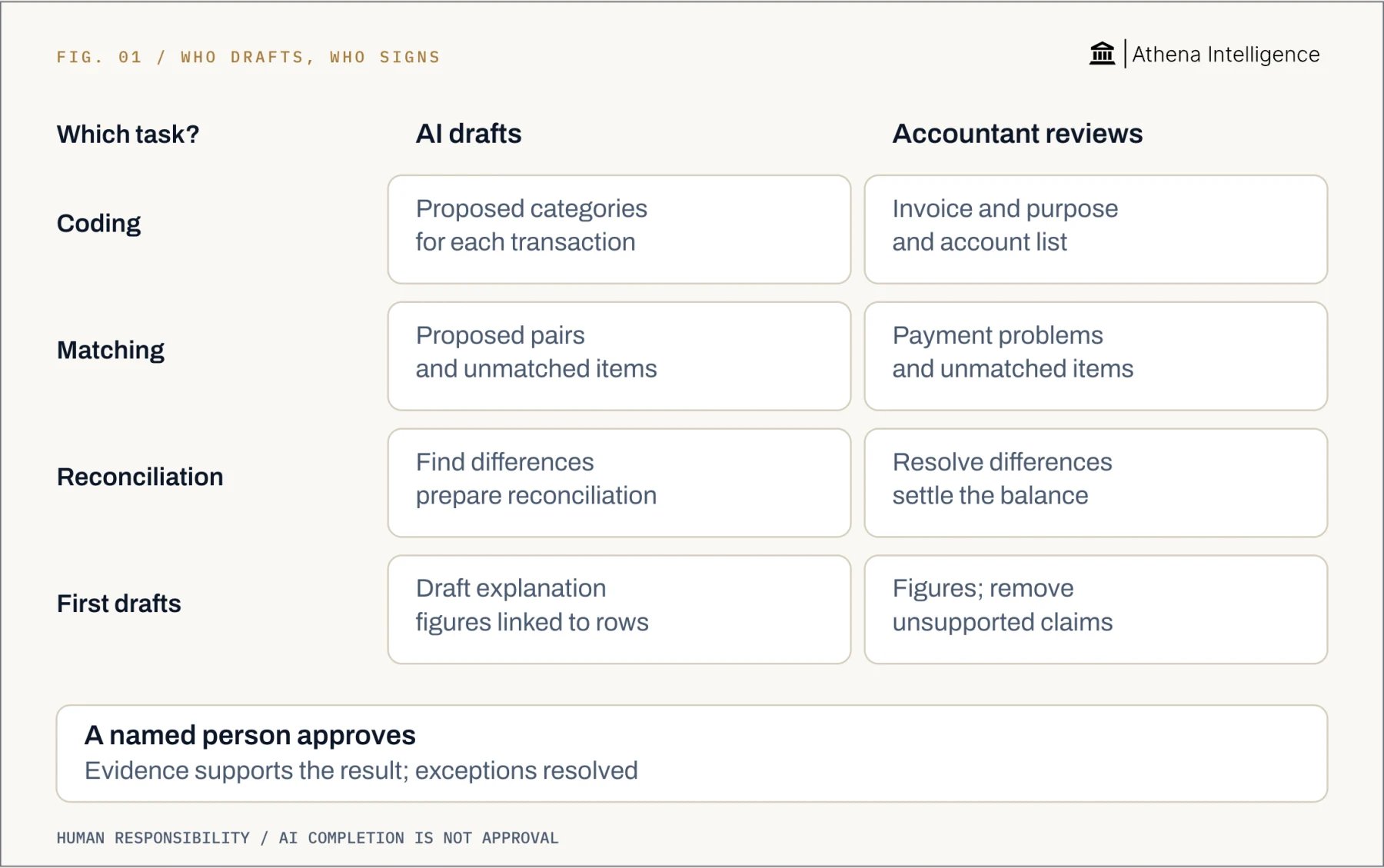
AI can help categorize invoices and reconcile records. Reconciliation means checking one set of records against another, such as a bank statement. AICPA & CIMA identifies invoice categorization and reconciliation as examples of automation.
Intuit’s Accounting Agent supports [transaction categorization, anomaly detection and reconciliation](https://digitalasset.intuit.com/render/content/dam/intuit/pcg/en_us/tax2025/documents/How-to-implement-AI-in-your-tax-and-accounting-firm.pdf). These are useful tasks to consider when choosing a practice exercise.
Start with a small output that another accountant can inspect:
* **Coding:** proposed account categories beside the original invoice identifiers.
* **Matching:** proposed transaction pairs, with unmatched items listed separately.
* **Reconciliation:** discrepancies organized for investigation.
* **Commentary:** a draft explanation with references to the rows behind each figure.
For each output, define what completion means before running the tool. A proposed receipt match might meet your matching rule. Deciding whether it belongs in the reporting period needs a separate accounting decision.
Keep a named person responsible for that decision. AICPA & CIMA says professional responsibility cannot be delegated to AI. It calls for verification, oversight and continued competence.
Use the same approach for client discussions. Prepare the figures, then assign someone to explain the assumptions and agree on the next action. Make that conversation a distinct step in the procedure.
 ## What should accountants learn before using AI on live work?
Start with one task and a fictional spreadsheet. OpenAI says ChatGPT can [analyze uploaded files, create tables and run calculations using Python](https://help.openai.com/en/articles/8437071-data-analysis-with-chatgpt). Its analysis view helps you inspect the generated code and assumptions.
Choose a question whose answer you already know. For example, make a small ledger with one duplicate receipt and one unmatched payment. Keep a manually checked answer beside it.
Try this practice prompt:
> Use this fictional ledger and statement. Propose matches only when date, amount and reference agree. Preserve original row identifiers. List unmatched items separately. Show the matching rules and calculations. Do not alter the source files or infer missing transactions.
Follow a repeatable learning sequence:
1. **Choose the task.** Name the input files and expected output. Keep the exercise narrow enough to check every result.
2. **Write the rules.** Identify the relevant columns and matching criteria. State how to handle missing information and which decisions need escalation.
3. **Check the result.** Confirm the reporting period and input completeness against an independently checked source. Recalculate totals and inspect exceptions. Record each correction.
4. **Save the procedure.** Include instructions, a checked example and a review checklist. Assign an owner and record revisions. Retest after changing the procedure or input format.
5. **Measure the whole job.** Record preparation, processing, review and correction time separately. Count unresolved exceptions. Agree on the criteria for expanding the pilot.
Have another accountant follow the saved instructions without your help. Ask them to identify the duplicate and explain the unmatched payment. Revise any instruction that leaves the expected action unclear.
## How do ChatGPT, Copilot, Gemini and Athena support review?
Compare tools using the same workbook and review question. Ask each to prepare a result that another accountant can inspect. Then look at how the result connects to its supporting records.
OpenAI’s ChatGPT analyzes uploaded files, while [Microsoft 365 Copilot works inside Excel](https://support.microsoft.com/en-us/excel/copilot/get-started-with-copilot-in-excel). Google’s Gemini works inside Google Sheets, including [action preview cards for supported actions](https://support.google.com/docs/answer/14356410?hl=en).
Athena Sheets [records saved changes with their author, conversation and before-and-after values](https://athenaintel.com/launches/01-every-cell-has-an-author/). Its [Compare view shows versions side by side](https://athenaintel.com/use-cases/15-audit-trail-and-rollback/).
## What should accountants learn before using AI on live work?
Start with one task and a fictional spreadsheet. OpenAI says ChatGPT can [analyze uploaded files, create tables and run calculations using Python](https://help.openai.com/en/articles/8437071-data-analysis-with-chatgpt). Its analysis view helps you inspect the generated code and assumptions.
Choose a question whose answer you already know. For example, make a small ledger with one duplicate receipt and one unmatched payment. Keep a manually checked answer beside it.
Try this practice prompt:
> Use this fictional ledger and statement. Propose matches only when date, amount and reference agree. Preserve original row identifiers. List unmatched items separately. Show the matching rules and calculations. Do not alter the source files or infer missing transactions.
Follow a repeatable learning sequence:
1. **Choose the task.** Name the input files and expected output. Keep the exercise narrow enough to check every result.
2. **Write the rules.** Identify the relevant columns and matching criteria. State how to handle missing information and which decisions need escalation.
3. **Check the result.** Confirm the reporting period and input completeness against an independently checked source. Recalculate totals and inspect exceptions. Record each correction.
4. **Save the procedure.** Include instructions, a checked example and a review checklist. Assign an owner and record revisions. Retest after changing the procedure or input format.
5. **Measure the whole job.** Record preparation, processing, review and correction time separately. Count unresolved exceptions. Agree on the criteria for expanding the pilot.
Have another accountant follow the saved instructions without your help. Ask them to identify the duplicate and explain the unmatched payment. Revise any instruction that leaves the expected action unclear.
## How do ChatGPT, Copilot, Gemini and Athena support review?
Compare tools using the same workbook and review question. Ask each to prepare a result that another accountant can inspect. Then look at how the result connects to its supporting records.
OpenAI’s ChatGPT analyzes uploaded files, while [Microsoft 365 Copilot works inside Excel](https://support.microsoft.com/en-us/excel/copilot/get-started-with-copilot-in-excel). Google’s Gemini works inside Google Sheets, including [action preview cards for supported actions](https://support.google.com/docs/answer/14356410?hl=en).
Athena Sheets [records saved changes with their author, conversation and before-and-after values](https://athenaintel.com/launches/01-every-cell-has-an-author/). Its [Compare view shows versions side by side](https://athenaintel.com/use-cases/15-audit-trail-and-rollback/).
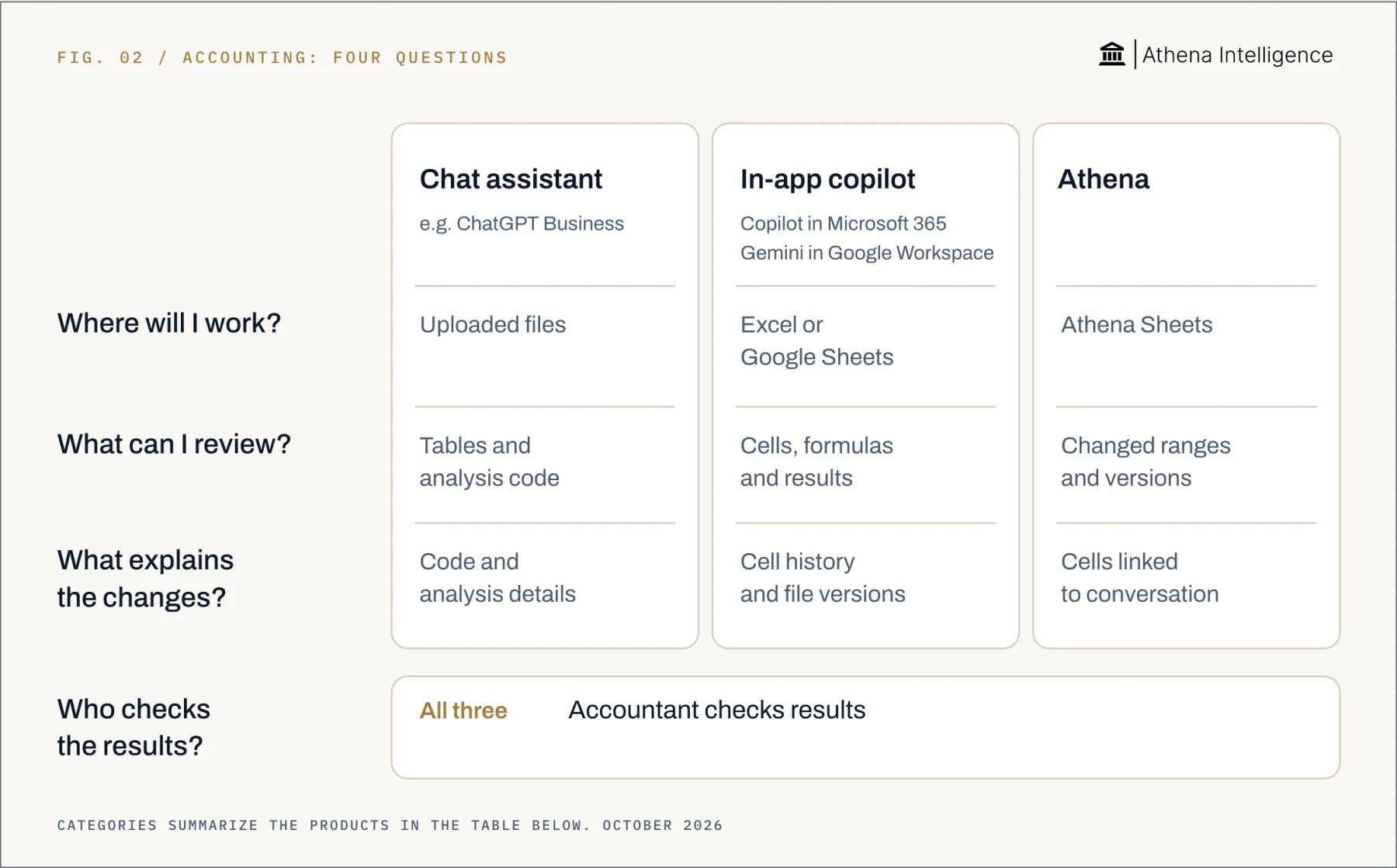 | Review question | ChatGPT | Microsoft Copilot | Gemini | Athena |
| - | - | - | - | - |
| Work surface | [Analyzes uploaded files](https://help.openai.com/en/articles/8437071-data-analysis-with-chatgpt). | [Works inside Excel](https://support.microsoft.com/en-us/excel/copilot/get-started-with-copilot-in-excel). | [Works inside Google Sheets](https://support.google.com/docs/answer/14356410?hl=en). | [Works in Athena Sheets](https://athenaintel.com/launches/01-every-cell-has-an-author/). |
| Review output | [Tables and analysis code](https://help.openai.com/en/articles/8437071-data-analysis-with-chatgpt). | [Cells, formulas and charts](https://support.microsoft.com/en-us/excel/copilot/get-started-with-copilot-in-excel). | [Action previews and results](https://support.google.com/docs/answer/14356410?hl=en). | [Changed cell ranges](https://athenaintel.com/launches/01-every-cell-has-an-author/) and [versions shown in Compare](https://athenaintel.com/use-cases/15-audit-trail-and-rollback/). |
| Edit evidence | [Code and analysis details](https://help.openai.com/en/articles/8437071-data-analysis-with-chatgpt). | [History of cell changes](https://support.microsoft.com/en-us/excel/show-changes-that-were-made-in-a-workbook); [separate Copilot conversation history](https://support.microsoft.com/en-us/excel/copilot/copilot-in-excel-tips). | [Cell history and file versions](https://support.google.com/docs/answer/190843?hl=en). | [Cells linked to conversation](https://athenaintel.com/launches/01-every-cell-has-an-author/). |
| Human review | [Accountant checks results](https://www.aicpa-cima.com/professional-insights/article/ethics-accountancy-and-ai-powered-tools). | [Accountant checks results](https://www.aicpa-cima.com/professional-insights/article/ethics-accountancy-and-ai-powered-tools). | [Accountant checks results](https://www.aicpa-cima.com/professional-insights/article/ethics-accountancy-and-ai-powered-tools). | [Accountant checks results](https://www.aicpa-cima.com/professional-insights/article/ethics-accountancy-and-ai-powered-tools). |
Microsoft’s Excel Show Changes [records who changed what, when, and previous cell values](https://support.microsoft.com/en-us/excel/show-changes-that-were-made-in-a-workbook). [Copilot conversation history is separate](https://support.microsoft.com/en-us/excel/copilot/copilot-in-excel-tips).
Google Sheets provides [cell edit history and file versions](https://support.google.com/docs/answer/190843?hl=en). Gemini offers Undo for its last action until further edits occur.
Test recovery on a copy of the workbook. Change an exchange-rate range, make a separate human correction, then try restoring only the exchange-rate changes. Check whether the human correction survives.
Keep the original workbook, checked result and reviewer’s decision together. This gives the next accountant a clear starting point for reproducing your review.
## How does Athena help a controller review agent work?
Click a changed cell, column or range in Athena Sheets to inspect its saved history. Open **Activity Monitor** to see the touched range and triggering session message. Use **Compare** in Editor to inspect before-and-after versions.
For an exchange-rate update, start with the changed range. Check each rate against your approved source, then inspect the dependent calculations. Record the decision beside the checked result.
If a disputed range needs restoring, Athena lets you roll it back while keeping other edits. That makes recovery more focused when a workbook contains several separate changes.
After a checked session, ask Athena to [create a **Skill**, a saved reusable procedure](https://athenaintel.com/product/build/skills/). It captures the procedure, tools and checks in a library with version history.
Give the procedure an owner and include the example used during review. When the input format changes, rerun that example before applying the procedure to the next reporting period.
## What to plan for
**Employment outcomes vary.** National BLS projections for accountants and auditors and bookkeeping, accounting, and auditing clerks cannot promise that an individual role will remain unchanged. Use measured workload and review effort when discussing staffing.
**Review takes time.** Include investigation and correction when assessing a pilot. Stop when the reviewer cannot verify an output.
**Inputs and privacy need attention.** Following AICPA & CIMA’s guidance, check input quality and where sensitive data is stored. Confirm the approved tool and data scope before uploading client records.
**History has limits.** Microsoft says Excel file [version history requires OneDrive or SharePoint](https://support.microsoft.com/en-gb/office/collab-files/view-previous-versions-of-office-files?nochrome=true). Google says restoring a Google Sheets version clears earlier cell edit history; make a copy when preserving that evidence matters.
**Attribution does not prove accuracy.** Athena records history per save, rather than per keystroke. Within one save, the last change to a cell wins; before-and-after values remain visible.
**Keep your accounting skills current.** AICPA & CIMA warns that overreliance on AI can erode professional competence. Continue practicing the reasoning behind the result.
## Questions teams ask
AI can automate parts of the work alongside accountants. BLS projects growth for accountants and auditors, while AICPA & CIMA says professional responsibility stays with the practitioner.
Review the tasks in your role and the effort needed to check automated results. BLS national projections describe broad occupations rather than individual jobs.
BLS projects a 6% decline for bookkeeping, accounting, and auditing clerks from 2025 to 2035. It links that decline to software automation.
Choose one fictional example with a known answer. Write the rules, check the result and save the procedure with its review checklist.
Yes, OpenAI’s ChatGPT can analyze uploaded spreadsheets and create review tables. Inspect its analysis details, including generated code and assumptions.
Google’s Gemini shows action preview cards for supported actions and offers Undo until further edits occur. Google Sheets also provides cell edit history and file versions.
This documentation is built and hosted on [Mintlify](https://mintlify.com), a developer documentation platform.
| Review question | ChatGPT | Microsoft Copilot | Gemini | Athena |
| - | - | - | - | - |
| Work surface | [Analyzes uploaded files](https://help.openai.com/en/articles/8437071-data-analysis-with-chatgpt). | [Works inside Excel](https://support.microsoft.com/en-us/excel/copilot/get-started-with-copilot-in-excel). | [Works inside Google Sheets](https://support.google.com/docs/answer/14356410?hl=en). | [Works in Athena Sheets](https://athenaintel.com/launches/01-every-cell-has-an-author/). |
| Review output | [Tables and analysis code](https://help.openai.com/en/articles/8437071-data-analysis-with-chatgpt). | [Cells, formulas and charts](https://support.microsoft.com/en-us/excel/copilot/get-started-with-copilot-in-excel). | [Action previews and results](https://support.google.com/docs/answer/14356410?hl=en). | [Changed cell ranges](https://athenaintel.com/launches/01-every-cell-has-an-author/) and [versions shown in Compare](https://athenaintel.com/use-cases/15-audit-trail-and-rollback/). |
| Edit evidence | [Code and analysis details](https://help.openai.com/en/articles/8437071-data-analysis-with-chatgpt). | [History of cell changes](https://support.microsoft.com/en-us/excel/show-changes-that-were-made-in-a-workbook); [separate Copilot conversation history](https://support.microsoft.com/en-us/excel/copilot/copilot-in-excel-tips). | [Cell history and file versions](https://support.google.com/docs/answer/190843?hl=en). | [Cells linked to conversation](https://athenaintel.com/launches/01-every-cell-has-an-author/). |
| Human review | [Accountant checks results](https://www.aicpa-cima.com/professional-insights/article/ethics-accountancy-and-ai-powered-tools). | [Accountant checks results](https://www.aicpa-cima.com/professional-insights/article/ethics-accountancy-and-ai-powered-tools). | [Accountant checks results](https://www.aicpa-cima.com/professional-insights/article/ethics-accountancy-and-ai-powered-tools). | [Accountant checks results](https://www.aicpa-cima.com/professional-insights/article/ethics-accountancy-and-ai-powered-tools). |
Microsoft’s Excel Show Changes [records who changed what, when, and previous cell values](https://support.microsoft.com/en-us/excel/show-changes-that-were-made-in-a-workbook). [Copilot conversation history is separate](https://support.microsoft.com/en-us/excel/copilot/copilot-in-excel-tips).
Google Sheets provides [cell edit history and file versions](https://support.google.com/docs/answer/190843?hl=en). Gemini offers Undo for its last action until further edits occur.
Test recovery on a copy of the workbook. Change an exchange-rate range, make a separate human correction, then try restoring only the exchange-rate changes. Check whether the human correction survives.
Keep the original workbook, checked result and reviewer’s decision together. This gives the next accountant a clear starting point for reproducing your review.
## How does Athena help a controller review agent work?
Click a changed cell, column or range in Athena Sheets to inspect its saved history. Open **Activity Monitor** to see the touched range and triggering session message. Use **Compare** in Editor to inspect before-and-after versions.
For an exchange-rate update, start with the changed range. Check each rate against your approved source, then inspect the dependent calculations. Record the decision beside the checked result.
If a disputed range needs restoring, Athena lets you roll it back while keeping other edits. That makes recovery more focused when a workbook contains several separate changes.
After a checked session, ask Athena to [create a **Skill**, a saved reusable procedure](https://athenaintel.com/product/build/skills/). It captures the procedure, tools and checks in a library with version history.
Give the procedure an owner and include the example used during review. When the input format changes, rerun that example before applying the procedure to the next reporting period.
## What to plan for
**Employment outcomes vary.** National BLS projections for accountants and auditors and bookkeeping, accounting, and auditing clerks cannot promise that an individual role will remain unchanged. Use measured workload and review effort when discussing staffing.
**Review takes time.** Include investigation and correction when assessing a pilot. Stop when the reviewer cannot verify an output.
**Inputs and privacy need attention.** Following AICPA & CIMA’s guidance, check input quality and where sensitive data is stored. Confirm the approved tool and data scope before uploading client records.
**History has limits.** Microsoft says Excel file [version history requires OneDrive or SharePoint](https://support.microsoft.com/en-gb/office/collab-files/view-previous-versions-of-office-files?nochrome=true). Google says restoring a Google Sheets version clears earlier cell edit history; make a copy when preserving that evidence matters.
**Attribution does not prove accuracy.** Athena records history per save, rather than per keystroke. Within one save, the last change to a cell wins; before-and-after values remain visible.
**Keep your accounting skills current.** AICPA & CIMA warns that overreliance on AI can erode professional competence. Continue practicing the reasoning behind the result.
## Questions teams ask
AI can automate parts of the work alongside accountants. BLS projects growth for accountants and auditors, while AICPA & CIMA says professional responsibility stays with the practitioner.
Review the tasks in your role and the effort needed to check automated results. BLS national projections describe broad occupations rather than individual jobs.
BLS projects a 6% decline for bookkeeping, accounting, and auditing clerks from 2025 to 2035. It links that decline to software automation.
Choose one fictional example with a known answer. Write the rules, check the result and save the procedure with its review checklist.
Yes, OpenAI’s ChatGPT can analyze uploaded spreadsheets and create review tables. Inspect its analysis details, including generated code and assumptions.
Google’s Gemini shows action preview cards for supported actions and offers Undo until further edits occur. Google Sheets also provides cell edit history and file versions.
This documentation is built and hosted on [Mintlify](https://mintlify.com), a developer documentation platform.