> ## Documentation Index
> Fetch the complete documentation index at: https://resources.athenaintel.com/llms.txt
> Use this file to discover all available pages before exploring further.
# What is shadow AI, and how can we reduce it without banning AI?
> Reduce shadow AI with approved tools, acceptable use policies, NIST AI RMF, ISO 42001 and practical audits. See Athena's governance controls.
> Microsoft defines shadow AI as [workplace AI use without IT visibility or approval](https://learn.microsoft.com/en-us/microsoft-365/admin/manage/agent-shadow-ai?view=o365-worldwide). Reduce it with approved tools for useful tasks, clear data rules, and tested access, approval and recordkeeping controls.
## What is shadow AI, and what actually goes wrong?
Microsoft warns that unmanaged AI use can expose data, create security vulnerabilities, violate compliance requirements and leave work without an audit trail.
Start by asking employees which tasks need AI and where approved tools failed them. Record the tool, account, data and actions involved. Help people move the task into an approved environment.
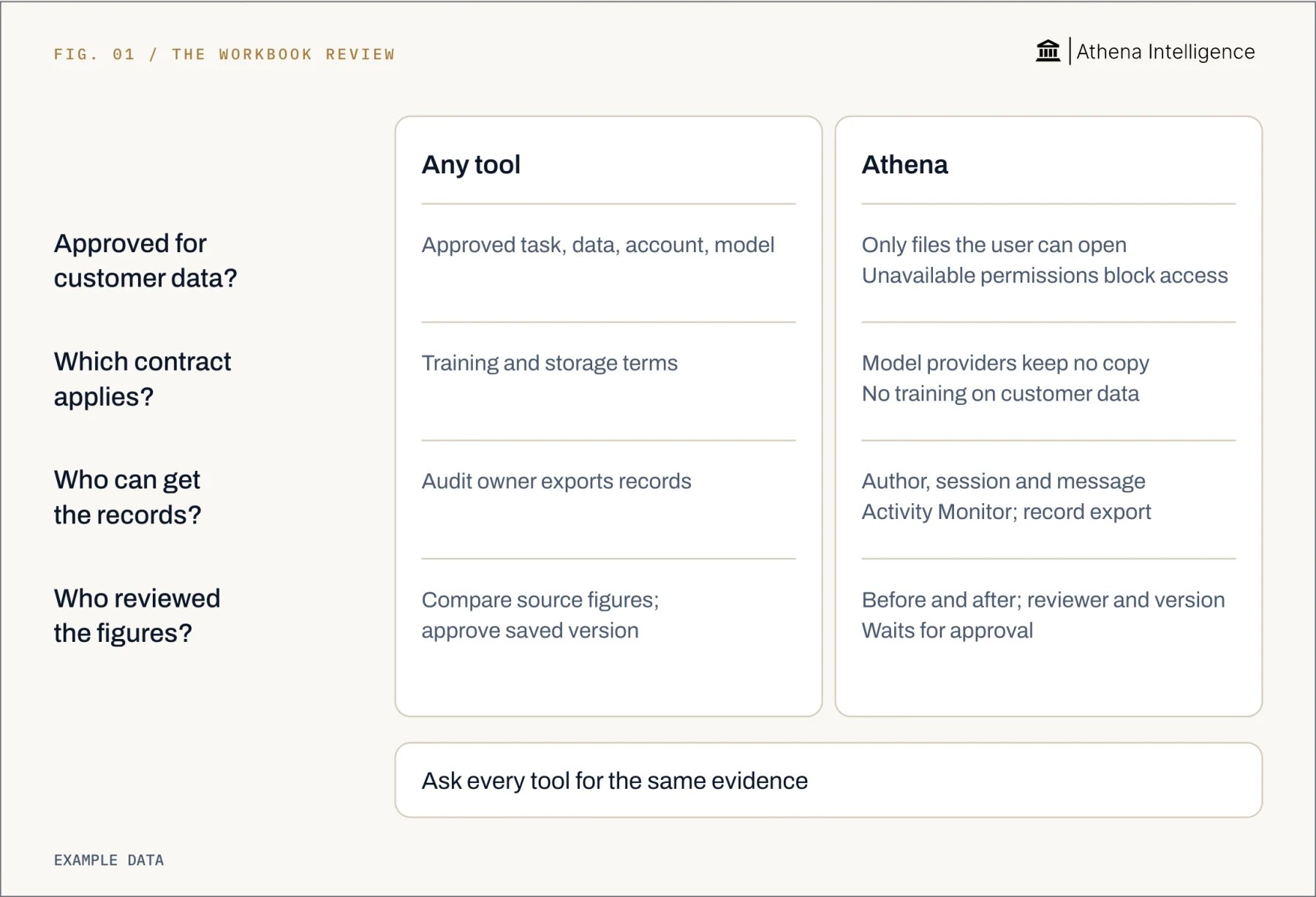
Consider an analyst uploading a customer margin workbook to a personal assistant account. The team needs answers to four questions:
* Was the account approved for customer data?
* Which contract governs the upload?
* Who can retrieve the interaction record?
* Who checked the resulting figures?
Approve the task, data class, work account and model route together. Assign a reviewer to check material figures against the original workbook. Record the version they approved.
 ## Which AI governance framework should we use?
NIST’s AI Risk Management Framework is [voluntary, with four iterative functions](https://airc.nist.gov/airmf-resources/airmf/5-sec-core/). Govern applies across Map, Measure and Manage.
* **Govern:** Assign owners, approval authority and policy responsibilities.
* **Map:** Describe the task, data, affected people and possible failures.
* **Measure:** Test access boundaries, output quality and review coverage.
* **Manage:** Approve, restrict, improve or retire the use.
Connect each risk to an owner, a control and evidence that the control works. Name who approves customer-data analysis and what they must inspect.
ISO’s ISO/IEC 42001:2023 [sets requirements for an AI management system](https://www.iso.org/standard/42001) for organizations providing or using AI. Consider it when you need formal, repeatable oversight.
## What should an AI acceptable use policy say?
Publish approved tools beside the policy. Include work accounts, permitted data classes, supported tasks and a help contact.
1. **Discover current use.** Compare employee reports with procurement, expenses, application inventories and access records. Include embedded AI and local agents.
2. **Define allowed data.** Specify permitted data classes and approval requirements for sensitive information. Use synthetic data for unapproved trials.
3. **Separate drafting from acting.** Name reviewers for material outputs. Require approval before consequential sends, publications or system changes.
4. **Review accounts and contracts.** Check training use, retention, deletion, processing providers and connected access. Record the approved configuration and review date.
5. **Set limits and records.** Define access scope, spending limits and evidence retention. Name who can inspect logs and revoke access.
6. **Provide exceptions and training.** Give requests an owner and response target. Teach the approved workflow and how to report accidental uploads.
Example policy clause:
> Use approved work accounts for approved tasks and data classes. Obtain approval before uploading restricted information or connecting production write access. Review material outputs before use.
Have business, security and legal owners approve the policy. Pair each rule with a configuration check or review record.
## How do we audit AI use and test the controls?
Define the tools, teams, workflows, period and criteria in scope. NIST calls for testing before deployment and during operation, with independent review where appropriate.
1. **Reconcile the inventory.** Compare registered uses with discovery records. Investigate ownerless tools, personal accounts holding work data and unexplained agent access.
2. **Select workflows by risk.** Sample sensitive data, external actions and material outputs.
3. **Test denied access.** Use synthetic files with different permissions. Check that unauthorized users and agents cannot retrieve or modify restricted files. Repeat after revocation.
4. **Test approvals and budgets.** Attempt an action requiring review and check that it waits for the authorized reviewer. Inspect what happens at a spending cap.
5. **Trace a completed task.** Follow its instruction, inputs, output, changes and approval. Recheck material results and identify the version reviewed.
6. **Record and retest findings.** Assign each failed control an owner and correction date. Preserve the retest result and escalate unresolved risks.
Keep configuration exports, test results, sampled records and sign-off together. Give the audit owner direct access to these records.
## How does this compare with ChatGPT, Copilot or Gemini?
Compare the same margin-workbook task in approved work accounts. OpenAI’s ChatGPT Enterprise [provides audit records](https://help.openai.com/en/articles/9261474-openai-compliance-platform-for-enterprise-and-edu-customers). Microsoft’s Copilot in Microsoft 365 [provides audit records](https://learn.microsoft.com/en-us/microsoft-365/copilot/microsoft-365-copilot-architecture-data-protection-auditing). Google’s Gemini in Workspace also [provides audit records](https://knowledge.workspace.google.com/admin/reports/gemini-for-workspace-log-events). Athena also [provides audit records](https://athenaintel.com/product/trust/attribution/).
## Which AI governance framework should we use?
NIST’s AI Risk Management Framework is [voluntary, with four iterative functions](https://airc.nist.gov/airmf-resources/airmf/5-sec-core/). Govern applies across Map, Measure and Manage.
* **Govern:** Assign owners, approval authority and policy responsibilities.
* **Map:** Describe the task, data, affected people and possible failures.
* **Measure:** Test access boundaries, output quality and review coverage.
* **Manage:** Approve, restrict, improve or retire the use.
Connect each risk to an owner, a control and evidence that the control works. Name who approves customer-data analysis and what they must inspect.
ISO’s ISO/IEC 42001:2023 [sets requirements for an AI management system](https://www.iso.org/standard/42001) for organizations providing or using AI. Consider it when you need formal, repeatable oversight.
## What should an AI acceptable use policy say?
Publish approved tools beside the policy. Include work accounts, permitted data classes, supported tasks and a help contact.
1. **Discover current use.** Compare employee reports with procurement, expenses, application inventories and access records. Include embedded AI and local agents.
2. **Define allowed data.** Specify permitted data classes and approval requirements for sensitive information. Use synthetic data for unapproved trials.
3. **Separate drafting from acting.** Name reviewers for material outputs. Require approval before consequential sends, publications or system changes.
4. **Review accounts and contracts.** Check training use, retention, deletion, processing providers and connected access. Record the approved configuration and review date.
5. **Set limits and records.** Define access scope, spending limits and evidence retention. Name who can inspect logs and revoke access.
6. **Provide exceptions and training.** Give requests an owner and response target. Teach the approved workflow and how to report accidental uploads.
Example policy clause:
> Use approved work accounts for approved tasks and data classes. Obtain approval before uploading restricted information or connecting production write access. Review material outputs before use.
Have business, security and legal owners approve the policy. Pair each rule with a configuration check or review record.
## How do we audit AI use and test the controls?
Define the tools, teams, workflows, period and criteria in scope. NIST calls for testing before deployment and during operation, with independent review where appropriate.
1. **Reconcile the inventory.** Compare registered uses with discovery records. Investigate ownerless tools, personal accounts holding work data and unexplained agent access.
2. **Select workflows by risk.** Sample sensitive data, external actions and material outputs.
3. **Test denied access.** Use synthetic files with different permissions. Check that unauthorized users and agents cannot retrieve or modify restricted files. Repeat after revocation.
4. **Test approvals and budgets.** Attempt an action requiring review and check that it waits for the authorized reviewer. Inspect what happens at a spending cap.
5. **Trace a completed task.** Follow its instruction, inputs, output, changes and approval. Recheck material results and identify the version reviewed.
6. **Record and retest findings.** Assign each failed control an owner and correction date. Preserve the retest result and escalate unresolved risks.
Keep configuration exports, test results, sampled records and sign-off together. Give the audit owner direct access to these records.
## How does this compare with ChatGPT, Copilot or Gemini?
Compare the same margin-workbook task in approved work accounts. OpenAI’s ChatGPT Enterprise [provides audit records](https://help.openai.com/en/articles/9261474-openai-compliance-platform-for-enterprise-and-edu-customers). Microsoft’s Copilot in Microsoft 365 [provides audit records](https://learn.microsoft.com/en-us/microsoft-365/copilot/microsoft-365-copilot-architecture-data-protection-auditing). Google’s Gemini in Workspace also [provides audit records](https://knowledge.workspace.google.com/admin/reports/gemini-for-workspace-log-events). Athena also [provides audit records](https://athenaintel.com/product/trust/attribution/).
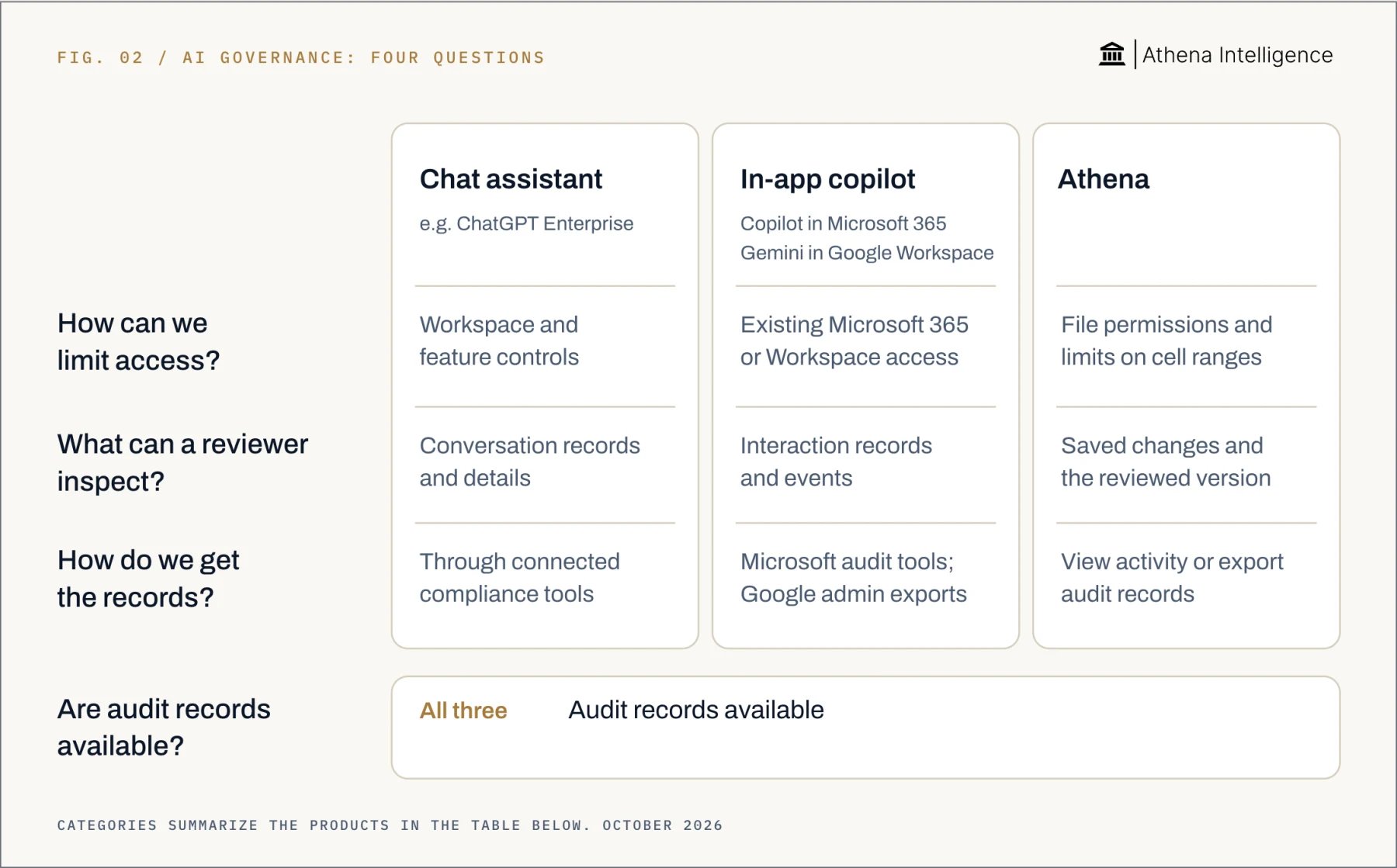 | Governance question | ChatGPT Enterprise | Microsoft 365 Copilot | Gemini in Google Workspace | Athena |
| - | - | - | - | - |
| Access limits | [Workspace and feature controls](https://openai.com/enterprise-privacy/) | [Microsoft 365 permissions](https://learn.microsoft.com/en-us/microsoft-365/copilot/microsoft-365-copilot-architecture-data-protection-auditing) | [Google Workspace permissions](https://knowledge.workspace.google.com/admin/generative-ai/generative-ai-in-google-workspace-privacy-hub) | [Source permissions and range restrictions](https://athenaintel.com/product/trust/permissions-identity/) |
| Audit records | [Audit records available](https://help.openai.com/en/articles/9261474-openai-compliance-platform-for-enterprise-and-edu-customers) | [Audit records available](https://learn.microsoft.com/en-us/microsoft-365/copilot/microsoft-365-copilot-architecture-data-protection-auditing) | [Audit records available](https://knowledge.workspace.google.com/admin/reports/gemini-for-workspace-log-events) | [Audit records available](https://athenaintel.com/product/trust/attribution/) |
| Review evidence | [Logs and metadata](https://help.openai.com/en/articles/9261474-openai-compliance-platform-for-enterprise-and-edu-customers) | [Interactions and references](https://learn.microsoft.com/en-us/microsoft-365/copilot/microsoft-365-copilot-architecture-data-protection-auditing) | [Gemini interaction events](https://knowledge.workspace.google.com/admin/reports/gemini-for-workspace-log-events) | [Saved changes and reviewed-version lineage](https://athenaintel.com/product/trust/attribution/) |
| Evidence retrieval | [Compliance Platform integrations](https://help.openai.com/en/articles/9261474-openai-compliance-platform-for-enterprise-and-edu-customers) | [Purview audit and discovery](https://learn.microsoft.com/en-us/microsoft-365/copilot/microsoft-365-copilot-architecture-data-protection-auditing) | [Admin search and CSV export](https://knowledge.workspace.google.com/admin/reports/gemini-for-workspace-log-events) | [Activity Monitor and audit-log export](https://athenaintel.com/product/trust/attribution/) |
| Training use | [No training by default](https://openai.com/enterprise-privacy/) | [Excluded from foundation-model training](https://learn.microsoft.com/en-us/microsoft-365/copilot/microsoft-365-copilot-privacy) | [Outside-domain training requires permission](https://knowledge.workspace.google.com/admin/generative-ai/generative-ai-in-google-workspace-privacy-hub) | [No customer-data training](https://athenaintel.com/product/trust/models/) |
For each option, ask the reviewer to find changed cells, the prior workbook version and approval evidence. Then ask them to export the records. Use the same task and reviewer role for every test.
Athena’s Compare in Editor shows saved changes alongside their earlier state. Its lineage connects work to the approver and version reviewed. This supports work-product review alongside the audit records all four options offer.
## How does Athena put the policy into practice?
Use a bounded pilot to connect policy rules to a working task:
1. **Set identity and scope.** Athena agents [inherit live source permissions, with asset and cell-range restrictions](https://athenaintel.com/product/trust/permissions-identity/). Test allowed and denied tasks using synthetic workbooks.
2. **Choose the model.** Select a specific model and configure a backup provider for outages. Athena’s provider agreements include [zero data retention and no customer-data training](https://athenaintel.com/product/trust/models/).
3. **Cap the run.** Create an Athena [Agent Operating Procedure, a versioned workflow](https://athenaintel.com/product/build/workflows/). Set [a dollar limit with `max_cost_usd`](https://athenaintel.com/product/trust/budgets-governance/), a model-call limit with `max_model_calls`, or both in the run's `run_budget` when you start it through the API.
4. **Inspect saved changes.** Use Activity Monitor and Compare in Editor. Athena saves identify the human or agent author, session and message, with audit-log export available.
5. **Require tool approvals.** Set your workspace's tool rules so consequential tools ask for approval before they run. Record who reviews them and retest after procedure changes.
## What to plan for
Discovery can miss personal accounts and unmanaged devices. Record coverage gaps and sampling limits, and assign an owner to improve visibility.
The NCSC advises you to [avoid sensitive information in public AI queries](https://www.ncsc.gov.uk/blog-post/chatgpt-and-large-language-models-whats-the-risk). Assess the exact business account’s agreement before approving sensitive work.
Athena inherits excessive source sharing and does not repair it. Correct over-shared folders before approving sensitive workflows.
Ask vendors how long they retain conversations, work products, audit records and backups. Review platform storage separately from model-provider retention agreements.
Check output accuracy against source data. Sent email and committed enterprise resource planning rows are examples of Athena actions that cannot be undone. Require review before those actions and keep an incident response plan.
Read the full ISO standard before making a conformity claim. Assign owners to interpret legal obligations, test controls and accept remaining risk.
## Questions teams ask
Microsoft defines shadow AI as workplace AI use without IT visibility or approval. Inventory the task, account and data so remediation addresses the actual use.
Provide an approved route and restrict specific unsafe uses. Offer a quick exception process and check whether approved tools support employees’ work.
NIST’s AI RMF is voluntary risk-management guidance organized around four functions. ISO’s ISO/IEC 42001 sets requirements for an organizational AI management system.
Produce a scoped inventory, control tests, sampled evidence, findings with owners and retest results.
Yes. OpenAI’s ChatGPT Enterprise provides [workspace and feature controls](https://openai.com/enterprise-privacy/) and audit records through its Compliance Platform. Microsoft’s Copilot provides administrative controls and audit records. Google’s Gemini in Workspace provides [controls through Workspace permissions](https://knowledge.workspace.google.com/admin/generative-ai/generative-ai-in-google-workspace-privacy-hub) and Gemini interaction audit records. Test the configuration and evidence your authorized reviewers can retrieve.
Athena connects saved changes to their author and reviewed version, alongside source permission controls and configurable run budgets. Use those controls to review the work itself.
[See it work](https://athenaintel.com/demo/)
This documentation is built and hosted on [Mintlify](https://mintlify.com), a developer documentation platform.
| Governance question | ChatGPT Enterprise | Microsoft 365 Copilot | Gemini in Google Workspace | Athena |
| - | - | - | - | - |
| Access limits | [Workspace and feature controls](https://openai.com/enterprise-privacy/) | [Microsoft 365 permissions](https://learn.microsoft.com/en-us/microsoft-365/copilot/microsoft-365-copilot-architecture-data-protection-auditing) | [Google Workspace permissions](https://knowledge.workspace.google.com/admin/generative-ai/generative-ai-in-google-workspace-privacy-hub) | [Source permissions and range restrictions](https://athenaintel.com/product/trust/permissions-identity/) |
| Audit records | [Audit records available](https://help.openai.com/en/articles/9261474-openai-compliance-platform-for-enterprise-and-edu-customers) | [Audit records available](https://learn.microsoft.com/en-us/microsoft-365/copilot/microsoft-365-copilot-architecture-data-protection-auditing) | [Audit records available](https://knowledge.workspace.google.com/admin/reports/gemini-for-workspace-log-events) | [Audit records available](https://athenaintel.com/product/trust/attribution/) |
| Review evidence | [Logs and metadata](https://help.openai.com/en/articles/9261474-openai-compliance-platform-for-enterprise-and-edu-customers) | [Interactions and references](https://learn.microsoft.com/en-us/microsoft-365/copilot/microsoft-365-copilot-architecture-data-protection-auditing) | [Gemini interaction events](https://knowledge.workspace.google.com/admin/reports/gemini-for-workspace-log-events) | [Saved changes and reviewed-version lineage](https://athenaintel.com/product/trust/attribution/) |
| Evidence retrieval | [Compliance Platform integrations](https://help.openai.com/en/articles/9261474-openai-compliance-platform-for-enterprise-and-edu-customers) | [Purview audit and discovery](https://learn.microsoft.com/en-us/microsoft-365/copilot/microsoft-365-copilot-architecture-data-protection-auditing) | [Admin search and CSV export](https://knowledge.workspace.google.com/admin/reports/gemini-for-workspace-log-events) | [Activity Monitor and audit-log export](https://athenaintel.com/product/trust/attribution/) |
| Training use | [No training by default](https://openai.com/enterprise-privacy/) | [Excluded from foundation-model training](https://learn.microsoft.com/en-us/microsoft-365/copilot/microsoft-365-copilot-privacy) | [Outside-domain training requires permission](https://knowledge.workspace.google.com/admin/generative-ai/generative-ai-in-google-workspace-privacy-hub) | [No customer-data training](https://athenaintel.com/product/trust/models/) |
For each option, ask the reviewer to find changed cells, the prior workbook version and approval evidence. Then ask them to export the records. Use the same task and reviewer role for every test.
Athena’s Compare in Editor shows saved changes alongside their earlier state. Its lineage connects work to the approver and version reviewed. This supports work-product review alongside the audit records all four options offer.
## How does Athena put the policy into practice?
Use a bounded pilot to connect policy rules to a working task:
1. **Set identity and scope.** Athena agents [inherit live source permissions, with asset and cell-range restrictions](https://athenaintel.com/product/trust/permissions-identity/). Test allowed and denied tasks using synthetic workbooks.
2. **Choose the model.** Select a specific model and configure a backup provider for outages. Athena’s provider agreements include [zero data retention and no customer-data training](https://athenaintel.com/product/trust/models/).
3. **Cap the run.** Create an Athena [Agent Operating Procedure, a versioned workflow](https://athenaintel.com/product/build/workflows/). Set [a dollar limit with `max_cost_usd`](https://athenaintel.com/product/trust/budgets-governance/), a model-call limit with `max_model_calls`, or both in the run's `run_budget` when you start it through the API.
4. **Inspect saved changes.** Use Activity Monitor and Compare in Editor. Athena saves identify the human or agent author, session and message, with audit-log export available.
5. **Require tool approvals.** Set your workspace's tool rules so consequential tools ask for approval before they run. Record who reviews them and retest after procedure changes.
## What to plan for
Discovery can miss personal accounts and unmanaged devices. Record coverage gaps and sampling limits, and assign an owner to improve visibility.
The NCSC advises you to [avoid sensitive information in public AI queries](https://www.ncsc.gov.uk/blog-post/chatgpt-and-large-language-models-whats-the-risk). Assess the exact business account’s agreement before approving sensitive work.
Athena inherits excessive source sharing and does not repair it. Correct over-shared folders before approving sensitive workflows.
Ask vendors how long they retain conversations, work products, audit records and backups. Review platform storage separately from model-provider retention agreements.
Check output accuracy against source data. Sent email and committed enterprise resource planning rows are examples of Athena actions that cannot be undone. Require review before those actions and keep an incident response plan.
Read the full ISO standard before making a conformity claim. Assign owners to interpret legal obligations, test controls and accept remaining risk.
## Questions teams ask
Microsoft defines shadow AI as workplace AI use without IT visibility or approval. Inventory the task, account and data so remediation addresses the actual use.
Provide an approved route and restrict specific unsafe uses. Offer a quick exception process and check whether approved tools support employees’ work.
NIST’s AI RMF is voluntary risk-management guidance organized around four functions. ISO’s ISO/IEC 42001 sets requirements for an organizational AI management system.
Produce a scoped inventory, control tests, sampled evidence, findings with owners and retest results.
Yes. OpenAI’s ChatGPT Enterprise provides [workspace and feature controls](https://openai.com/enterprise-privacy/) and audit records through its Compliance Platform. Microsoft’s Copilot provides administrative controls and audit records. Google’s Gemini in Workspace provides [controls through Workspace permissions](https://knowledge.workspace.google.com/admin/generative-ai/generative-ai-in-google-workspace-privacy-hub) and Gemini interaction audit records. Test the configuration and evidence your authorized reviewers can retrieve.
Athena connects saved changes to their author and reviewed version, alongside source permission controls and configurable run budgets. Use those controls to review the work itself.
[See it work](https://athenaintel.com/demo/)
This documentation is built and hosted on [Mintlify](https://mintlify.com), a developer documentation platform.