> ## Documentation Index
> Fetch the complete documentation index at: https://resources.athenaintel.com/llms.txt
> Use this file to discover all available pages before exploring further.
# AI spreadsheet tools with an audit trail and range rollback
> Compare Copilot, Gemini, Claude, ChatGPT and spreadsheet audit tools for saved cell changes, AI attribution, audit exports and range rollback.
> Yes, Microsoft’s Excel with Copilot [tracks supported edits](https://support.microsoft.com/en-us/excel/copilot/copilot-in-excel-change-history) with [human and Copilot attribution](https://www.microsoft.com/en-us/copilot/blog/2026/06/25/copilot-in-excel-built-for-the-era-of-frontier-finance/) and [restores workbook versions](https://support.microsoft.com/en-us/office/collab-files/view-previous-versions-of-office-files). Athena [records saved changes with human or agent authorship](https://athenaintel.com/launches/01-every-cell-has-an-author/), links agent edits to conversations, and [supports range rollback](https://athenaintel.com/use-cases/15-audit-trail-and-rollback/) through its Sheets and [desktop Excel workflow](https://athenaintel.com/product/surfaces/office-add-in/).
## What should a spreadsheet change record contain?
Start with the question a reviewer must answer: what changed, who changed it, and which saved version contains the result? Keep the instruction and source figures beside that record. A chat summary alone cannot show which numbers reached the workbook.
Three records serve different needs:
* **Cell history** helps you inspect changes to values or formulas.
* **File history** helps you recover an earlier workbook.
* **Agent activity** helps you review instructions and actions.
Choose recovery as carefully as history. Restoring yesterday's entire workbook may remove today's approved correction. Selective range rollback lets you recover chosen cells while keeping changes elsewhere.
For accounting work, begin with one realistic review task. Pick an assumption range, its source evidence and a separate approved correction. Decide what another reviewer should be able to retrieve before comparing products.
## How do Copilot, Gemini and Athena compare?
Microsoft’s Copilot, Google’s Gemini and Athena all offer a way to inspect changed spreadsheet contents, through Excel Show Changes, [Google Sheets history](https://support.google.com/docs/answer/190843?hl=en) and Athena’s saved cell history. Their authorship, context and recovery workflows differ. The table compares those workflows for a saved edit.
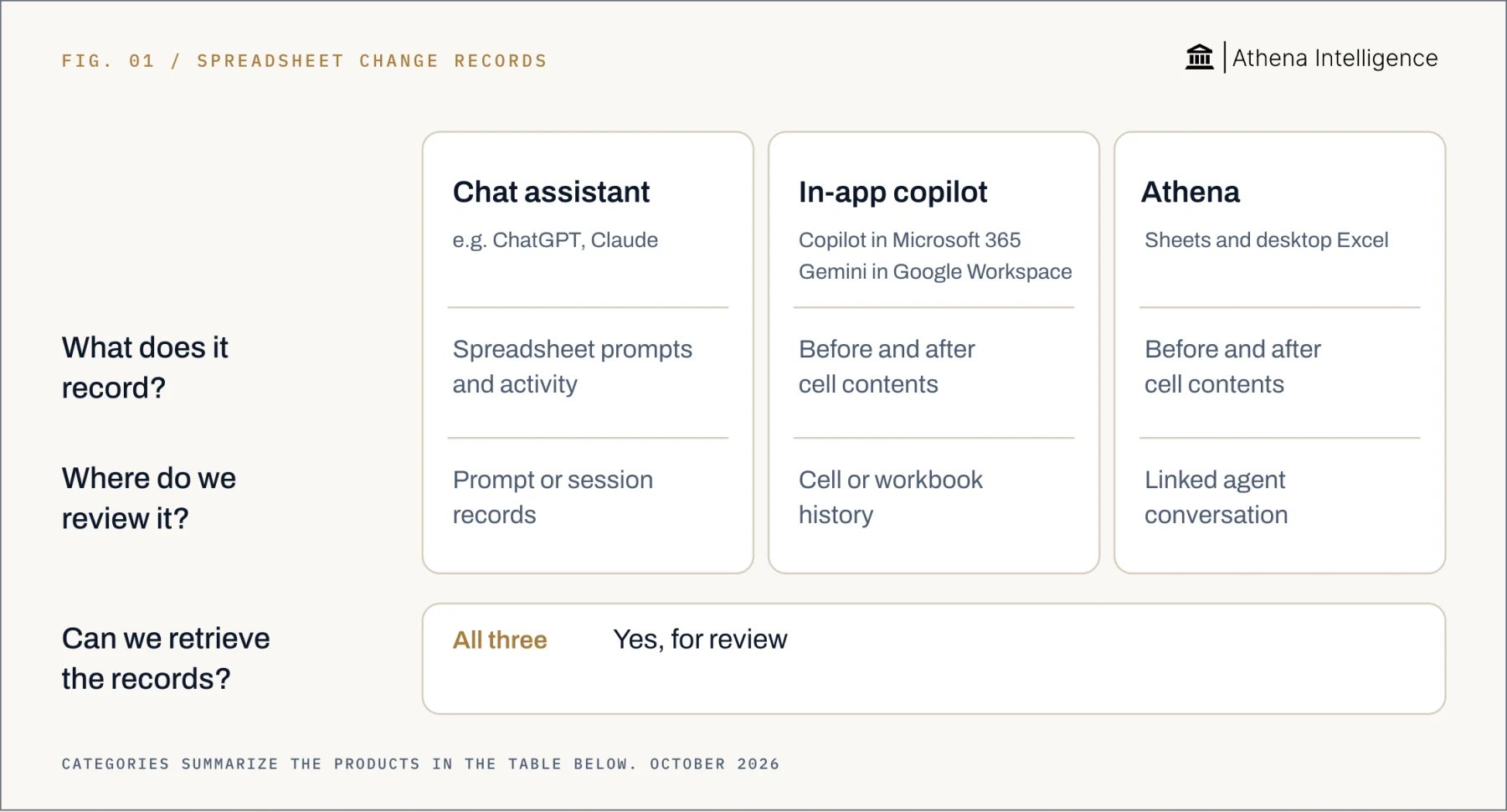 | Review need | Microsoft Copilot | Gemini | Athena |
| - | - | - | - |
| Change history | [Before and after contents](https://support.microsoft.com/en-gb/excel/get-help-with-show-changes-in-excel). | [Before and after contents](https://support.google.com/docs/answer/190843?hl=en). | [Before and after contents](https://athenaintel.com/launches/01-every-cell-has-an-author/). |
| Authorship | [Editor attribution in history](https://support.microsoft.com/en-us/excel/copilot/copilot-in-excel-change-history) and [attribution for Copilot edits](https://www.microsoft.com/en-us/copilot/blog/2026/06/25/copilot-in-excel-built-for-the-era-of-frontier-finance/). | Google identifies [the editor behind changes](https://support.google.com/docs/answer/190843?hl=en). | [Human or agent per save](https://athenaintel.com/launches/01-every-cell-has-an-author/). |
| Review context | Microsoft’s [Show Changes review workflow](https://support.microsoft.com/en-us/excel/copilot/copilot-in-excel-change-history) for [supported spreadsheet cell edits](https://support.microsoft.com/en-gb/excel/get-help-with-show-changes-in-excel). | Google’s [spreadsheet cell edit history](https://support.google.com/docs/answer/190843?hl=en) and [Gemini conversations in Workspace](https://support.google.com/docs/answer/16880047?hl=en). | [Linked agent conversation](https://athenaintel.com/launches/01-every-cell-has-an-author/) with [session and message context](https://athenaintel.com/product/trust/attribution/). |
| Recovery | [Restore workbook version](https://support.microsoft.com/en-us/office/collab-files/view-previous-versions-of-office-files). | [Undo the last action](https://support.google.com/docs/answer/14356410?hl=en); [restore an earlier version](https://support.google.com/docs/answer/190843?hl=en). | [Roll back selected range](https://athenaintel.com/use-cases/15-audit-trail-and-rollback/). |
Athena's difference here is the connection between a saved cell change and its agent conversation and recovery of a selected range. Microsoft’s Copilot and Google’s Gemini already offer spreadsheet history through Excel’s Show Changes feature and Google Sheets edit history. Choose based on the review you need to perform.
Other tools cover different parts of the task. OpenAI’s ChatGPT Excel and Sheets integrations give Enterprise administrators [access to spreadsheet prompts and responses through the Compliance API](https://help.openai.com/en/articles/20001063-chatgpt-for-excel-and-google-sheets). Anthropic’s Claude [links prompts and tool actions by session](https://claude.com/docs/office-agents/opentelemetry) and can send them to an organization's configured collection service.
DataSnipper [records each agent action in a worksheet log](https://knowledge.datasnipper.com/en/articles/819773-excel-agents-audit-activity-log) and [links chat summaries to affected ranges](https://knowledge.datasnipper.com/en/articles/702973-2026). xltrail [compares workbook versions](https://www.xltrail.com/docs/en/stable/features_and_navigation) and lets you [download an earlier workbook](https://www.xltrail.com/blog/collaborate-on-excel-workbooks). Rockhopper provides [old/new cell values and human/AI attribution](https://www.rockhopper.co/features/track-changes/) and [restoration of earlier workbook versions](https://www.rockhopper.co/features/version-control/).
## When is native version history enough?
Use native history when you need to inspect a change or recover the whole file. In Microsoft’s Excel, open **Review → Show Changes** to inspect supported spreadsheet edits. Open **File → Info → Version History** for earlier saved workbook versions.
Check Microsoft’s editor name and Copilot indicator when reviewing an AI edit. Then compare the affected cells with the instruction and source figures. Keep the version you approved with the supporting evidence.
In Google Sheets, right-click a cell and choose **Show edit history**. Open **Last edit / Version history** to inspect earlier file versions. Google’s Workspace conversation history gives you another place to [review your Gemini chats](https://support.google.com/docs/answer/16880047?hl=en).
Whole-file recovery suits a workbook whose later changes can all be discarded. A forecast with several approved corrections needs a more selective recovery test. Decide which cells must return to their old state and which must remain untouched.
## How does Athena handle review and range rollback?
Athena Sheets records the author and before/after contents at each save. Agent edits [link to the session and message behind the work](https://athenaintel.com/product/trust/attribution/). Use that connection to move from a changed number to the instruction that caused it.
For desktop Excel, choose **Copy to Athena** in the Office add-in. This moves the workbook into Studios, Athena's editing workspace, and sync returns the result with attribution. The add-in keeps the history intact through sync with Athena Sheets.
Review a fictional exchange-rate edit in four steps:
1. **Open Activity Monitor.** Find the affected range and inspect the old and new contents.
2. **Open the linked conversation.** Read the message that triggered the edit and the explanation in the conversation, then compare the rate with your retained source.
3. **Open Compare in Editor.** Inspect the saved states side by side.
4. **Roll back the range.** Keep changes outside the selected range and inspect the recorded rollback author.
In Athena, people with edit rights can roll back, subject to organizational policy. Export the change log for the file or workspace. Give another authorized reviewer the saved workbook and its evidence so they can repeat the review.
| Review need | Microsoft Copilot | Gemini | Athena |
| - | - | - | - |
| Change history | [Before and after contents](https://support.microsoft.com/en-gb/excel/get-help-with-show-changes-in-excel). | [Before and after contents](https://support.google.com/docs/answer/190843?hl=en). | [Before and after contents](https://athenaintel.com/launches/01-every-cell-has-an-author/). |
| Authorship | [Editor attribution in history](https://support.microsoft.com/en-us/excel/copilot/copilot-in-excel-change-history) and [attribution for Copilot edits](https://www.microsoft.com/en-us/copilot/blog/2026/06/25/copilot-in-excel-built-for-the-era-of-frontier-finance/). | Google identifies [the editor behind changes](https://support.google.com/docs/answer/190843?hl=en). | [Human or agent per save](https://athenaintel.com/launches/01-every-cell-has-an-author/). |
| Review context | Microsoft’s [Show Changes review workflow](https://support.microsoft.com/en-us/excel/copilot/copilot-in-excel-change-history) for [supported spreadsheet cell edits](https://support.microsoft.com/en-gb/excel/get-help-with-show-changes-in-excel). | Google’s [spreadsheet cell edit history](https://support.google.com/docs/answer/190843?hl=en) and [Gemini conversations in Workspace](https://support.google.com/docs/answer/16880047?hl=en). | [Linked agent conversation](https://athenaintel.com/launches/01-every-cell-has-an-author/) with [session and message context](https://athenaintel.com/product/trust/attribution/). |
| Recovery | [Restore workbook version](https://support.microsoft.com/en-us/office/collab-files/view-previous-versions-of-office-files). | [Undo the last action](https://support.google.com/docs/answer/14356410?hl=en); [restore an earlier version](https://support.google.com/docs/answer/190843?hl=en). | [Roll back selected range](https://athenaintel.com/use-cases/15-audit-trail-and-rollback/). |
Athena's difference here is the connection between a saved cell change and its agent conversation and recovery of a selected range. Microsoft’s Copilot and Google’s Gemini already offer spreadsheet history through Excel’s Show Changes feature and Google Sheets edit history. Choose based on the review you need to perform.
Other tools cover different parts of the task. OpenAI’s ChatGPT Excel and Sheets integrations give Enterprise administrators [access to spreadsheet prompts and responses through the Compliance API](https://help.openai.com/en/articles/20001063-chatgpt-for-excel-and-google-sheets). Anthropic’s Claude [links prompts and tool actions by session](https://claude.com/docs/office-agents/opentelemetry) and can send them to an organization's configured collection service.
DataSnipper [records each agent action in a worksheet log](https://knowledge.datasnipper.com/en/articles/819773-excel-agents-audit-activity-log) and [links chat summaries to affected ranges](https://knowledge.datasnipper.com/en/articles/702973-2026). xltrail [compares workbook versions](https://www.xltrail.com/docs/en/stable/features_and_navigation) and lets you [download an earlier workbook](https://www.xltrail.com/blog/collaborate-on-excel-workbooks). Rockhopper provides [old/new cell values and human/AI attribution](https://www.rockhopper.co/features/track-changes/) and [restoration of earlier workbook versions](https://www.rockhopper.co/features/version-control/).
## When is native version history enough?
Use native history when you need to inspect a change or recover the whole file. In Microsoft’s Excel, open **Review → Show Changes** to inspect supported spreadsheet edits. Open **File → Info → Version History** for earlier saved workbook versions.
Check Microsoft’s editor name and Copilot indicator when reviewing an AI edit. Then compare the affected cells with the instruction and source figures. Keep the version you approved with the supporting evidence.
In Google Sheets, right-click a cell and choose **Show edit history**. Open **Last edit / Version history** to inspect earlier file versions. Google’s Workspace conversation history gives you another place to [review your Gemini chats](https://support.google.com/docs/answer/16880047?hl=en).
Whole-file recovery suits a workbook whose later changes can all be discarded. A forecast with several approved corrections needs a more selective recovery test. Decide which cells must return to their old state and which must remain untouched.
## How does Athena handle review and range rollback?
Athena Sheets records the author and before/after contents at each save. Agent edits [link to the session and message behind the work](https://athenaintel.com/product/trust/attribution/). Use that connection to move from a changed number to the instruction that caused it.
For desktop Excel, choose **Copy to Athena** in the Office add-in. This moves the workbook into Studios, Athena's editing workspace, and sync returns the result with attribution. The add-in keeps the history intact through sync with Athena Sheets.
Review a fictional exchange-rate edit in four steps:
1. **Open Activity Monitor.** Find the affected range and inspect the old and new contents.
2. **Open the linked conversation.** Read the message that triggered the edit and the explanation in the conversation, then compare the rate with your retained source.
3. **Open Compare in Editor.** Inspect the saved states side by side.
4. **Roll back the range.** Keep changes outside the selected range and inspect the recorded rollback author.
In Athena, people with edit rights can roll back, subject to organizational policy. Export the change log for the file or workspace. Give another authorized reviewer the saved workbook and its evidence so they can repeat the review.
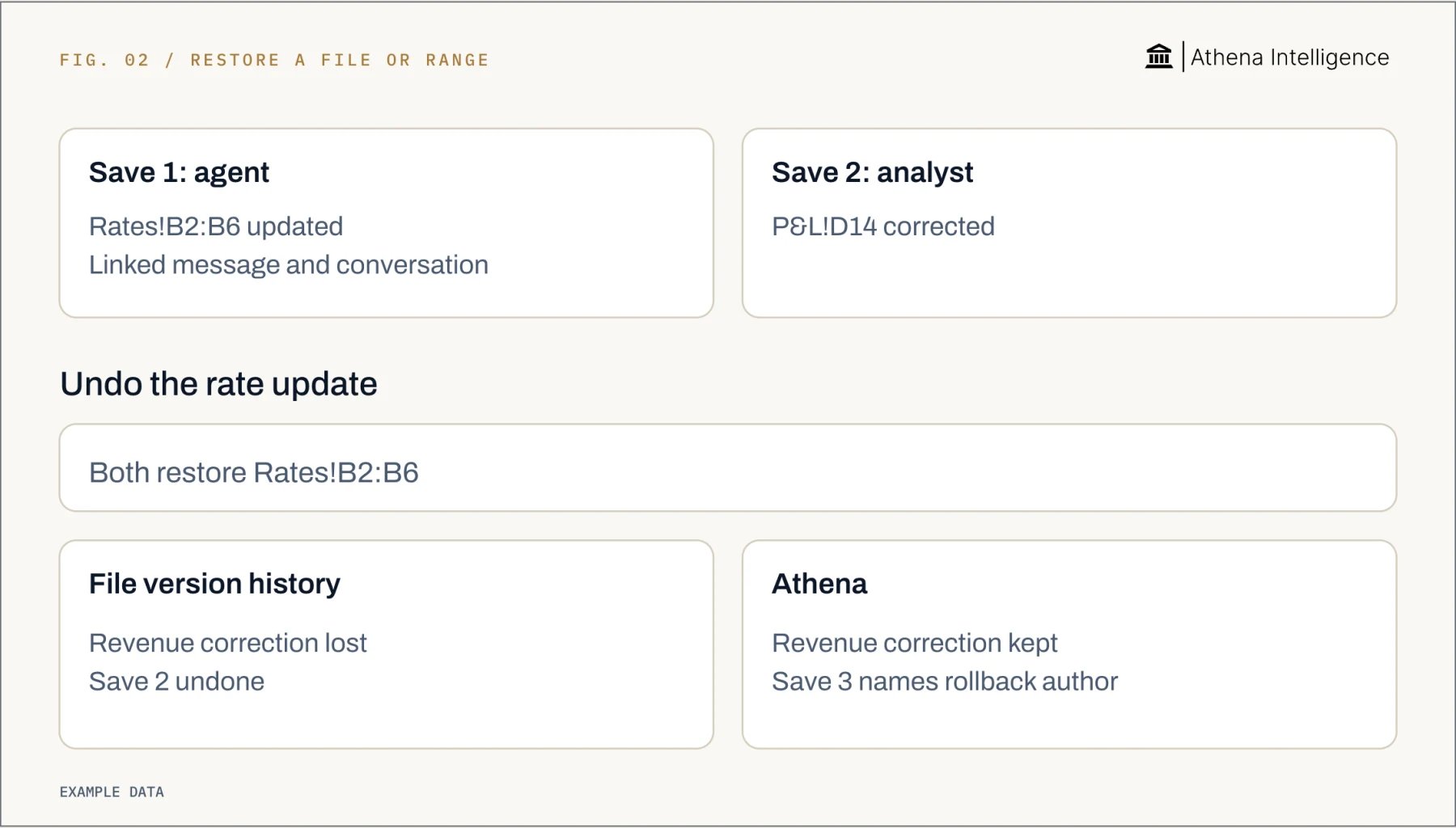 ## How should you test recovery before using real figures?
Run the same exercise for each candidate tool on a workbook with fictional figures. This is a proposed test, not a result. Make the expected outcome clear before the assistant edits anything.
1. Save a baseline. Note the exchange-rate range and a separate revenue cell.
2. Ask the assistant to change only the exchange rates. Save and retain the instruction and source rates.
3. Have an analyst correct the separate revenue cell. Save again.
4. Find the saved exchange-rate edit. Retrieve its author, previous contents, new contents and instruction.
5. Recover only the exchange-rate range. Check that the later revenue correction remains and dependent formulas calculate correctly.
6. Export the evidence. Ask another authorized reviewer to retrieve the same edit and reviewed version.
Record where the test succeeds and where it needs manual work. Include desktop sync if that is how your team works. Use the result to choose a workflow and assign responsibility for approval.
## What to plan for
Restoring a Google spreadsheet clears cell history from before the restore, so preserve a copy when you need that record. Google’s Gemini [last-action Undo must happen before further edits](https://support.google.com/docs/answer/14356410?hl=en). Athena keeps history per save; same-cell edits within one save retain the last writer and before/after contents.
DataSnipper users can turn off activity recording. xltrail [excludes calculated results from its tracked cell differences](https://www.xltrail.com/). Account for these limits when deciding which evidence to retain.
Agree on retention periods, reviewer permissions and export fields. Ask vendors how deletion affects conversations, change logs and backups. Check source figures and calculations independently before approval.
Workbook rollback cannot retrieve disclosed information. Sent email and committed business-system writes remain outside Athena’s workbook rollback. A change record does not prove correctness or accounting compliance.
## Questions teams ask
Microsoft’s Copilot tracks supported edits with attribution for Copilot edits and offers recovery of workbook versions. Athena records saved spreadsheet changes and supports rollback of selected ranges with history retained through Excel sync.
Microsoft’s Copilot, Google’s Gemini and Athena offer spreadsheet change history through Excel Show Changes, Google Sheets history and Athena’s saved cell history. DataSnipper records spreadsheet agent actions, while OpenAI’s ChatGPT offers enterprise records of spreadsheet prompts and responses and Anthropic’s Claude offers enterprise records of prompts or tool activity.
Require source figures, named authors, saved before/after contents, independent calculation checks and demonstrated recovery. Set approval responsibilities before using real financial data.
Athena supports selected-range rollback while keeping other changes. Use the fictional workbook exercise above to check your team's recovery flow.
It records an AI system's inputs, actions or changes and the context needed to review them. For spreadsheets, distinguish chat records from saved cell history.
Find the changed range, its author, the instruction and the saved version. Then recover the intended cells and check the resulting calculations.
[See it work](https://athenaintel.com/demo/)
This documentation is built and hosted on [Mintlify](https://mintlify.com), a developer documentation platform.
## How should you test recovery before using real figures?
Run the same exercise for each candidate tool on a workbook with fictional figures. This is a proposed test, not a result. Make the expected outcome clear before the assistant edits anything.
1. Save a baseline. Note the exchange-rate range and a separate revenue cell.
2. Ask the assistant to change only the exchange rates. Save and retain the instruction and source rates.
3. Have an analyst correct the separate revenue cell. Save again.
4. Find the saved exchange-rate edit. Retrieve its author, previous contents, new contents and instruction.
5. Recover only the exchange-rate range. Check that the later revenue correction remains and dependent formulas calculate correctly.
6. Export the evidence. Ask another authorized reviewer to retrieve the same edit and reviewed version.
Record where the test succeeds and where it needs manual work. Include desktop sync if that is how your team works. Use the result to choose a workflow and assign responsibility for approval.
## What to plan for
Restoring a Google spreadsheet clears cell history from before the restore, so preserve a copy when you need that record. Google’s Gemini [last-action Undo must happen before further edits](https://support.google.com/docs/answer/14356410?hl=en). Athena keeps history per save; same-cell edits within one save retain the last writer and before/after contents.
DataSnipper users can turn off activity recording. xltrail [excludes calculated results from its tracked cell differences](https://www.xltrail.com/). Account for these limits when deciding which evidence to retain.
Agree on retention periods, reviewer permissions and export fields. Ask vendors how deletion affects conversations, change logs and backups. Check source figures and calculations independently before approval.
Workbook rollback cannot retrieve disclosed information. Sent email and committed business-system writes remain outside Athena’s workbook rollback. A change record does not prove correctness or accounting compliance.
## Questions teams ask
Microsoft’s Copilot tracks supported edits with attribution for Copilot edits and offers recovery of workbook versions. Athena records saved spreadsheet changes and supports rollback of selected ranges with history retained through Excel sync.
Microsoft’s Copilot, Google’s Gemini and Athena offer spreadsheet change history through Excel Show Changes, Google Sheets history and Athena’s saved cell history. DataSnipper records spreadsheet agent actions, while OpenAI’s ChatGPT offers enterprise records of spreadsheet prompts and responses and Anthropic’s Claude offers enterprise records of prompts or tool activity.
Require source figures, named authors, saved before/after contents, independent calculation checks and demonstrated recovery. Set approval responsibilities before using real financial data.
Athena supports selected-range rollback while keeping other changes. Use the fictional workbook exercise above to check your team's recovery flow.
It records an AI system's inputs, actions or changes and the context needed to review them. For spreadsheets, distinguish chat records from saved cell history.
Find the changed range, its author, the instruction and the saved version. Then recover the intended cells and check the resulting calculations.
[See it work](https://athenaintel.com/demo/)
This documentation is built and hosted on [Mintlify](https://mintlify.com), a developer documentation platform.