> ## Documentation Index
> Fetch the complete documentation index at: https://resources.athenaintel.com/llms.txt
> Use this file to discover all available pages before exploring further.
# AI made up numbers in my financial model: how do I catch hallucinated figures?
> Catch fabricated AI figures with source cells, independent calculations, and a finance review checklist. See how Athena makes changes traceable.
> Catch hallucinated figures by tracing inputs to source cells or documents, then independently recomputing the outputs. Athena [adds version-aware citations](https://athenaintel.com/product/trust/attribution/) and [saved-change history to help reviewers inspect and correct the work](https://athenaintel.com/product/work/studios/sheets/).
## Why does AI make up numbers in financial analysis?
OpenAI describes an AI hallucination as [an incorrect or fabricated answer presented as fact](https://help.openai.com/en/articles/8313428-does-chatgpt-tell-the-truth). ChatGPT generates responses from learned patterns and can invent facts or citations.
Start by separating three problems. A fabricated input needs a real source. A wrong calculation needs a corrected formula, while a stale figure needs current data.
These hypothetical examples show what to look for:
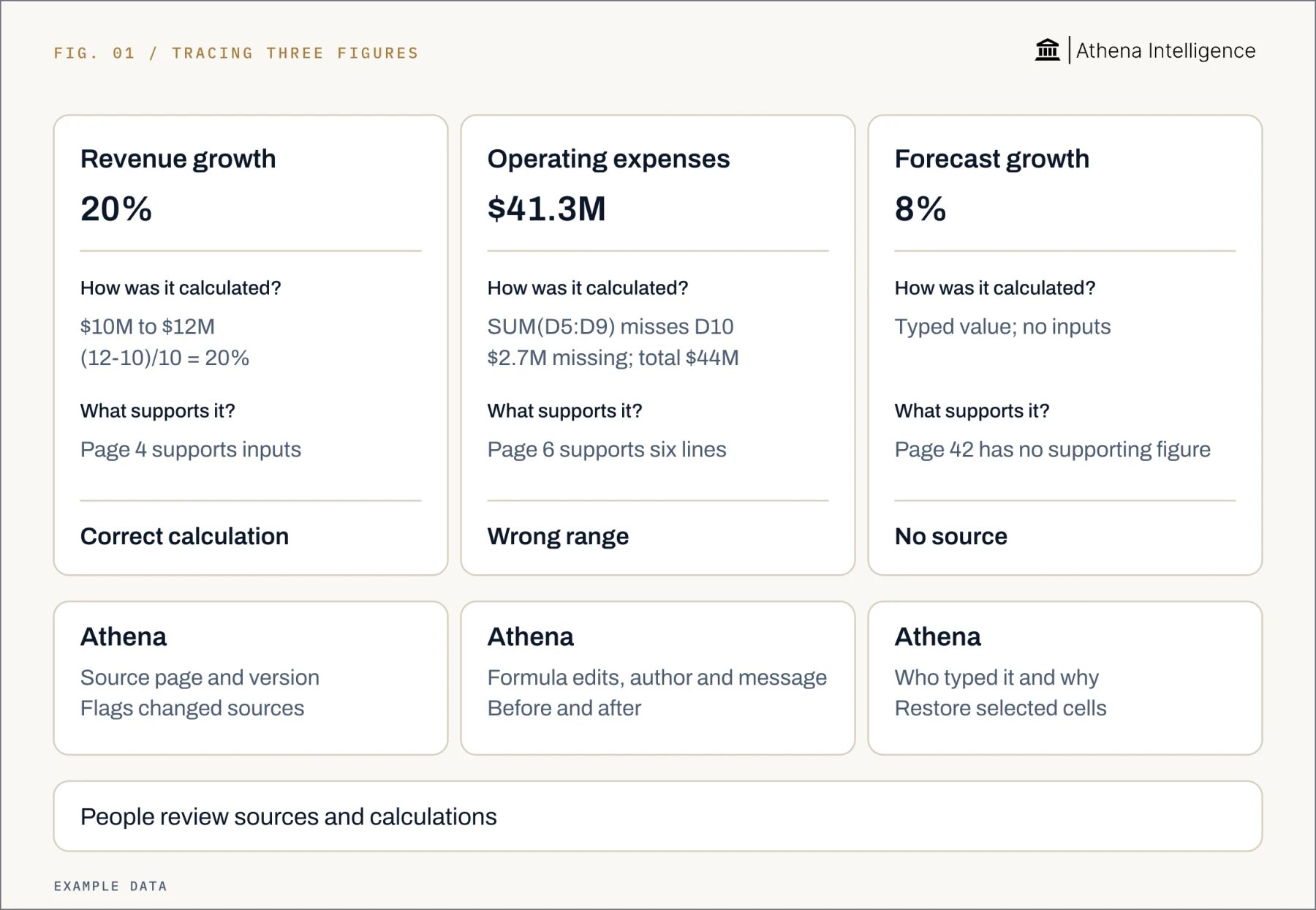
* **Invented growth:** A report says revenue grew 14%, without showing revenue for either period. Find both figures and calculate the change.
* **An assumption presented as an actual:** A forecast uses 8% growth and calls it historical performance. Label the assumption and name its owner.
* **An unsupported citation:** A summary points to page 42 of a filing, but the page contains no matching figure. Remove the unsupported value.
* **Mixed periods:** A margin calculation divides one quarter's gross profit by another quarter's revenue. Align the periods before recalculating.
* **Old data:** A current-period summary uses last month's extract. Replace the extract and repeat the calculation.
Identify the specific error before asking the assistant to try again. A new explanation alone does not replace a missing input or repair a formula.
## How do I catch made-up numbers before sharing the model?
### 1. Preserve the files
Keep the original workbook, source extracts, and AI output. Record reporting periods and extract dates so everyone reviews the same version.
### 2. Build a figure register
List material figures: numbers that could affect the decision. For each one, record:
* Output cell, value, and unit.
* Reporting period and source version.
* Source file, sheet, and cell or range.
* Document page or table, when applicable.
* Whether it is an input, calculated output, or approved assumption.
### 3. Open each reference
Check that the source supports the exact figure. Confirm currency, scale, period, and whether the value is actual, budget, or forecast.
A link to the right filing is only a starting point. Find the supporting table and match its definition to the model's label.
### 4. Recompute independently
Use verified inputs in a separate calculation. Revenue rising from $10 million to $12 million gives `(12 - 10) / 10 × 100 = 20%`.
If the summary says 14%, investigate the difference. Use a calculator or a separately checked formula, rather than repeating the assistant's result.
To check freshness, compare the input with an independently verified current source. Recalculating an old extract checks arithmetic without updating its data.
### 5. Follow the formulas
Microsoft explains how to [trace formula relationships in supported desktop Excel versions](https://support.microsoft.com/en-us/excel/display-the-relationships-between-formulas-and-cells). Select the output cell and choose **Formulas > Formula Auditing > Trace Precedents**. Use **Trace Dependents** to follow affected outputs.
Check range boundaries, hard-coded values, and links to other sheets. Microsoft’s **Formulas > Formula Auditing > Error Checking** can [help identify formula problems](https://support.microsoft.com/en-us/excel/detect-formula-errors-in-excel).
### 6. Record the review
Check decision-driving totals, changed assumptions, and unsupported entries first. Sample other rows across periods and categories, including blanks and boundary rows.
If a sample fails, expand the review across the affected calculation or data set. Record the checked rows, corrections, reviewer, and accepted file version.
 ## What should I ask the AI to return?
Give the assistant a defined source and clear instructions for missing values:
> Use only the attached workbook and approved assumptions sheet. Return each figure's source file, sheet, cell or range, reporting period, and unit.
> Show formulas and input references for calculated figures. Mark unsupported figures “unavailable.”
> List missing inputs. Keep proposed assumptions separate for review.
Use this checklist before sharing:
* **Source:** Material inputs have a specific location and version.
* **Definition:** Currency, scale, period, and metric definitions match.
* **Assumptions:** Proposed values are separated from actuals and approved by an owner.
* **Calculation:** Material outputs match an independent calculation.
* **Changes:** Altered formulas and affected outputs have been reviewed.
* **Exceptions:** Missing inputs and unexplained differences stay visible.
* **Approval:** The reviewer and accepted file version are recorded.
## How do ChatGPT, Copilot in Excel, Gemini in Sheets, and Athena compare?
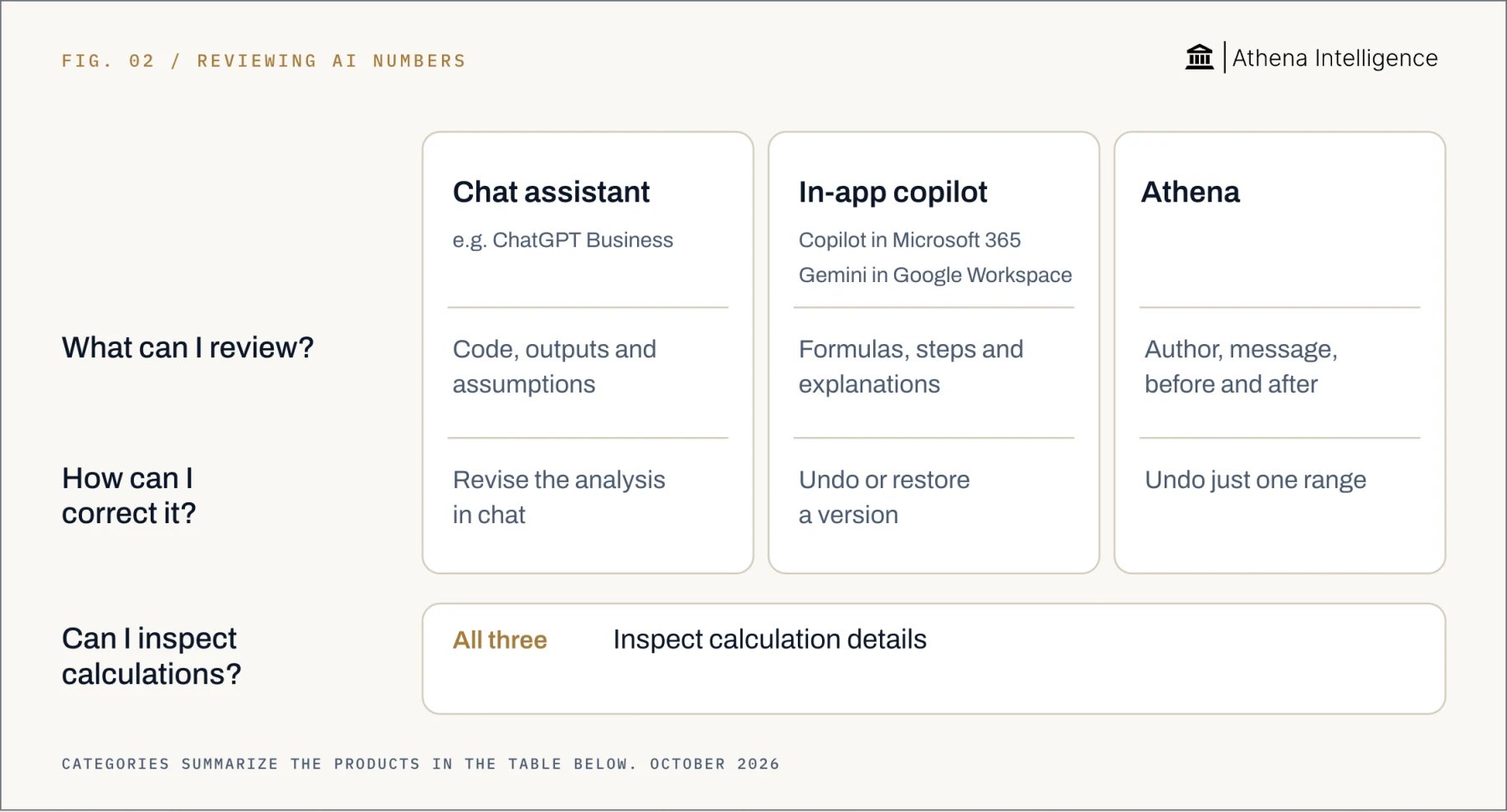
Compare the same task in each product: explain a revenue change, inspect the calculation, and correct the result. OpenAI’s ChatGPT and Microsoft’s Copilot offer [calculation details in chat](https://help.openai.com/en/articles/8437071-data-analysis-with-chatgpt) and [calculation details in Excel](https://support.microsoft.com/en-us/excel/copilot/frequently-asked-questions-about-copilot-in-excel). Google’s Gemini and Athena offer [calculation details in Sheets](https://support.google.com/docs/answer/14356410?hl=en) and calculation details in a shared workbook that a reviewer can inspect.
## What should I ask the AI to return?
Give the assistant a defined source and clear instructions for missing values:
> Use only the attached workbook and approved assumptions sheet. Return each figure's source file, sheet, cell or range, reporting period, and unit.
> Show formulas and input references for calculated figures. Mark unsupported figures “unavailable.”
> List missing inputs. Keep proposed assumptions separate for review.
Use this checklist before sharing:
* **Source:** Material inputs have a specific location and version.
* **Definition:** Currency, scale, period, and metric definitions match.
* **Assumptions:** Proposed values are separated from actuals and approved by an owner.
* **Calculation:** Material outputs match an independent calculation.
* **Changes:** Altered formulas and affected outputs have been reviewed.
* **Exceptions:** Missing inputs and unexplained differences stay visible.
* **Approval:** The reviewer and accepted file version are recorded.
## How do ChatGPT, Copilot in Excel, Gemini in Sheets, and Athena compare?
Compare the same task in each product: explain a revenue change, inspect the calculation, and correct the result. OpenAI’s ChatGPT and Microsoft’s Copilot offer [calculation details in chat](https://help.openai.com/en/articles/8437071-data-analysis-with-chatgpt) and [calculation details in Excel](https://support.microsoft.com/en-us/excel/copilot/frequently-asked-questions-about-copilot-in-excel). Google’s Gemini and Athena offer [calculation details in Sheets](https://support.google.com/docs/answer/14356410?hl=en) and calculation details in a shared workbook that a reviewer can inspect.
 | Review question | ChatGPT | Microsoft Copilot | Gemini | Athena |
| - | - | - | - | - |
| Where does work happen? | [Uploaded files in chat](https://help.openai.com/en/articles/8437071-data-analysis-with-chatgpt) | [Work inside Excel](https://support.microsoft.com/en-us/excel/copilot/frequently-asked-questions-about-copilot-in-excel) | [Sheets side panel](https://support.google.com/docs/answer/14356410?hl=en) | [Work in a shared workbook](https://athenaintel.com/product/work/studios/sheets/) |
| Can I inspect calculations? | [Inspect calculation details](https://help.openai.com/en/articles/8437071-data-analysis-with-chatgpt) | [Inspect calculation details](https://support.microsoft.com/en-us/excel/copilot/frequently-asked-questions-about-copilot-in-excel) | [Inspect calculation details](https://support.google.com/docs/answer/14356410?hl=en) | [Inspect calculation details](https://athenaintel.com/product/work/studios/sheets/) |
| What review context is available? | [Python code and assumptions](https://help.openai.com/en/articles/8437071-data-analysis-with-chatgpt) | [Formulas and explanations](https://support.microsoft.com/en-us/excel/copilot/frequently-asked-questions-about-copilot-in-excel) | [Analysis steps and code](https://support.google.com/docs/answer/14356410?hl=en) | [Author and message](https://athenaintel.com/product/work/studios/sheets/), [before and after](https://athenaintel.com/product/trust/attribution/) |
| How can I correct work? | [Revise analysis in chat](https://help.openai.com/en/articles/8437071-data-analysis-with-chatgpt) | [Undo or prior versions](https://support.microsoft.com/en-us/excel/copilot/frequently-asked-questions-about-copilot-in-excel) | [Undo last Gemini action](https://support.google.com/docs/answer/14356410?hl=en) | [Roll back selected range](https://athenaintel.com/use-cases/15-audit-trail-and-rollback/) [in the shared workbook](https://athenaintel.com/product/work/studios/sheets/) |
OpenAI’s ChatGPT supports uploaded spreadsheets and Python calculations, with code, outputs, and assumptions available for review. Microsoft’s Copilot can generate formulas and insights and edit the workbook inside Excel.
Google’s Gemini offers formulas, Analysis steps, and Show code alongside actions in Sheets. Athena records each save’s author, session, message, and before-and-after state.
Use the same acceptance test across products. Find the source cells, reproduce the calculation, inspect the changed range, and correct any wrong result.
## How does Athena help reviewers check the numbers?
In Athena Sheets, people and agents edit the same workbook. Each saved change carries its author and conversation context.
1. **Open Activity Monitor.** Find [the changed range and its before-and-after values](https://athenaintel.com/use-cases/15-audit-trail-and-rollback/), and the message that triggered the edit.
2. **Use Compare in Editor.** Inspect the agent’s change side by side, then check the inputs and formulas against your independent calculation.
3. **Open the citation.** Source links lead to cells or document pages and flag sources changed since the agent read them.
4. **Correct the range.** Roll back the affected cells while retaining other workbook edits, then recompute the outputs.
A version-aware citation opens the version the agent saw. Compare that figure with the reporting period you need before accepting the model.
## What to plan for
* **Accuracy:** OpenAI warns that ChatGPT can sound confident while giving false answers. Check references against the files, even when the response follows your prompt.
* **Finance decisions:** Microsoft advises verifying Copilot results and avoiding its use for decisions in sensitive areas such as finance.
* **Review coverage:** Samples cover only the checked rows. A review can miss a wrong definition, outdated source, or unchecked error.
* **Excel links:** Microsoft says references to another workbook require that workbook to be open. Excel’s error checks are incomplete.
* **Gemini history:** Google says side-panel conversations can disappear when a sheet closes or reloads. Inserted charts do not update when original data changes.
* **Athena history:** Athena’s attribution is per save. When a person and agent edit one cell within a save window, the record reflects the last writer.
* **External actions:** Athena says some actions, including sent email and rows written to enterprise resource planning systems, cannot be undone.
Saved history helps explain an edit; it does not prove the figure is correct. Record human approval separately, naming the reviewer and accepted version.
Hold any report that depends on an unsupported required input. Resolve the missing source or remove the claim before distributing the figures.
## Questions teams ask
Require source references for inputs, formulas for outputs, and missing values marked unavailable. Independently check figures that affect the decision.
Hypothetical examples include an invented growth rate and a citation to a page containing no supporting figure. Wrong ranges and stale extracts also need checking.
Yes. Microsoft says Copilot’s explanations, insights, and formulas can be inaccurate. Review, edit, and verify the results.
Athena links each save to its author, session, message, and before-and-after state. Version-aware citations help reviewers inspect changes, and selected-range rollback helps them correct changes.
Find a supporting source or remove the value. Label any replacement estimate as an assumption and have its owner approve it.
Errors can come from the wrong source, range, period, or metric definition. Check the input and formula before rerunning the task.
[See it work](https://athenaintel.com/demo/)
This documentation is built and hosted on [Mintlify](https://mintlify.com), a developer documentation platform.
| Review question | ChatGPT | Microsoft Copilot | Gemini | Athena |
| - | - | - | - | - |
| Where does work happen? | [Uploaded files in chat](https://help.openai.com/en/articles/8437071-data-analysis-with-chatgpt) | [Work inside Excel](https://support.microsoft.com/en-us/excel/copilot/frequently-asked-questions-about-copilot-in-excel) | [Sheets side panel](https://support.google.com/docs/answer/14356410?hl=en) | [Work in a shared workbook](https://athenaintel.com/product/work/studios/sheets/) |
| Can I inspect calculations? | [Inspect calculation details](https://help.openai.com/en/articles/8437071-data-analysis-with-chatgpt) | [Inspect calculation details](https://support.microsoft.com/en-us/excel/copilot/frequently-asked-questions-about-copilot-in-excel) | [Inspect calculation details](https://support.google.com/docs/answer/14356410?hl=en) | [Inspect calculation details](https://athenaintel.com/product/work/studios/sheets/) |
| What review context is available? | [Python code and assumptions](https://help.openai.com/en/articles/8437071-data-analysis-with-chatgpt) | [Formulas and explanations](https://support.microsoft.com/en-us/excel/copilot/frequently-asked-questions-about-copilot-in-excel) | [Analysis steps and code](https://support.google.com/docs/answer/14356410?hl=en) | [Author and message](https://athenaintel.com/product/work/studios/sheets/), [before and after](https://athenaintel.com/product/trust/attribution/) |
| How can I correct work? | [Revise analysis in chat](https://help.openai.com/en/articles/8437071-data-analysis-with-chatgpt) | [Undo or prior versions](https://support.microsoft.com/en-us/excel/copilot/frequently-asked-questions-about-copilot-in-excel) | [Undo last Gemini action](https://support.google.com/docs/answer/14356410?hl=en) | [Roll back selected range](https://athenaintel.com/use-cases/15-audit-trail-and-rollback/) [in the shared workbook](https://athenaintel.com/product/work/studios/sheets/) |
OpenAI’s ChatGPT supports uploaded spreadsheets and Python calculations, with code, outputs, and assumptions available for review. Microsoft’s Copilot can generate formulas and insights and edit the workbook inside Excel.
Google’s Gemini offers formulas, Analysis steps, and Show code alongside actions in Sheets. Athena records each save’s author, session, message, and before-and-after state.
Use the same acceptance test across products. Find the source cells, reproduce the calculation, inspect the changed range, and correct any wrong result.
## How does Athena help reviewers check the numbers?
In Athena Sheets, people and agents edit the same workbook. Each saved change carries its author and conversation context.
1. **Open Activity Monitor.** Find [the changed range and its before-and-after values](https://athenaintel.com/use-cases/15-audit-trail-and-rollback/), and the message that triggered the edit.
2. **Use Compare in Editor.** Inspect the agent’s change side by side, then check the inputs and formulas against your independent calculation.
3. **Open the citation.** Source links lead to cells or document pages and flag sources changed since the agent read them.
4. **Correct the range.** Roll back the affected cells while retaining other workbook edits, then recompute the outputs.
A version-aware citation opens the version the agent saw. Compare that figure with the reporting period you need before accepting the model.
## What to plan for
* **Accuracy:** OpenAI warns that ChatGPT can sound confident while giving false answers. Check references against the files, even when the response follows your prompt.
* **Finance decisions:** Microsoft advises verifying Copilot results and avoiding its use for decisions in sensitive areas such as finance.
* **Review coverage:** Samples cover only the checked rows. A review can miss a wrong definition, outdated source, or unchecked error.
* **Excel links:** Microsoft says references to another workbook require that workbook to be open. Excel’s error checks are incomplete.
* **Gemini history:** Google says side-panel conversations can disappear when a sheet closes or reloads. Inserted charts do not update when original data changes.
* **Athena history:** Athena’s attribution is per save. When a person and agent edit one cell within a save window, the record reflects the last writer.
* **External actions:** Athena says some actions, including sent email and rows written to enterprise resource planning systems, cannot be undone.
Saved history helps explain an edit; it does not prove the figure is correct. Record human approval separately, naming the reviewer and accepted version.
Hold any report that depends on an unsupported required input. Resolve the missing source or remove the claim before distributing the figures.
## Questions teams ask
Require source references for inputs, formulas for outputs, and missing values marked unavailable. Independently check figures that affect the decision.
Hypothetical examples include an invented growth rate and a citation to a page containing no supporting figure. Wrong ranges and stale extracts also need checking.
Yes. Microsoft says Copilot’s explanations, insights, and formulas can be inaccurate. Review, edit, and verify the results.
Athena links each save to its author, session, message, and before-and-after state. Version-aware citations help reviewers inspect changes, and selected-range rollback helps them correct changes.
Find a supporting source or remove the value. Label any replacement estimate as an assumption and have its owner approve it.
Errors can come from the wrong source, range, period, or metric definition. Check the input and formula before rerunning the task.
[See it work](https://athenaintel.com/demo/)
This documentation is built and hosted on [Mintlify](https://mintlify.com), a developer documentation platform.